
If you open the Supabase Security Advisor and see “RLS Disabled in Public”, it means a table in your project’s public schema has Row Level Security (RLS) switched off. In plain terms: the database is not checking which rows a request is allowed to see before it answers. If that table can be reached through Supabase’s Data API, anyone holding your project’s publishable key may be able to read, edit, or delete its rows.
That is the short answer. The fix is not just flipping one switch. You need to turn RLS on, set the grants correctly, write a policy for each operation your app uses, and then test the result as a signed-out visitor and as a second, signed-in user. This guide walks through each step, and through the traps that leave a table exposed even after RLS looks “enabled”.
What Row Level Security does
Row Level Security is a feature of PostgreSQL, the database Supabase is built on. It lets you write rules, called policies, that sit on a table and filter its rows for every query. A policy works a bit like an extra condition added to each request: a user asking for their own profile rows only ever sees rows that match that condition.
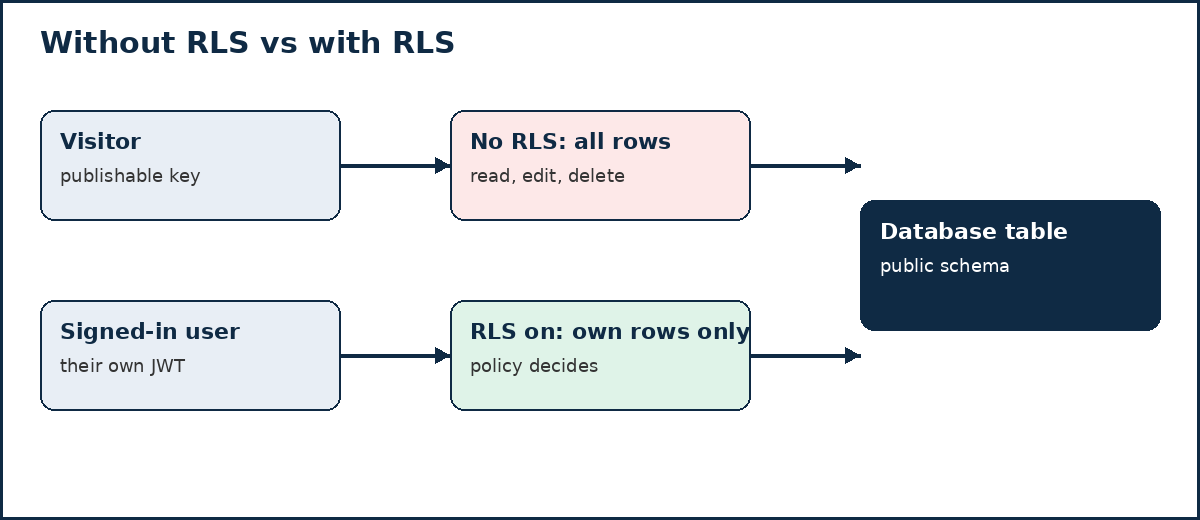
Without RLS, there is no row filter at all. The database checks only whether the role making the request has permission to touch the table — and, on many existing Supabase projects, new tables in the public schema start with broad permissions already granted to the anon and authenticated roles. Supabase’s own documentation puts it directly: a table in an exposed schema without RLS can be read and written by any role that has a grant on it.
Why your publishable key is not the problem
It is tempting to treat this warning as a leaked key. It usually is not. Supabase’s publishable key (and the older anon key) is designed to be public. It ships inside your app’s JavaScript, so every visitor gets a copy. That is fine — provided the database itself decides what each request may see.
Think of the key as a ticket into the building and RLS as the guard at each room. A ticket alone should not open every door. When RLS is off, there is no guard, so the ticket is enough.
One key must never be public, though: the secret key (formerly the service_role key). It bypasses RLS entirely, so it belongs only in trusted server-side code, never in browser or mobile app code. If you find it in client-side code, remove it and rotate it.
Two checks, not one
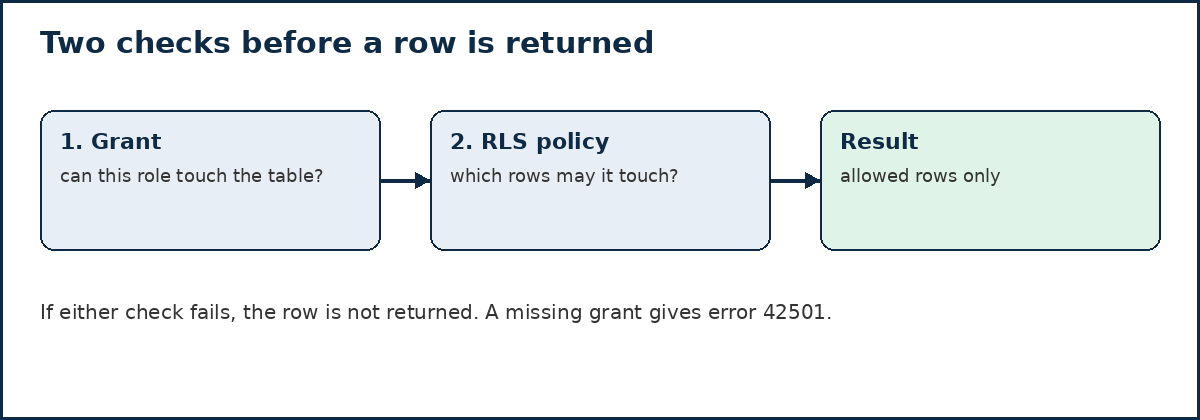
Postgres runs two separate checks before a client touches a table, and you need both:
- Grants decide whether a role can run an operation on the table at all — select, insert, update, or delete.
- Policies decide which rows that operation applies to.
Adding a policy does not take back a grant, and a grant does not filter rows. A table can therefore look protected while still handing an unwanted operation to a role, or it can have perfect policies that never run because the grant is missing. When a grant is missing, the Data API returns a Postgres 42501 “permission denied” error — check the grants before you rewrite the policy.
How to find every affected table
Start in the Supabase dashboard, under Advisors, then Security Advisor. Look for two related findings:
- RLS disabled in public — a public table with RLS switched off.
- Policy exists, RLS disabled — a table that has policies written, but RLS switched off, so those policies do nothing.
You can also list the tables directly in the SQL Editor:
select tablename, rowsecurity
from pg_tables
where schemaname = 'public'
order by rowsecurity, tablename;
Every row with rowsecurity = false is unprotected. Your goal is zero such rows for tables that the Data API can reach — unless a table is deliberately kept out of the API, which is a separate, conscious decision, not an oversight.
How to fix it, step by step
Work through one table at a time, and keep the changes together in a migration so they can be reviewed and repeated in other environments. Supabase’s own guidance is to bundle grants with the RLS setup in the same migration.
1. Enable RLS on the table.
alter table public.profiles enable row level security;Replace profiles with your table name. From this moment, the default is deny-all: with no policies yet, requests made with a publishable key get no rows back. That is safe, but parts of your app may go blank until you add policies, so do not stop here.
2. Set the grants to match what each role should do.
Revoke the operations a role does not need, then grant back only what the app actually uses. For a typical user-owned table, signed-in users need the operations the app exposes, and signed-out visitors need nothing:
revoke all on table public.profiles from anon, authenticated;
grant select, insert, update, delete on table public.profiles to authenticated;
Grant select to anon only for a table that signed-out visitors are genuinely meant to read, such as published public content. Never run a bulk grant across the whole public schema to “fix” an error: that also reopens every table where RLS was never switched on.
3. Write one policy per operation.
Postgres does not accept several operations in a single policy, and a combined “for all” policy hides which operation each rule was meant to cover. Write them separately, and name the role each policy applies to. The examples below use a profiles table where each user manages only their own row, identified by a user_id column. auth.uid() returns the ID of the user making the request.
create policy "Users can read their own profile"
  on public.profiles for select
  to authenticated
  using ((select auth.uid()) = user_id);

create policy "Users can create their own profile"
  on public.profiles for insert
  to authenticated
  with check ((select auth.uid()) = user_id);

create policy "Users can update their own profile"
  on public.profiles for update
  to authenticated
  using ((select auth.uid()) = user_id)
  with check ((select auth.uid()) = user_id);

create policy "Users can delete their own profile"
  on public.profiles for delete
  to authenticated
  using ((select auth.uid()) = user_id);
The difference matters: using filters existing rows for reads, updates, and deletes, while with check controls what a new or changed row is allowed to look like. Without a with check on an update, a user could reassign a row to someone else. Only add policies for operations the app really uses; an unused delete policy is an unnecessary opening.
For genuinely public data, a read policy that allows everyone is correct — but only for reading, and only for that table:
create policy "Anyone can read published posts"
  on public.posts for select
  to anon, authenticated
  using (true);
Reserve using (true) for data meant to be public. On a private table, it removes the protection RLS was supposed to provide.
4. Check views, functions, and Storage separately.
Views bypass RLS by default, because Postgres creates them with the privileges of their owner. On Postgres 15 and later, create a view over a protected table with security_invoker = true so it follows the policies of the tables underneath. On older versions, protect the view by revoking access from the anon and authenticated roles, or by moving it into a schema the Data API does not expose.
Functions that run as their owner can also skip RLS, and Supabase Storage files do not inherit your app-table policies — a public bucket serves files to anyone. Review each of these alongside the table policies, not as an afterthought.
5. Test as three different people, not just as yourself.
Your own account, and especially queries run in the SQL Editor as the table owner, bypass RLS. That is why a fix can look fine in the dashboard and still leak in production. Test each table:
- As a signed-out visitor: private rows should not be returned at all.
- As user A: only user A’s rows should appear.
- As user B: user A’s rows should not appear, and user B should not be able to edit or delete them.
For a repeatable version of the same checks, Supabase documents writing database tests under supabase/tests/ and running them with supabase test db. A one-off manual check is a start; a test that runs on every change is what stops the warning coming back.
Traps that leave a table exposed after the fix
Policies exist, but RLS is off. This is the “Policy exists, RLS disabled” finding. The policies are written, but Postgres never runs them. Always confirm the switch itself, not just the policy list.
RLS is on, but the policy allows everyone. A table can show RLS enabled and still return every row, because a policy such as using (true) on a private table satisfies the switch while checking nothing useful. Read each policy and ask who it lets in.
Grants were never trimmed. Adding policies does not revoke grants. If anon still holds insert or delete on a table, that operation remains available at the table level, even if no policy should allow it for that role.
A 42501 error was “fixed” with a grant alone. A missing grant produces a 42501 error, and the error hint names a grant statement. Copying that hint onto a table without RLS, or granting to anon without checking what the table holds, turns an error into an exposure. Check RLS first, then grant only what the role needs.
The default-grant behaviour changed. Supabase has been changing its platform default so that exposure becomes opt-in rather than automatic: new tables in the public schema increasingly need an explicit grant before the Data API can see them. That means behaviour can differ between older and newer projects, and a new table may fail with 42501 even with correct policies. The fix is still the same combination — grant, RLS, and policies in one migration — not a blanket grant, and never turning RLS off to make the error go away.
Frequently asked questions
Does turning on RLS break my app?
It can, temporarily, if you stop after step 1. With RLS on and no policies, the default is deny-all, so signed-in users get no rows until you add the policies their app needs. Add the policies in the same change and test before deploying.
Is my anon key leaked if I see this warning?
Not necessarily. The publishable key is meant to be public. The warning is about the missing row filter, not the key. The key that must never appear in client code is the secret key, which bypasses RLS.
What if the table is only used by server code?
Then the safest option may be to keep it out of the Data API altogether — for example, by placing it in a schema the API does not expose, or by turning the Data API off if your app never uses it. A table the API cannot reach does not need client-facing policies, but it still needs to be a deliberate choice, documented as one.
How often should I re-check?
Every time a table is added or changed. Tables created through the Supabase dashboard get RLS enabled by default, but tables created with SQL, migrations, or AI coding tools do not always get it. Make the Security Advisor check part of your launch checklist, and re-run the table listing after any migration.
A short checklist to keep
- Security Advisor shows no “RLS disabled in public” findings.
- Every exposed table has RLS on and one policy per operation it uses.
- Grants match the app:
anongets only genuinely public reads, if any. - Views use
security_invoker = true(Postgres 15+) or are otherwise protected. - The secret key appears nowhere in client-side code.
- Tests pass as a signed-out visitor, as user A, and as user B.
Fixing this warning is not about hiding a dashboard alert. It is about making the database itself enforce who sees what, so that a public key, a forgotten migration, or a direct API call cannot quietly undo your app’s access rules. If you scan your own app for exposed keys and data — the kind of check PrivacyReport is built around — treat a clean Security Advisor as one part of that review, not a substitute for testing your policies yourself.
Sources
- Supabase, Row Level Security
- Supabase, Securing your API
Related reading on PrivacyReport
- What to do if an API key is exposed
- What vibe-coding security means, and why AI-generated code needs review
- Vibe-coding security risks to check before shipping
