
Is It Safe to Expose Your Supabase Anon Key? (Only If RLS Is On)
Yes — with one condition that does all the work. The Supabase anon key, now called the publishable key in new projects, is designed to be public. It ships inside your app’s JavaScript, so every visitor already has a copy. That is normal, not a leak.
The condition is Row Level Security (RLS). Supabase’s own API keys guide calls the publishable key “safe to expose online” precisely because “it only reaches what Row Level Security allows”. If RLS is off on a table, or a policy lets everyone through, that same public key can read — and often change — rows it should never touch. So the right question is not “how do I hide this key?” It is “what can anyone holding this key actually reach?”
Which key are you looking at?
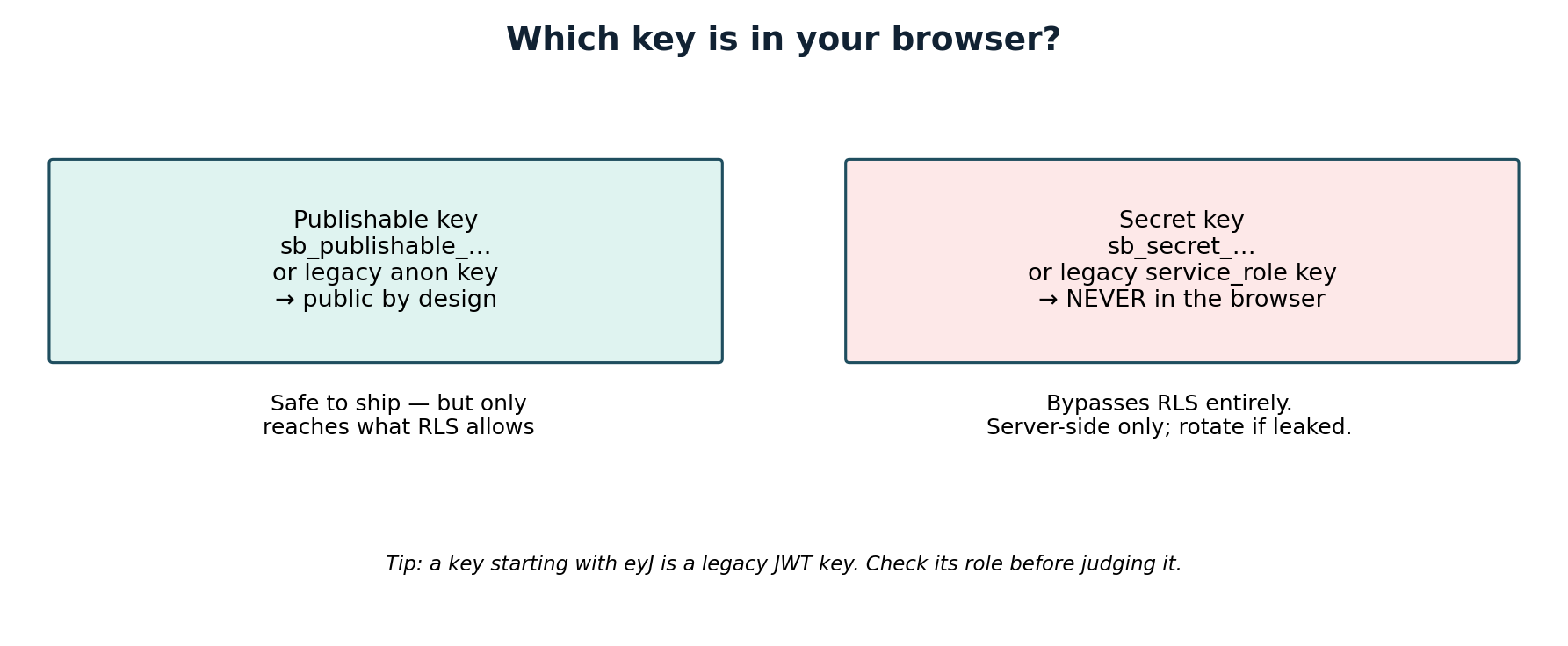
Supabase now has two key systems running side by side, and telling them apart is the first step. Use this table, not the variable name in your code — an AI coding tool can put the wrong key behind a harmless-looking name.
| Key | Looks like | Belongs in the browser? |
|---|---|---|
| Publishable key | sb_publishable_… |
Yes, with RLS on |
| Legacy anon key | A long string starting with eyJ |
Yes, with RLS on |
| Secret key | sb_secret_… |
Never |
| Legacy service_role key | A long string starting with eyJ |
Never |
The publishable key and the legacy anon key are the same idea in two formats: low privilege, and subject to RLS. The secret key and the legacy service_role key are also the same idea: elevated privilege, bypassing RLS entirely. Supabase’s docs are blunt about the second pair: a secret key “bypasses Row Level Security, so it must never leave your control”, and policies never apply to it because the service_role role carries the BYPASSRLS attribute.
Two identification details matter, and most short guides skip them:
- New keys are not JWTs, so you cannot decode them. The legacy keys are JSON Web Tokens, and the middle segment of a legacy key, decoded from base64url, names its role (
anonorservice_role). That trick works only on your own project’s legacy keys, and only to identify which key you hold. The newersb_publishable_…andsb_secret_…keys are short strings, not JWTs, so the prefix is the identifier — and the wordsecretis the warning. - Creating new keys does not retire the old ones. Supabase’s docs state that creating a publishable or secret key adds it alongside your existing
anonandservice_rolekeys without affecting them. The legacy keys keep working until you disable them separately in Settings, then API Keys. If you “migrated” to the new keys but never disabled the old service_role key, the old master key is still live.
What the public key can and cannot do
A request made with the publishable key runs as one of two database roles. Nobody signed in means the anon role; a user signed in through Supabase Auth means the authenticated role. Your RLS policies are written for those roles, and Postgres applies them to every query.
That gives you a simple test for any table:
- RLS off: the public key reaches the table with no row filter at all. Supabase’s RLS guide states the consequence plainly: a table in an exposed schema without RLS can be read and written by any role that has a grant on it.
- RLS on, no policies: the default is deny-all. With a publishable key, no data is accessible through the API until you create policies. Parts of your app may go blank — that is the protection working, not a bug.
- RLS on, broad policy: a policy such as
using (true)on a private table satisfies the switch while checking nothing useful. RLS is on and the data is still open. Read each policy and ask who it lets in, not just whether the switch is on.
There is a second, subtler point. The publishable key is not a security boundary against someone inspecting your app. Supabase lists what publishable keys do not protect against: code analysis and reverse engineering, the browser’s Network inspector, cross-site request forgery, cross-site scripting, phishing, and man-in-the-middle attacks. Hiding the key from the Network tab is therefore not a fix — anyone can retrieve it from a public component, and Supabase says so. The protection has to live in the database, where a copied key cannot override it.
The secret key is the real leak — and it hides in plain sight
If you search your shipped JavaScript and find a secret key, that is the emergency, not the anon key. The usual ways it gets there are painfully ordinary: an AI tool added it to make an admin feature work, or a variable was given a public prefix such as NEXT_PUBLIC_, VITE_, or REACT_APP_, which tells the bundler to copy the value into the code every visitor downloads.
How to check your own app, using only your own code:
- Open your live app’s JavaScript bundle or your browser’s DevTools Sources panel and search for
sb_secret_andservice_role. You should find neither. - Search your repository and environment files for any variable with a public prefix that holds a secret key. A public prefix means public, whatever the variable is called.
- Check Storage and views separately. Storage files have their own policies and do not inherit your table policies, so a “public” bucket serves files to anyone with the URL. Views bypass RLS by default because Postgres creates them with their owner’s privileges; on Postgres 15 and later, create them with
security_invoker = trueso they follow the underlying tables’ policies.
If you find a secret key in client code, do three things in this order: remove it from the shipped code, move the work it was doing to a server route or Edge Function that checks authorisation first, and rotate the key. Rotation matters even though Supabase blocks secret keys from browsers: the docs note that the browser block returns HTTP 401, but an attacker can still use the key from other tools. A key that was ever public stays usable until it is retired — and, per the point above, retiring it means disabling the compromised key, not just creating a replacement.
Test the public key as three different visitors
Your own account, and especially queries run in the SQL Editor as the table owner, bypass RLS. A fix can look fine in the dashboard and still leak in production. Test each table that holds private data:
- Signed out, using only the publishable key: no private rows should come back.
- Signed in as user A: only user A’s rows should appear.
- Signed in as user B: user A’s rows should not appear, and user B should not be able to edit or delete them.
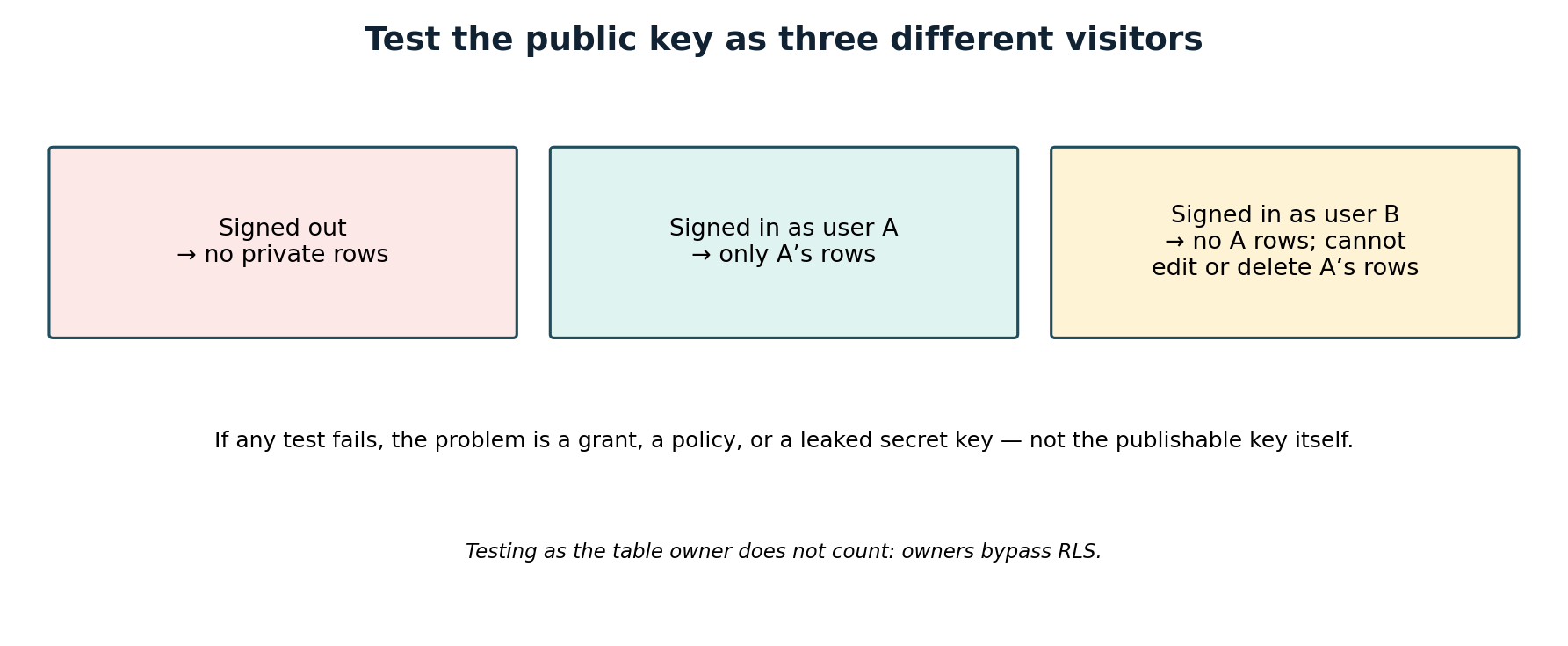
Learn the two failure shapes, because they point at different fixes. A missing grant produces a Postgres 42501 “permission denied” error before any policy runs — check the grants before rewriting the policy. A policy that matches no rows, by contrast, returns an empty result with no error. An empty result for a signed-out visitor is usually the protection working; an empty result for a signed-in user who should see their own rows means a policy or grant needs fixing. If a table fails the three-visitor test, the full step-by-step fix — enabling RLS, trimming grants, and writing one policy per operation — is covered in our guide to the “RLS Disabled in Public” warning, linked below.
Frequently asked questions
Should I rotate my anon key if I see it in my JavaScript?
No — it was never a secret, and rotating it does not help. Anyone who copied data while a table was unprotected keeps that copy. Fix the RLS policies and grants, and rotate only a secret or service_role key that was exposed.
Is the Supabase project URL also public?
Yes. It is just the HTTPS endpoint your app talks to, and it ships alongside the publishable key. Treat it the same way: public by design, protected by RLS, not by secrecy.
Does enabling RLS break my app?
It can, temporarily. With RLS on and no policies, the default is deny-all, so signed-in users get no rows until you add the policies their app needs. Add the policies in the same change and test before deploying.
What if a table is only used by server code?
Then the safest option may be to keep it out of the Data API altogether — for example, by placing it in a schema the API does not expose. A table the API cannot reach does not need client-facing policies, but that must be a deliberate, documented choice, not an oversight.
How often should I re-check?
Every time a table is added or changed, and whenever an AI coding tool touches your schema. Tables created through the Supabase dashboard get RLS enabled by default, but tables created with SQL, migrations, or AI tools do not always get it. Run the Security Advisor check as part of your launch checklist.
A short checklist to keep
- The browser holds only the publishable or legacy anon key — never a secret or service_role key.
- Every exposed table has RLS on, with policies that limit rows to the people who should see them.
- Grants match the app:
anongets only genuinely public reads, if any. - Storage buckets and views have been checked separately from table policies.
- Legacy keys have been disabled in Settings, then API Keys, once replaced — not just superseded.
- The three-visitor test passes: signed out, user A, and user B.
The key in your JavaScript is supposed to be there. What keeps your data safe is RLS on every table, policies that limit each row to the people who should see it, and a secret key that never leaves your server. If you scan your own app for exposed keys and data — the kind of check PrivacyReport is built around — treat a clean key search as one part of that review, not a substitute for testing your policies yourself.
Sources
- Supabase, API keys: https://supabase.com/docs/guides/getting-started/api-keys
- Supabase, Row Level Security: https://supabase.com/docs/guides/database/postgres/row-level-security
Related reading on PrivacyReport
- Supabase “RLS Disabled in Public” warning: what it means and how to fix it: https://privacyreport.org/supabase-rls-disabled-in-public-warning-fix/
- What to do if an API key is exposed: https://privacyreport.org/api-key-exposed-what-to-do/
- How to scan for secrets in VS Code: https://privacyreport.org/how-to-scan-for-secrets-in-vs-code/
