

Finding out that your API key was exposed is one of the most stressful moments in a developer or business owner’s day. Whether it was pushed to a public GitHub repository, embedded in client-side JavaScript, or leaked through a server log, an exposed API key is the digital equivalent of leaving your front door keys in the lock.
According to the GitGuardian State of Secrets Sprawl Report 2026, a record 28.65 million secrets were leaked in public GitHub commits in 2025 alone—a 34% increase year-over-year. Even more concerning is that internal repositories are estimated to be 6x more likely to contain hardcoded secrets than public ones.
If this happens to you, panic is your worst enemy. Speed, precision, and a systematic response are your best allies. Here is the step-by-step incident response plan to secure your systems, assess your regulatory risks, and prevent it from happening again.
Triage: The Immediate 3-Step Emergency Response
When an API key is exposed, you must assume it has already been discovered. Malicious scripts actively monitor public code hosting platforms to scrape credentials within seconds of exposure. Treat the key as permanently compromised. Do not wait to see if someone uses it; execute the following steps immediately.
Step 1: Revoke the Exposed Key Immediately
The only way to completely neutralize the threat is to delete or deactivate the compromised credential at the source.
- Log in to the dashboard of your service provider (e.g., AWS Console, OpenAI Developer Platform, Stripe Dashboard, Google Cloud Console).
- Locate the specific API key that was exposed.
- Click Revoke, Delete, or Invalidate.
Once revoked, any request made using that key will instantly fail, stopping attackers in their tracks.
Step 2: Generate and Securely Deploy a New Key
After deactivating the old credential, you need to restore your application’s functionality.
- Generate a new API key in the provider console.
- Do not hardcode the new key back into your code files. Instead, save it as an environment variable (e.g., in a
.envfile) or use a secure secrets manager. One caveat specific to AI coding tools: several of them check for a provider key in your environment and silently prefer it over your subscription. If you already pay for a plan, an exported key can mean paying per token for work your subscription already covers — worth checking after any key rotation. - Restart your application servers to apply the configuration changes.
Step 3: Audit Access Logs and Assess Financial Impact
Once your services are stable, you must investigate what occurred during the window of exposure.
- Request or download the access logs for the compromised key from your service provider.
- Look for unauthorized IP addresses, unexpected geographic locations, or spike patterns in API requests.
- Verify your billing dashboard for any sudden, anomalous cost increases (e.g., unauthorized GPU compute usage or bulk database extractions). For AI provider keys specifically, you need a baseline to compare against — knowing what normal spend looks like on each plan and tier is what turns a billing page into an alarm.
Git Cleanup: Why Simply Deleting the File is Not Enough
A common mistake developers make when realizing their code contains an exposed key is deleting the key or the file, committing the change, and pushing it to GitHub.
WARNING
The Git History Trap: Simply deleting a secret in your latest commit does not remove it from your project. Anyone can browse your Git history, view past commits, or clone the repository to retrieve the exposed key.
To completely wipe the key from your version control history, you must scrub the repository using specialized tools:
- Use
git-filter-repo: This is the officially recommended tool for rewriting Git history.bash# Install git-filter-repo (usually via python/pip or package manager)git filter-repo –invert-paths –path path/to/your/config.env - Force Push Changes: Once the history is rewritten locally, you must force push the cleaned history to your remote repository:bashgit push origin –force –all
- Rotate Repository Access: If you cannot scrub the history easily, consider deleting the repository entirely and re-publishing it, treating the old repository URL as compromised.
Compliance & Legal: Does an Exposed API Key Count as a Data Breach?
For businesses, SaaS companies, and compliance teams, an exposed API key is not just a technical issue—it can trigger legal reporting obligations.
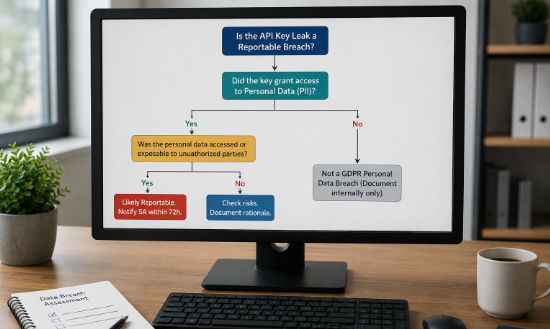
GDPR Breach Notification Rules (Articles 33 & 34)
Under the General Data Protection Regulation (GDPR), the exposure of an API key is evaluated based on the data it protects:
- The Threshold: If the exposed API key granted access to databases or interfaces containing personal data (PII), this incident constitutes a personal data breach.
- The 72-Hour Rule: According to GDPR Article 33, data controllers must notify their lead Supervisory Authority of the breach within 72 hours of becoming aware of it, unless the breach is unlikely to result in a risk to the rights and freedoms of individuals.
- Individual Notification: If the breach poses a “high risk” to individuals (e.g., identity theft or financial fraud), you must also notify the affected individuals directly under GDPR Article 34.
Other Regulatory Frameworks
- CCPA/CPRA (California): If the exposed key allows access to personal information of California residents, failing to protect it can trigger statutory damages under the CCPA’s private right of action.
- HIPAA (Healthcare): If the key grants access to Protected Health Information (PHI), you must comply with the HIPAA Breach Notification Rule, reporting to the Department of Health and Human Services (HHS) and notifying patients.
- PCI DSS (Payments): For companies handling cardholder data, exposing keys that interact with payment processors violates PCI DSS requirements (particularly Requirement 2 and 6 regarding secure systems), which can result in heavy fines or suspension of card processing abilities.
IMPORTANT
Internal Incident Documentation: Regardless of whether the leak meets the threshold for reporting to regulators, you are legally required to document the incident details, its consequences, and the remediation steps in an internal security register.
Prevention: How to Stop Future API Key Exposure
Rebuilding security after a leak is essential, but the best approach is to prevent secrets from ever reaching your repository.
- Configure Gitignore Correctly: Add files containing environment variables (like
.env,config.json, orsecrets.yml) to your.gitignorefile before making your first commit. - Use CI/CD Secret Scanning: Integrate automated scanners into your GitHub Actions, GitLab CI, or pre-commit hooks. Tools like
ggshieldblock commits if they detect high-entropy strings resembling API keys. - Run Ephemeral Live Audits: Keep a regular check on your deployed applications. Using tools like PrivacyReport’s automated App Security Scanner allows product teams to scan live-deployed apps and data flows to flag exposed API keys, unauthenticated endpoints, and data leaks. PrivacyReport’s security practices leverage static analysis engines without storing source code, guaranteeing safe detection.
Incident Action Checklist
| Phase | Action Item | Target Timeframe | Done |
|---|---|---|---|
| Triage | Revoke and delete the exposed key in the provider console | Within 15 minutes of discovery | [ ] |
| Triage | Generate new key and deploy using environment variables | Within 30 minutes | [ ] |
| Audit | Check service logs for anomalous API usage or billing | Within 2 hours | [ ] |
| Git Cleanup | Rewrite repository history using git-filter-repo | Within 24 hours | [ ] |
| Compliance | Check if the key allowed access to PII, PHI, or PCI data | Within 24 hours | [ ] |
| Compliance | Document the incident details internally for audit logs | Within 48 hours | [ ] |
| Prevention | Integrate automated scanning & test with an external scanner | Within 7 days | [ ] |
Frequently Asked Questions (FAQ)
1. If I delete a public GitHub repository, is the API key still compromised?
Yes. Once a repository is public, it is indexed by automated scrapers almost instantly. Even if you delete the repository, you must assume the key was cached or downloaded by third parties. Always revoke the key.
2. Can I just change the permissions of the exposed key instead of deleting it?
It is highly discouraged. While reducing scopes (e.g., making a key read-only instead of write) limits damage, the credential remains in unauthorized hands. The only secure response is full deactivation and replacement.
3. What is the difference between a secret manager and environment variables?
Environment variables store configuration keys in server memory at the OS level (separate from code files). A Secret Manager (like AWS Secrets Manager or HashiCorp Vault) centralizes, encrypts, and rotates those credentials automatically, providing higher security for enterprise applications.

Abdullah Zulfiqar is a cybersecurity and application security writer at PrivacyReport.org, where he focuses on AI-driven security, privacy protection, and SaaS application risk analysis. His work explores how modern AI systems and digital platforms handle sensitive user data, with a strong emphasis on identifying vulnerabilities, preventing data leaks, and improving software security practices.
He writes about the intersection of artificial intelligence and cybersecurity, helping readers and developers understand emerging threats in AI-powered applications and how to build more secure, privacy-respecting systems.