
Supabase Security Checklist for Vibe-Coded Apps (2026)
A vibe-coded app can look finished long before it is safe. The interface works, sign-in works, and data appears where it should. What is easy to miss is that the same setup also lets the wrong people reach that data, because Supabase’s safety does not come from hiding anything. Your project URL and publishable key ship inside your app by design. What protects your data is the set of rules between a visitor and each row — and an AI coding tool is very good at building the app while leaving those rules half-written.
This checklist covers a Supabase project end to end: database, keys, sign-in, files, and server code. Work through it in order, and do not skip a section because an earlier one looked fine. Each section guards a different layer, and a pass in one layer does not compensate for a failure in another.
Start with the three gates
Every request for a row passes through three gates, in this order. If you remember nothing else from this article, remember this, because it tells you where to look when something leaks or breaks:
- Reachable. Is the table exposed through the Data API, Realtime, or Storage at all? A table in a schema the API does not expose cannot be reached through it, whatever its policies say.
- Granted. Does the caller’s role hold the operation? Postgres checks grants before policies. A missing grant produces a 42501 “permission denied” error before any policy runs.
- Allowed. Does a policy for that operation match this row, for this user? A policy that matches no rows returns an empty result with no error. That empty result is usually the protection working, not a bug.
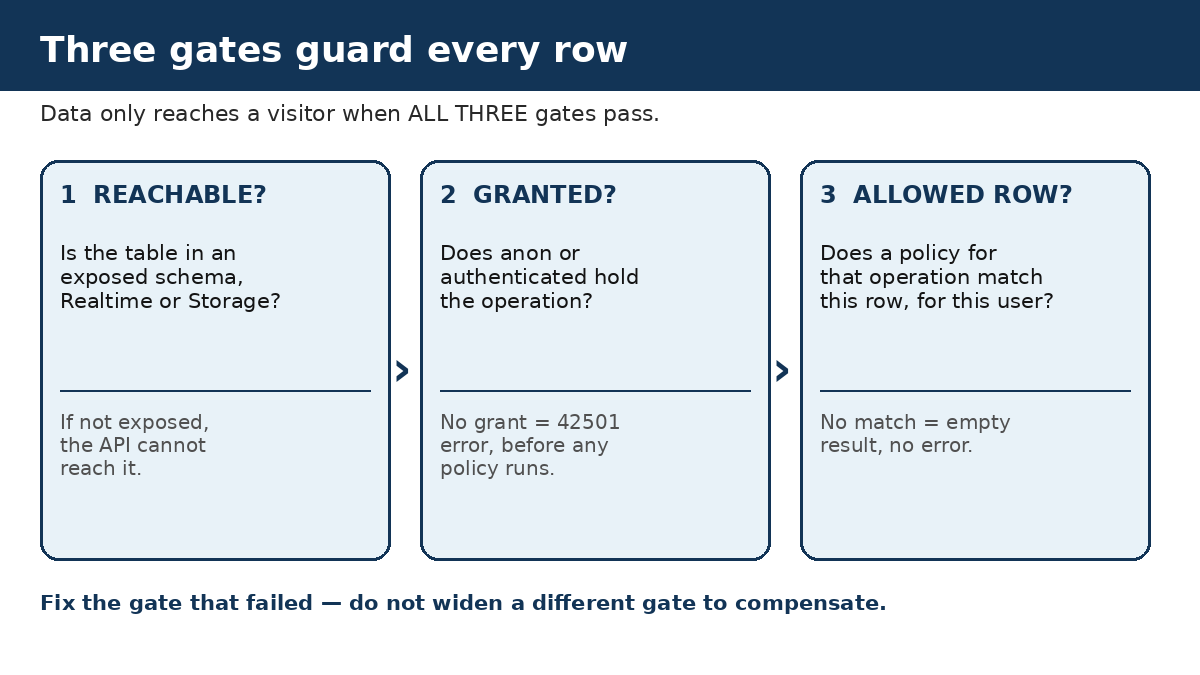
When a test fails, fix the gate that failed. Widening a different gate to make a broken feature work — for example, opening a policy because a grant was missing — trades a visible error for a silent leak.
1. Database: Row Level Security, done properly
Row Level Security (RLS) is the Postgres feature that attaches a rule to a table, so every query is filtered by who is asking. Supabase’s production checklist starts here for a reason: a table without RLS and reasonable policies allows any client to access and change its data.
RLS is on for every table in an exposed schema. Check this in the dashboard, and also with a query in your own project’s SQL Editor, which lists every public table and its RLS flag:
select tablename, rowsecurity
from pg_tables
where schemaname = 'public'
order by rowsecurity, tablename;
Every row should say true. Tables created through the Supabase dashboard get RLS enabled by default, but tables created with SQL, migrations, or AI tools do not always get it. That difference is exactly how vibe-coded apps end up with one unprotected table among twenty protected ones.
Grants match the app, not the defaults. On existing projects, a new table in the public schema starts with every privilege already granted to the anon, authenticated, and service_role roles. Adding policies does not take those grants back. A table protected only by policies still hands anon an insert path if you never revoke the grant. Revoke from both client roles, then grant back only the operations each role actually needs: anon gets only genuinely public reads, if any; authenticated gets only the operations your app exposes to signed-in users.
One policy per operation. Postgres does not accept multiple operations in one policy clause, and a single “for all” policy hides which rule covers which action. Write four policies per private table — select, insert, update, delete — and name the role each one applies to with the to clause, so a policy meant for signed-in users never runs for anonymous visitors.
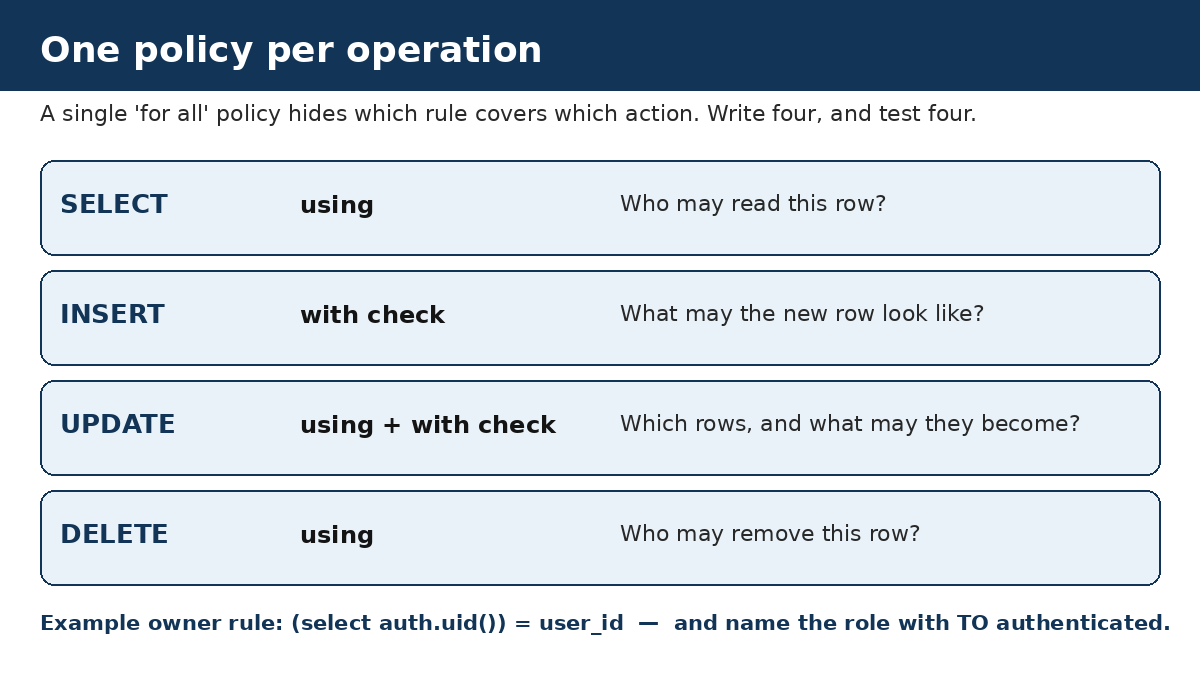
For a table where each user manages only their own row, the select policy looks like this:
create policy "Users read their own profile"
on public.profiles
for select
to authenticated
using ((select auth.uid()) = user_id);
auth.uid() returns the ID of the signed-in user making the request. Wrapping it in select is the form Supabase’s current guide uses, and it also helps Postgres evaluate the policy efficiently.
“Signed in” is not “owner.” This is the most common policy mistake after leaving RLS off entirely. A policy such as using (auth.uid() is not null) checks only that someone is signed in — and then admits every signed-in user to every row. Private rows need a comparison against the row itself, such as (select auth.uid()) = user_id, not just proof of sign-in. Read each policy and ask who it lets in, not just whether a policy exists. The same caution applies to using (true): it answers “yes” for every row, for every person, and is only correct for data that is genuinely meant to be public.
Update policies need both halves. An update policy has two parts: using decides which existing rows can be updated, and with check decides what the resulting row is allowed to look like. Without with check, a user who can update their own row may be able to reassign its user_id to someone else. The insert policy needs with check for the same reason: without it, a user can create a row that belongs to someone else.
Roles live where users cannot rewrite them. Supabase stores two kinds of user metadata. raw_user_meta_data can be updated by the user themselves; raw_app_meta_data cannot. Authorization data — roles, admin flags, team membership — belongs in app metadata. A policy that trusts a role from user metadata can be bypassed by the user simply updating their own profile. If a role or is_admin column sits on a table users can update, the same problem appears in table form: keep roles in a table only server code can write, or limit which columns an update policy allows.
Views and privileged functions get the same treatment. Views bypass RLS by default because Postgres creates them with their owner’s privileges, so a view over a protected table can hand out every row the table’s policies were meant to withhold. On Postgres 15 and later, create views with security_invoker = true so they follow the underlying tables’ policies. Functions marked security definer run with their creator’s privileges and can likewise bypass RLS; if you use one, re-check auth.uid() inside it, and pin its search_path to an empty string with schema-qualified names, so a caller cannot redirect an unqualified name at their own object.
Realtime tables follow the same rule. If a table is published to Realtime, enable RLS and set its policies before publishing it. Supabase’s production checklist makes the same point for replication: sensitive tables are protected by enabling RLS and setting row security policies, not by assuming a live feed is somehow separate from the API.
2. Keys: the public one is fine, the secret one must never travel
Supabase has two key systems, and the checklist question for each is different. The publishable key (and the legacy anon key) is designed to be public — it ships in your app’s JavaScript, and anyone can retrieve it. That is normal, and it is only safe because RLS stands behind it. The secret key (and the legacy service_role key) bypasses RLS entirely, so it must never appear in browser code, a public repository, a chat message, or a URL.
Run these checks on your own shipped code:
- Search your app’s JavaScript bundle and repository for
sb_secret_andservice_role. You should find neither. A common cause is a variable with a public prefix such asNEXT_PUBLIC_,VITE_, orREACT_APP_, which tells the bundler to copy the value into code every visitor downloads. - Use a separate secret key for each backend component, so one leak means rotating one key, not every key.
- If a secret key was ever public, rotate it after removing it from the shipped code. Supabase blocks secret keys in browsers with an HTTP 401 response, but a key can still be used from other tools, so the browser block is not a substitute for rotation.
- If you moved to the new publishable and secret keys, disable the legacy keys separately in Settings, then API Keys. Creating new keys adds them alongside the old ones without affecting them, so a “migrated” project can still have a live legacy service_role key.
The full key-by-key explanation, including how to tell the four key formats apart, is in our guide to whether the Supabase anon key is safe to expose, linked below.
3. Sign-in: close the doors around the database
Database rules protect rows; sign-in settings protect accounts. Supabase’s production checklist covers both, and these are the items vibe-coded apps most often leave at their defaults:
- Site URL and redirect allowlist. The Site URL is the default redirect when your code does not specify one. Change it from
http://localhost:3000to your production URL, and keep the redirect allowlist to exact paths on domains you control. EveryredirectTovalue must match the allowlist; broad wildcards are for local development and preview deployments, not production. - Email confirmation on. Users should confirm their email address before signing in for the first time, so an account cannot be created with someone else’s address.
- One-time password expiry short. Supabase recommends setting OTP expiry to 3600 seconds (one hour) or lower.
- Abuse protection on. Enable CAPTCHA protection on the sign-up, sign-in, and password reset endpoints, and review the auth rate limits for your project.
- Multi-factor authentication, twice over. Protect your Supabase account and organisation with MFA, consider enforcing MFA on the organisation, and add a second owner so losing one account does not lock you out of the project. For your users, consider MFA where the app requires a higher level of security — and for sensitive actions, enforce it in RLS itself, for example by requiring the second assurance level in the policy, rather than relying on a user-interface check that an attacker can skip.
- Remove test data. Delete any test phone numbers added during development, and set up a custom SMTP server for auth emails so messages come from your own trusted domain.
4. Files, server code, and everything around the tables
Storage has its own policies. Storage files do not inherit your table policies. By default, Storage allows no uploads without RLS policies, and those policies live on the storage.objects table. A “public” bucket serves files to anyone with the URL, so check each bucket separately: private files need owner-checked policies, and a service key used from trusted server code bypasses Storage RLS, which is why it must never reach the browser.
Server code checks authorisation itself. Never trust a check that only exists in the interface. A user can inspect, alter, and resend any request, so every write operation needs a server-side check of who is signed in, what role they hold, and whether the row belongs to them. Edge Functions need the same discipline: the platform’s JWT verification check alone does not authenticate a caller that sends only an API key, so authorise in code, using the server SDK’s verified client where available.
Turn on the platform safeguards. In the dashboard, enable SSL enforcement and network restrictions for the database, and set up backups with point-in-time recovery if your data needs a shorter recovery window. Backups are not downloadable on free-plan projects, so confirm what your plan actually gives you before you need a restore.
5. Prove it, then prove it again after every AI change
A checklist that is never tested is a list of intentions. Supabase’s RLS guide describes the workflow precisely: one test file per table under supabase/tests/, asserting allow and deny for select, insert, update, and delete, for both anon and authenticated roles, run with supabase test db. Until that suite passes, you do not know whether the policies do what you intended.
At minimum, test each table holding private data as three different visitors, using only the publishable key:
- Signed out: no private rows should come back.
- Signed in as user A: only user A’s rows should appear.
- Signed in as user B: user A’s rows should not appear, and user B should not be able to edit or delete them.
Run the dashboard’s Security Advisor and read every finding before dismissing it, and wire the database linter into your workflow so a migration that creates a table without RLS is caught before it reaches production.
Then make the checklist a habit, not a launch event. This is the part most checklists miss, and it matters most for vibe-coded apps: every time an AI tool touches your schema — a new table, a new column, a regenerated migration — the defaults can reset. Dashboard-created tables get RLS by default; SQL- and migration-created tables do not always. Re-run this checklist on every schema change, and keep grants, RLS, and the test file in the same migration, so a regenerated schema cannot silently drop the protection. If a table fails after a change, fix it before shipping, even if the feature works: a feature that works because its table is open is not finished.
The checklist, in one place
Copy this into your launch notes and tick each item against your own project:
Database
- [ ] RLS is on for every table in an exposed schema.
- [ ] Grants are trimmed: anon holds only genuinely public reads, if any.
- [ ] One policy per operation (select, insert, update, delete), with the role named.
- [ ] Private policies compare against the row owner, not just signed-in status.
- [ ] Update and insert policies include
with check. - [ ] Roles live in app metadata or a server-only table, never in user-editable metadata.
- [ ] Views use
security_invoker = true(Postgres 15+) or live in an unexposed schema. - [ ] Security definer functions re-check
auth.uid()and pinsearch_path.
Keys
- [ ] Only the publishable or legacy anon key ships in client code.
- [ ] No
sb_secret_orservice_rolevalue in bundles, repos, or public variables. - [ ] Legacy keys disabled in Settings, then API Keys, once replaced.
- [ ] A leaked secret key rotated after the leak is removed, not just replaced in code.
Sign-in
- [ ] Site URL is the production URL; redirect allowlist holds exact paths only.
- [ ] Email confirmation is on; OTP expiry is one hour or lower.
- [ ] CAPTCHA abuse protection is on for sign-up, sign-in, and password reset.
- [ ] MFA protects the Supabase account and organisation; a second owner exists.
- [ ] Test phone numbers removed; custom SMTP set up for auth emails.
Files and server code
- [ ] Storage buckets have owner-checked policies; no private file sits in a public bucket.
- [ ] Every write is authorised server-side, not only in the interface.
- [ ] Edge Functions authorise the caller in code, not by the platform check alone.
- [ ] SSL enforcement and network restrictions are on; backups are confirmed.
Proof
- [ ] The three-visitor test passes for every private table.
- [ ] One pgTAP test file per table passes under
supabase test db. - [ ] The Security Advisor shows no unread findings.
- [ ] The checklist is re-run after every AI-driven schema change.
One general note: if your app handles other people’s personal data, the security work above sits alongside whatever privacy and data-protection duties apply to your situation. Those duties depend on your users, your data, and your jurisdiction, so treat this checklist as the technical half of launch readiness, not legal advice.
If you run through this list and find a table, bucket, or key that fails, the detailed fixes for the two most common findings — the “RLS Disabled in Public” warning and the question of whether your anon key is safe — are linked below. And if you would rather have the scan done for you, a tool like PrivacyReport can run these checks against your own app automatically — but treat any automated scan as one part of the review, not a substitute for testing your policies yourself.
Frequently asked questions
Does turning on RLS break my app?
It can, temporarily. With RLS on and no policies, the default is deny-all, so signed-in users get no rows until you add the policies their app needs. Add the policies in the same change and test before deploying.
Is a green Security Advisor result enough?
No. The Advisor is a valuable first pass, but it checks known patterns, not your intent. A policy can be too broad without matching any known-bad pattern — “signed in” instead of “owner” is the classic example. Read every policy yourself, then test it as three visitors.
Should I just move private tables out of the public schema?
That is a legitimate option for tables only server code touches: a table the Data API cannot reach does not need client-facing policies. Make it a deliberate, documented choice, not an accident of where the AI tool put the table — and keep the server code that touches it authorised.
How often should I re-run this checklist?
Every time a table is added or changed, and whenever an AI coding tool touches your schema. That is also the right moment to check for newly exposed secrets, since the same change that adds a table can add a key to client code.
What do I fix first if several items fail?
In this order: a secret key in client code (rotate it), any table with RLS off, then broad policies on private tables. A leaked secret key bypasses every other fix on this list, so it outranks all of them.
Sources
- Supabase, Production checklist
- Supabase, Row Level Security
- Supabase, API keys
- Supabase, Redirect URLs
- Supabase, Storage access control
Related reading on PrivacyReport
- Supabase “RLS Disabled in Public” warning: what it means and how to fix it
- Is it safe to expose your Supabase anon key? (Only if RLS is on)
- What to do if an API key is exposed
- How to scan for secrets in VS Code
- What is vibe-coding security?
