

How to Hide an API Key From the Browser Network Tab (and Why You Can’t)
You cannot hide an API key from the browser’s Network tab if the browser itself sends that key. The Network tab is not a leak in the browser. It is the browser showing its owner exactly what it sent and received. If your JavaScript calls a third-party service with a secret key, every visitor can open DevTools, click Network, and read that key in the request headers or the URL.
That sounds like bad news, but it points to the real fix. Do not try to conceal a request the browser makes. Change the design so the browser never holds the secret in the first place. Your server makes the call to the third-party service, and the browser only talks to your server. Then there is no secret in the Network tab to find — because the secret never left your server.
This distinction matters for vibe-coded apps in particular. AI builders often make an app work by putting a key straight into front-end code, and the app works perfectly. Nothing warns you, because the app is doing exactly what you asked. The exposure only becomes visible when you, or someone else, opens the Network tab.
First, be clear about which "hide" you mean
Two different questions get mixed up here, and they need different answers.
Hiding a request from your own screen. You might want a key not to appear while you demo, share your screen, or record a video. Window-only sharing, a clean demo account, and masking tools can help there. But none of that changes what a visitor’s browser can see.
Hiding a secret from every visitor’s browser. This is the question this article answers. The visitor owns their browser, and DevTools belongs to them. There is no setting, header, or code trick that stops the owner of a browser from inspecting the requests that browser makes. Any guide that promises otherwise is selling obscurity, not security.
If you remember only one sentence from this article, make it this one: anything sent to the browser is public to the person using that browser.
What the Network tab actually shows
Open DevTools in Chrome, Edge, or Firefox, go to Network, and reload the page. Every request the page makes appears as a row. Click a row and you can see its URL, its request headers, its payload, and its response. That includes:
- A key in the URL, such as
?api_key=...— visible in the request line itself. - A key in a header, such as
Authorization: Bearer ...— visible under Request Headers. - A key baked into the JavaScript bundle — visible by searching the downloaded scripts, even before any request is made.
HTTPS does not change this. HTTPS encrypts traffic between the browser and the server, so someone on the same Wi-Fi network cannot read it in transit. It does not hide the request from the browser’s own owner, who can see it before encryption and after decryption. OWASP’s REST Security guidance makes the same point from the other side: secure services must use HTTPS so credentials cannot be eavesdropped in transit — but that protection is about the network, not about the browser’s owner.
In short: if the key is in the browser, the Network tab will show it. If the key is not in the browser, the Network tab cannot show it.
Why the usual quick fixes do not work
Putting the key in a .env file. A .env file keeps a secret out of your repository, which is good practice. It does not keep it out of the browser. Build tools copy certain variables into the JavaScript bundle at build time. In Vite, any variable starting with VITE_ is exposed in client-side source after bundling, and Vite’s own documentation says such variables should not contain sensitive information such as API keys. In Next.js, any variable starting with NEXT_PUBLIC_ is inlined into the JavaScript sent to the browser. The prefix is a label that says "this value is public", not a lock. Adding the prefix to a secret key does not protect it; it publishes it.
A plain .env variable without a public prefix is different: it stays on the server and is not sent to the browser. That is why the same file can hold both kinds of values safely, as long as you know which prefix means "public". The mistake is treating every .env value as secret, or every front-end variable as safe, without checking which side of that line it falls on.
Minifying or obfuscating the code. Minification shrinks code and renames variables. Obfuscation scrambles it further. Neither removes a key from the bundle. Anyone can search the downloaded JavaScript for the key format, copy the request from the Network tab, and replay it. Obfuscation only slows down a casual glance, and it does nothing against the Network tab at all, because the key still travels in the request.
Removing the key from the URL and putting it in a header. This is better hygiene — OWASP advises against putting passwords, tokens, and API keys in URLs, because URLs end up in logs, browser history, and referrer headers — but it is not a fix for browser exposure. A header is just as visible in the Network tab as a query parameter. Move the key out of the URL by all means, but do not mistake that tidy-up for hiding it.
Blocking DevTools or disabling right-click. These tricks annoy legitimate users, break accessibility tools, and are trivially bypassed: the visitor can use another browser, a proxy tool, or simply view the page source. They also signal that something is being hidden, which invites a closer look. Do not rely on them for anything.
The fix: a server proxy
The reliable pattern is simple, and it is the one used by almost every production app that calls a paid or private API from a web page:
- The browser calls your own server, for example
POST /api/weatherwith a city name. - Your server checks the request — is this user signed in, and is this request allowed?
- Your server adds the secret key from its own environment variables and calls the third-party service.
- Your server returns only the data the page needs to the browser.
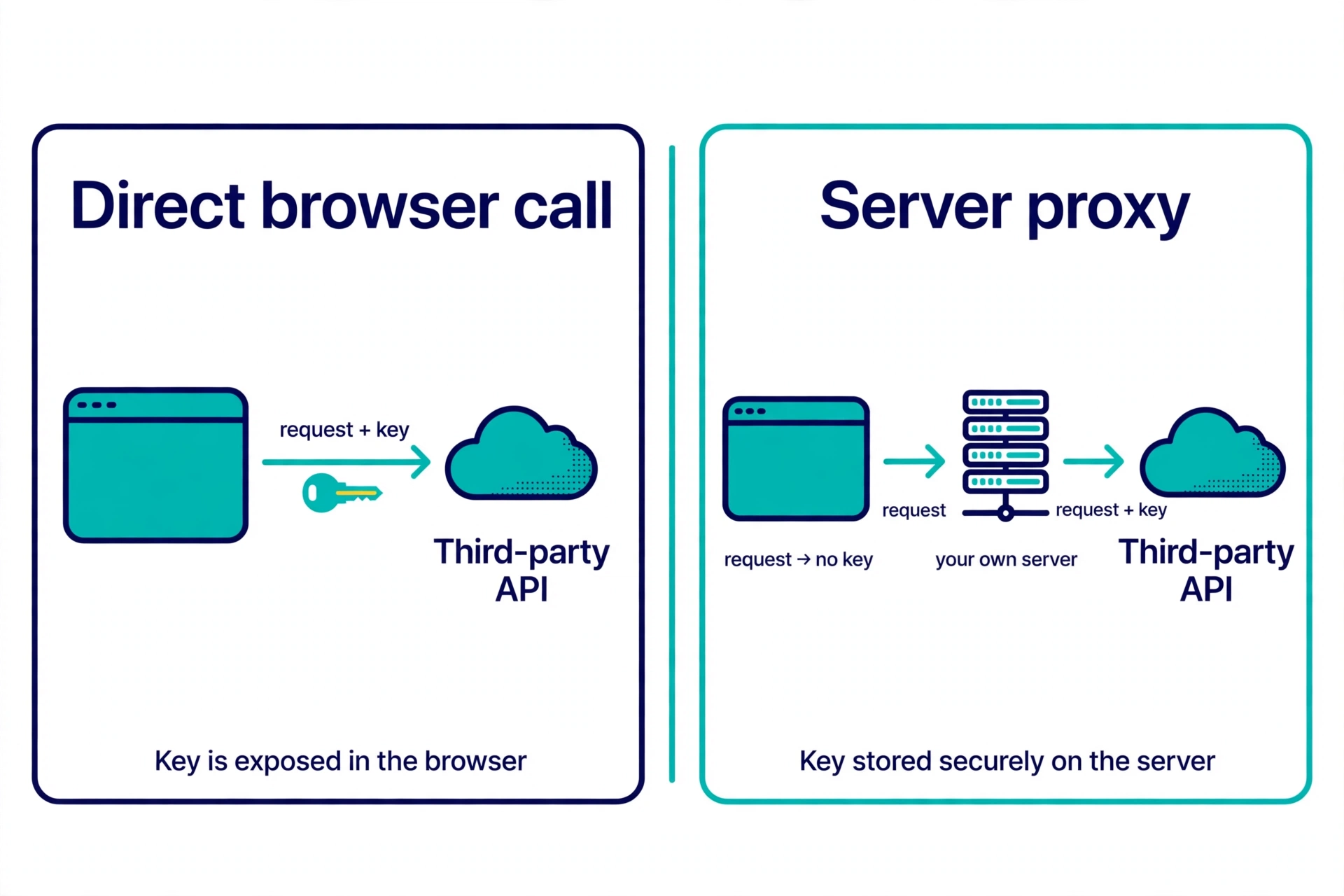
Now look at the Network tab again. The visitor sees a request to your own server, and the response your server chose to return. The third-party key appears in no request the browser makes, because the browser never makes that request. The key lives in one place: your server’s environment, where only your server code can read it.
A minimal server example, in plain Node.js style, shows the shape. The browser side sends no key at all:
// Browser code — no key here
const response = await fetch('/api/weather', {
  method: 'POST',
  headers: { 'Content-Type': 'application/json' },
  body: JSON.stringify({ city: 'Austin' }),
});
const data = await response.json();
The server side is where the key belongs, read from server-only environment variables:
// Server code only — this file is never sent to the browser
app.post('/api/weather', async (req, res) => {
  const { city } = req.body;
  // Validate the input and check the signed-in user here, before calling out.
  const response = await fetch(
    `https://api.example.com/weather?city=${encodeURIComponent(city)}`,
    { headers: { Authorization: `Bearer ${process.env.WEATHER_API_KEY}` } }
  );
  const data = await response.json();
  res.json({ temperature: data.temperature, condition: data.condition });
});
Notice two details in that example. First, the server returns only the fields the page needs, not the provider’s full response — a habit that stops private fields leaking through your own API. Second, the comment about validating input and checking the user is not decoration. It is the part most quick proxy guides skip, and it is where the next problem lives.
In Next.js, the same idea is a Route Handler: server code that reads a non-NEXT_PUBLIC_ variable and returns JSON to the browser. In a Vite app, the same idea is a small backend or a serverless/edge function, which is exactly what Vite’s documentation recommends for protecting secrets in production. The framework changes; the boundary does not. Secrets stay in code that runs on the server, never in code that ships to the browser.
A proxy without controls is just a public relay
Here is the trap. If you move the key to your server but let anyone call your proxy endpoint with no checks, you have not removed the abuse — you have moved it. Anyone who finds your /api/weather endpoint can call it as often as they like, and your key pays for every call. In effect, you have built a free public gateway to a paid service, on your bill.
So a proxy needs the same controls you would put on any endpoint that spends money or touches private data:
- Sign-in where it matters. If the feature is for your users, require a signed-in session before the proxy calls the provider. Anonymous, unlimited access to a paid API is the leak you just moved, not fixed.
- Allowlist what the proxy can do. Accept only the inputs the page needs — a city name, not an arbitrary URL — and only forward to the one provider endpoint the feature requires. A proxy that forwards any URL a visitor supplies can be turned into a tool for reaching other services.
- Rate-limit per user. Cap calls per account, and per IP address for any endpoint that must stay public. Return a
429 Too Many Requestsresponse when the limit is hit, as OWASP suggests for API keys under heavy use. - Return less, not more. Strip provider fields the page does not display, and never forward error bodies that contain provider internals or key fragments.
- Log and watch usage. A sudden spike in proxy calls is often the first sign that someone found the endpoint. Provider dashboards show usage per key; check them after launch, not only when the bill arrives.
None of this makes the proxy harder for a legitimate user. It makes it useless as a free ride for everyone else.
Which key belongs where
Not every key is a secret, and that is where many guides go wrong by treating all keys the same. Use this decision table before you move anything:
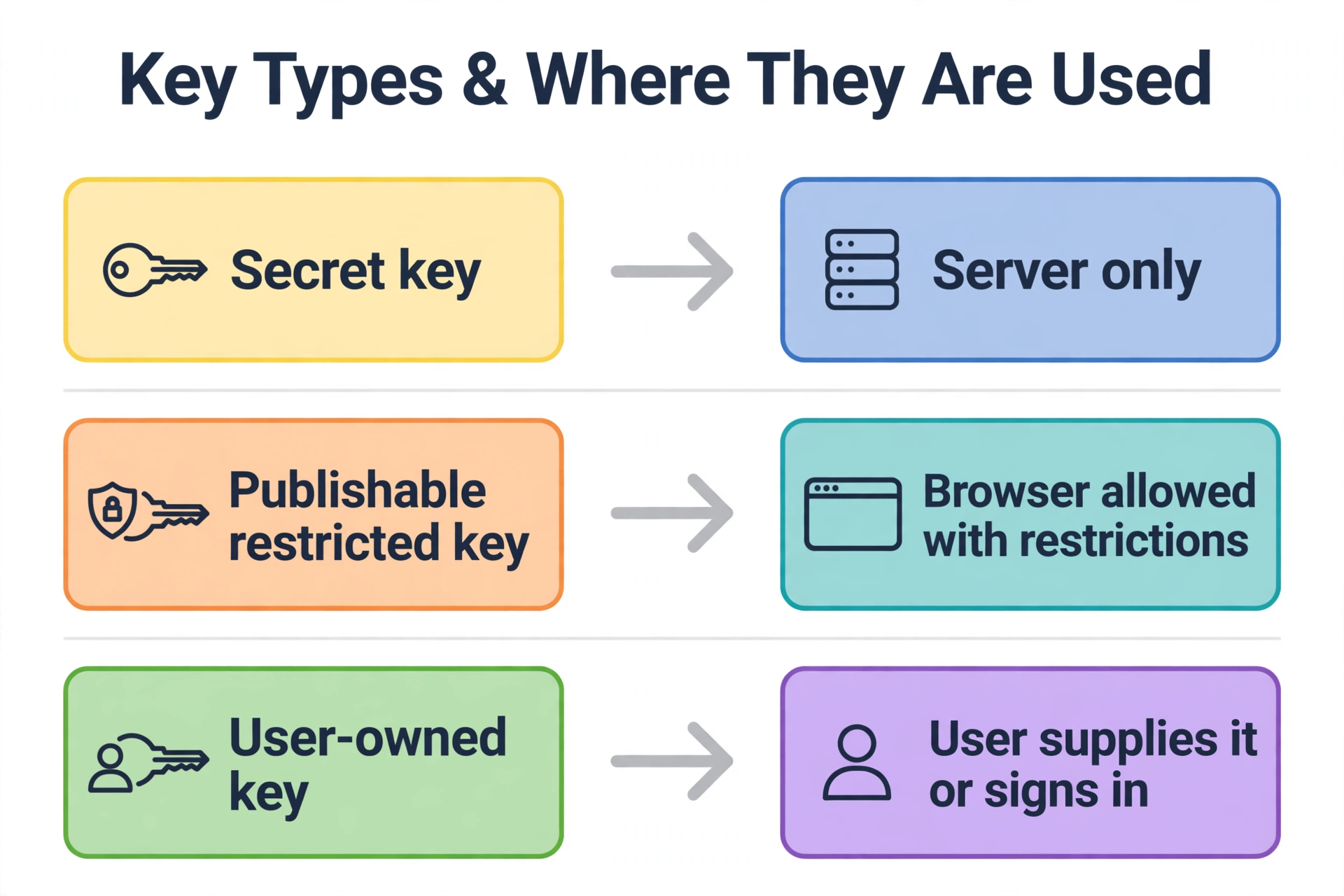
- Secret key — server only. Payment keys, AI provider keys, database keys, email service keys, and any key that can spend money or read private data. These go behind a proxy, full stop. If you find one in front-end code, treat it as exposed: move it, then rotate it, because a key that was ever in a shipped bundle may already have been copied.
- Publishable or public key, with restrictions — browser is fine. Some services issue keys designed for the browser, such as a maps key or a publishable payment key. Even then, restrict them: Google Cloud’s documentation describes website (HTTP referrer) restrictions that limit a browser key to your domains, and API restrictions that limit it to the APIs it needs. Restrictions reduce abuse, but they do not turn a secret key into a safe browser key — a restricted secret key in the browser is still a key anyone can copy and use from an allowed-looking context.
- User-owned key — let the user supply it. If each user has their own account with the provider, the browser can use that user’s key, or better, the user signs in and your server uses a short-lived token for their session. The key that matters is theirs, scoped to their account, not a shared secret for all visitors.
- Server-to-server key — never in the browser, and never in a browser proxy response. Some provider keys are only meant for calls between servers, such as geocoding or admin APIs. Keep them in server code, and do not return them — or data derived only from them — through a browser-facing endpoint that does not need it.
If you cannot tell which kind a key is, check the provider’s documentation for that key type before deciding. "It works in the browser" is not evidence that it belongs there.
Check your own app in five minutes
Use this check on your own app — only on apps you own or have permission to test:
- Open your app, open DevTools, go to Network, and reload. Filter for Fetch/XHR requests.
- Click each request to a third-party domain. Look at its URL and its Request Headers for a key, token, or
Authorizationvalue that is not yours to share. - In DevTools, search all loaded JavaScript for your key formats — for example
sk-,sb_secret_, or the provider’s prefix. A hit in a bundle is a hit, even if no request used it yet. - Check your
.envhandling: any secret with aVITE_orNEXT_PUBLIC_prefix is already public by design. Remove the prefix, move the call server-side, and rebuild — then rotate the key, because changing the variable does not remove it from bundles already shipped. - If you added a proxy, test it as a stranger would: call your own endpoint without signing in, with an unexpected input, and repeatedly. If any of those reach the provider on your key, add the controls from the previous section before you rely on the proxy.
If step 2 or 3 finds a secret key, do not just move it and move on. The companion guide on what to do when a key is exposed covers rotation and checking for misuse — moving the key stops future copies, but only rotation stops the copies already made.
What about short-lived tokens?
A common follow-up question: if the browser must call a service directly, can a short-lived token help? Sometimes, yes — with limits. Your server can issue a token that expires in minutes, is scoped to one operation, and is tied to one signed-in user. The token is still visible in the Network tab, and anyone who copies it can use it until it expires. What changes is the blast radius: a stolen token stops working quickly, and it cannot do anything beyond its scope.
That is a useful pattern for uploads, one-off actions, and user-scoped calls. It is not a way to hide a long-lived secret in the browser, and it is not a substitute for a proxy when the provider key itself is powerful. OWASP’s warning applies here too: do not rely exclusively on API keys to protect sensitive, critical, or high-value resources. A short-lived token is one control among several, not a hiding place.
Where PrivacyReport fits
If you would rather check first and redesign second, PrivacyReport’s homepage describes a scan that takes a deployed app URL or a GitHub repo URL and returns a simple privacy and security report, checking for exposed keys and more than 20 other issues, with a free tier of one to two scans a month. Use it as a first pass for the checks in this article — especially the shipped-JavaScript search — and follow up with the proxy and rotation steps above for anything it finds.
Frequently asked questions
Can I hide an API key from the Network tab with an environment variable?
Only if the variable stays on the server. A server-only variable is never sent to the browser, so it never appears in the Network tab. A variable with a public prefix (VITE_ or NEXT_PUBLIC_) is copied into the browser bundle at build time, so it appears in both the bundle and the Network tab. The file name .env does not decide this; the prefix and the code that runs it do.
Does HTTPS hide my key from the Network tab?
No. HTTPS hides traffic from eavesdroppers on the network. The browser’s owner can still see their own requests in DevTools, before encryption and after decryption.
Is a backend proxy slower than calling the provider directly?
Slightly — there is one extra hop through your server. For most features, that cost is small compared with the risk of a leaked key, and it buys you caching, input validation, and abuse controls that a direct call cannot offer. If latency truly matters, cache the provider’s response on your server for a short time rather than moving the key back to the browser.
What if my provider only gives me one key and says to put it in the front end?
Check whether that key is a publishable key with restrictions, or a secret key the provider expects you to proxy. Providers that offer browser keys also offer restriction settings — domain restrictions, API restrictions, and quotas. Apply all of them, and keep any secret or admin key from the same provider strictly server-side.
I already shipped a secret key in front-end code. Is moving it to a proxy enough?
No. Moving it stops new copies, but anyone who already downloaded the old bundle may still hold the key. Rotate it with the provider, update your server to the new key, and check provider usage for calls you did not make.
Can I use a WebSocket or another transport to hide the request?
No. WebSocket messages are also visible in DevTools, under the Messages view for that connection. Changing the transport changes where the request appears, not whether the browser’s owner can see it.
Sources
- OWASP, REST Security Cheat Sheet
- Google Cloud, Manage API keys
- Next.js, How to use environment variables in Next.js
- Vite, Env Variables and Modes
Related reading on PrivacyReport
- What to do if an API key is exposed
- How to scan for secrets in VS Code
- Is it safe to expose your Supabase anon key? (Only if RLS is on)
- Free Security Scanner for Vibe-Coded Apps: Check Yours in 60 Seconds
- Supabase Security Checklist for Vibe-Coded Apps (2026)
