
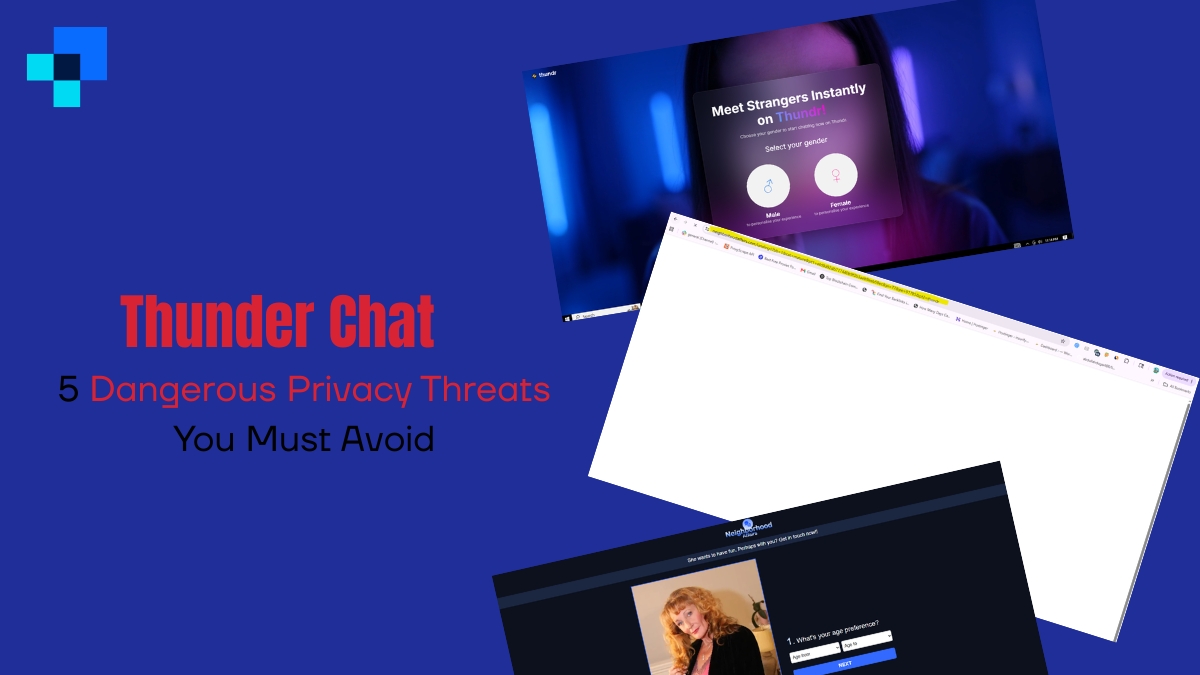
The sudden shutdown of Omegle in late 2023 marked the end of an era for the early, chaotic, and completely open internet. For nearly fifteen years, Omegle had been the default destination for millions of people looking to connect with strangers across the globe. Almost immediately after its closure, a massive vacuum formed. A new wave of cloning services, random video matching applications, and community portals rushed to capture this displaced audience.
Among these emerging platforms, Thunder Chat (often marketed online as Thundr or Thundr Chat) has quickly risen to prominence. Advertising itself as the ultimate Omegle alternative, the platform promises instant, sign-up-free video matching with strangers from every corner of the planet. Under the banner of “complete anonymity” and “zero-friction connection,” it has attracted millions of monthly visits from teenagers, college students, content creators, and casual web surfers.

However, behind the clean user interfaces and enticing promises of boundary-free socialization lies a complex, highly vulnerable technological backend. In the digital space, true anonymity is a carefully manufactured illusion. While platforms like Thunder Chat claim to keep your identity secure by eliminating standard registration procedures, their database operations, server configurations, and transmission protocols paint a radically different picture.
In this comprehensive security analysis, we will deconstruct the technological framework of Thunder Chat, audit its digital privacy footprint, and reveal the five critical privacy threats you must understand—and actively avoid—before clicking the “Start” button.
Thunder Chat: The Core Privacy Scorecard
| Privacy Dimension | Security Evaluation | Risk Category |
|---|---|---|
| User Registration | None (Sign-up Free) | High (Creates False Sense of Security) |
| Transmission Protocol | Standard WebRTC / SSL | Medium (Vulnerable to IP Exposure) |
| Encryption Standard | Transit Only (No End-to-End Encryption) | High (Open to Interception/Auditing) |
| Server Metadata Logs | IPs, User-Agent, Device Specs, Timestamps | Critical (Permanent Digital Footprint) |
| Visual/Screen Security | None (No Screenshot/Record Restrictions) | Critical (Permanent Image/Voice Theft) |
| Overall Privacy Grade | D- | Extremely Vulnerable |
2. Thunder Chat: What is it and How Does it Work?
Before auditing the privacy implications of this platform, it is crucial to understand what it actually is and the different tools that share its name.
The Post-Omegle Random Video Chat Platform
In 95% of consumer search contexts, Thunder Chat refers to the live video matching service designed to connect anonymous users via webcam and microphone. The service operates inside a standard web browser (Chrome, Safari, Firefox, Edge) and does not require users to download desktop software or mobile applications.
To connect users, the platform utilizes a framework called WebRTC (Web Real-Time Communication). WebRTC is an open-source project that enables browsers and mobile applications to exchange real-time media (video, audio, and data) directly with each other without needing a middleman server to relay the actual video stream.
While this makes the platform fast, cheap, and responsive, it introduces massive security vulnerabilities that we will detail below.
Web3 and AI Software Alternatives
It is worth noting that there are minor software projects, decentralized Web3 protocols, and AI writing systems that also use the name “Thunder Chat” or “ThunderChat.”
- The Web3 Variant: A decentralized, blockchain-based messaging system designed to leverage cryptographic key exchanges (like ECDH) to store encrypted text logs on peer-to-peer chains.
- The AI Variant: An automated business writing assistant designed to generate marketing copy.
While these tools carry their own standard data-collection concerns, they are not the primary focus of public concern. The real, immediate digital danger lies with the widely popular random video chat platform.
3. How Thunder Chat is Silently Affecting User Privacy
When you use a random video chat platform, you are exposing much more than just a live stream of your face. You are opening a technical window into your local network, your physical device, and your digital identity.
Here are the five critical ways Thunder Chat actively compromises and affects your personal privacy.
1. WebRTC IP Leak Vulnerabilities (Direct Peer-to-Peer Risks)
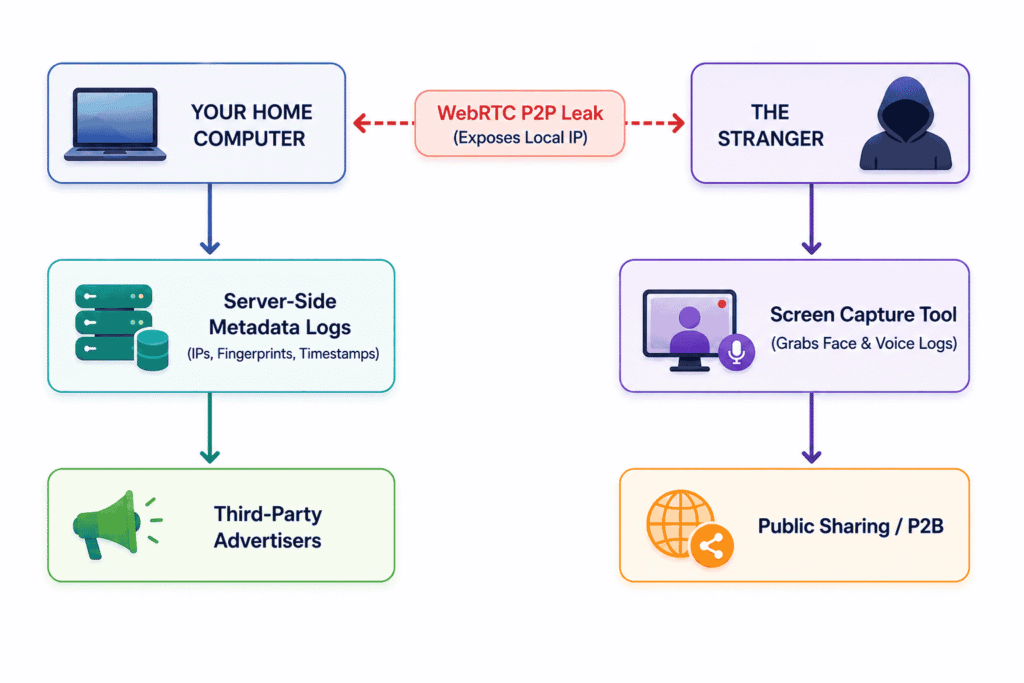
The most severe technical threat on platforms like Thunder Chat is the inherent design of WebRTC. To establish a fast, low-latency video feed between two people (User A in New York and User B in London), WebRTC attempts to connect their browsers directly in a peer-to-peer (P2P) connection.
To do this, both browsers must exchange network data, including their External IP Addresses.
Unless a platform is specifically configured to route all traffic through secure, encrypted intermediate servers (known as TURN/STUN relay servers), the two connecting browsers will share their raw IP addresses with one another. A technically savvy user on the other end of your video chat can easily run basic network sniffing tools (like Wireshark) or execute simple browser-developer console scripts to capture your local IP address instantly.
Once an attacker has your IP address, they can:
- Pinpoint your physical geographic location (often down to the neighborhood or street block level).
- Identify your Internet Service Provider (ISP).
- Execute targeted Denial of Service (DDoS) attacks to crash your home internet network.
- Cross-reference your IP address with public databases of data leaks to find your physical home address, phone number, and real name.
2. Extensive Server-Side Session Logging
Thunder Chat marketed itself heavily as a “no registration” platform. While it is true that you do not have to provide an email address, create a password, or verify a phone number, the platform’s backend servers still create a highly detailed, permanent profile of your session.
Every time you access the site, the servers log:
- Your Real IP Address: The system requires this to coordinate matches.
- Device Fingerprint: A highly unique combination of your browser type, operating system version, active browser extensions, screen resolution, and local timezone settings.
- Session Metadata: The exact timestamps of when you logged in, how many people you matched with, the duration of each chat, and which users you skipped or reported.
Even without an email address attached, this metadata represents a highly unique digital signature. If a government agency subpoenas the platform’s logs, or if the platform suffers a backend database leak, this data can be easily correlated with your real-world identity.
3. Third-Party Screen Recording and Digital Footprints
Because Thunder Chat operates entirely within standard web browsers, there are zero DRM (Digital Rights Management) protections in place. Unlike streaming apps (like Netflix) that black out the screen when a screen capture tool is active, standard web browsers cannot prevent users from capturing video.
The person on the other side of your chat window can easily run OBS Studio, QuickTime, or simple mobile phone cameras to record the entire interaction.
If you are matched with an attacker, they can capture high-resolution images of your face, record your voice, and document your physical surroundings. These recordings are frequently uploaded to public social media platforms (like TikTok, YouTube, and Reddit) or used for malicious extortion and blackmail schemes, creating a permanent, damaging digital footprint that is nearly impossible to delete.
4. Browser Cookie Tracking & Profile Correlation
When you load Thunder Chat, the website drops cookies and local storage variables onto your browser. Many of these cookies are operated by third-party advertising networks and analytic suites.
These tracking pixels are designed to monitor your behavior across the web. If you visit Thunder Chat, and then subsequently log into your personal Facebook, Amazon, or Google account on the same browser, these advertising networks can correlate your “anonymous” video chat activity with your real-world profile. This allows companies to build highly detailed behavioural profiles, leading to targeted ads or potential data leakage to third-party brokers.
5. Weak Moderation and Exposure of Sensitive Data to AI Auditing
To keep random video chats safe from illegal content, platforms like Thunder Chat utilize automated moderation algorithms. These systems continuously capture screenshots of your webcam feed and record audio clips, processing them through third-party AI image recognition and natural language processing (NLP) systems to check for violations.
This means that your “private” conversation is actively monitored, processed, and evaluated by external AI engines. If you display private documents, credit card numbers, or sensitive family environments in front of your camera, this visual data is processed by external servers, presenting a significant risk of data exposure.
4. The Anonymity Illusion: Anonymous vs. Private
Many users conflate anonymity with privacy. Understanding the difference between these two concepts is essential for personal digital safety.
- Anonymity: Means that you do not reveal your real name or personal contact details to the other party.
- Privacy: Means that the transaction, connection, and data exchange are completely secure from third-party interception, logging, tracking, and surveillance.
Thunder Chat offers surface-level anonymity (the stranger doesn’t know your name unless you tell them), but it offers zero privacy.
Every segment of your session is logged, tracked, monitored, and open to recording by both the platform’s servers, moderation AI, and the stranger on the other end.
Privacy Profile: Secure Messaging vs. Random Video Chat
To illustrate this, let’s compare a truly secure, private communication tool (like Signal) with a random video chat platform (like Thunder Chat).
| Privacy Dimension | Secure App (Signal) | Thunder Chat (Thundr) |
|---|---|---|
| End-to-End Encryption (E2EE) | Yes (Decryption keys remain on devices) | No (Processed and audited by servers) |
| IP Protection | Yes (Option to proxy all calls through Signal servers) | No (Direct WebRTC peer-to-peer risk) |
| Metadata Protection | Yes (Does not log contacts, dates, or histories) | No (Logs match history, IPs, and durations) |
| Moderation Audits | None (System cannot view content) | Active (Automated AI visual auditing) |
| Permanent Recording Risk | Low (Used only with trusted contacts) | Extremely High (Interacting with random strangers) |
5. How to Use Thunder Chat Without Exposing Your Identity
If you choose to use random video chat platforms like Thunder Chat for entertainment, you must implement strict defensive cybersecurity measures to shield your identity and network data.
⚠️ Security Vetting Checklist for Random Chats
- Always Use a Premium VPN: Before opening the website, connect to a Virtual Private Network (VPN). A VPN masks your real external IP address, routing your WebRTC connections through a secure server. This ensures that other users attempting to sniff your IP will only see the VPN server’s location, protecting your home network from geolocating and DDoS attacks.
- Use a WebRTC Leaks Blocker: Install security extensions on your browser (such as WebRTC Control, uBlock Origin, or Privacy Badger) and configure them to block browser-level WebRTC IP queries. This forces WebRTC to use proxy servers instead of exposing your local network details.
- Audit Your Visual Environment: Check your camera’s field of view before clicking match. Remove any identifiable objects, such as school banners, company logos, mail envelopes showing your address, or recognizable outside window views. Ensure family members are not in the background.
- Operate in Incognito/Private Mode: Always open random video chat sites in your browser’s private window. This prevents the website from retaining persistent tracking cookies and ensures all local storage variables are deleted the moment you close the tab.
- Strictly Protect External Handles: Under no circumstances should you share your Instagram, Snapchat, Discord, or phone number with a stranger on an anonymous platform. Once an attacker has your social media handle, they can easily tie your anonymous webcam feed to your real-world identity, exposing you to target tracking and social engineering.
6. Frequently Asked Questions
Is Thunder Chat safe to use?
Generally, no. While the platform offers quick entertainment, it presents significant security risks. The combination of potential WebRTC IP leaks, the lack of screen recording prevention, and the presence of malicious actors looking to harvest images and network data makes it a high-risk environment.
Can other users find my real location on Thunder Chat?
Yes. If you do not use a VPN, a technically skilled user can capture your external IP address via direct WebRTC connections. This IP address can be used to identify your city, postal code, and Internet Service Provider.
Does Thunder Chat save your video chats?
The platform uses automated moderation software that continuously captures screenshots of video feeds to detect inappropriate content. While the platform claims these images are deleted after analysis, the metadata logs (IPs, session lengths, match histories) are retained on their servers.
Do I need a VPN to use random chat sites?
It is absolutely critical. Using a VPN is the only reliable way to mask your real IP address from WebRTC peer-to-peer connections, preventing strangers from locating your home network or executing DDoS attacks.
Are conversations on Thunder Chat end-to-end encrypted?
No. While the connection between your browser and the platform is encrypted using standard HTTPS/SSL, the platform itself has full access to the video and audio streams to perform automated AI moderation audits. Decryption keys are managed by the platform, not by the users.
7. Conclusion: Reclaiming Digital Privacy in a Post-Omegle World
The appeal of random video chat platforms is easy to understand. They offer a unique, spontaneous, and frictionless way to connect with people worldwide. However, in the modern digital landscape, the real cost of “free” and “frictionless” connection is paid directly with your personal data, identity security, and network integrity.
Platforms like Thunder Chat build an illusion of safety around the absence of standard registration screens. But as our technical audit reveals, this missing barrier simply masks extensive metadata logging, vulnerabilities to WebRTC P2P IP leaks, automated AI surveillance, and a complete lack of protection against malicious screen recording.
If you choose to navigate the unpredictable waters of random video chats, you must treat your digital safety as a primary priority. By always utilizing a premium VPN, disabling WebRTC leaks at the browser level, auditing your physical environment, and strictly withholding all personal social media handles, you can protect your private data from exploitation and reclaim your digital security in an increasingly unsecure online world.

Abdullah Zulfiqar is a cybersecurity and application security writer at PrivacyReport.org, where he focuses on AI-driven security, privacy protection, and SaaS application risk analysis. His work explores how modern AI systems and digital platforms handle sensitive user data, with a strong emphasis on identifying vulnerabilities, preventing data leaks, and improving software security practices.
He writes about the intersection of artificial intelligence and cybersecurity, helping readers and developers understand emerging threats in AI-powered applications and how to build more secure, privacy-respecting systems.
Leave a Reply