

In modern software development, digital credentials are the keys to your entire technological kingdom. They authenticate payment gateways, unlock cloud infrastructure, connect production databases, and grant access to proprietary AI models.
Yet, as teams accelerate delivery cycles and rely on AI coding assistants, these sensitive credentials frequently end up hardcoded directly in plain text within codebases. This phenomenon—known across the cybersecurity industry as secrets sprawl—represents one of the fastest vectors for unauthorized system intrusion.
According to security industry telemetry from the GitGuardian State of Secrets Sprawl Report, over 28 million new hardcoded secrets were exposed in public GitHub commits in a single year—a 34% increase driven largely by rapid prototyping and AI-assisted workflows. Once pushed to a public repository, malicious scanning bots typically discover and attempt to exploit exposed credentials within two to five minutes.
This comprehensive guide explains what a secret scanner is, details how modern detection engines identify sensitive strings, contrasts secret scanners with traditional static analysis tools, and provides an actionable blueprint to protect your software development lifecycle (SDLC).
What Is a Secret Scanner? (And What Counts as a “Secret”?)
A secret scanner is a specialized security analysis engine that systematically inspects code repositories, configuration files, commit histories, build containers, and deployment bundles to locate exposed credentials before they reach production or public environments.
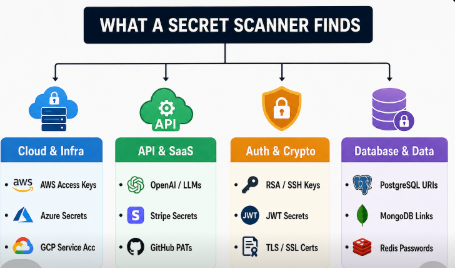
In software engineering, a “secret” is any digital authentication token or credential used by an application to verify identity and gain authorized access to another service, system, or database.
Common Types of Exposed Secrets
- API Keys & Service Tokens: Credentials used to authenticate with third-party APIs (e.g., Stripe secret keys, OpenAI tokens, SendGrid mail keys, Twilio auth tokens).
- Cloud Provider Credentials: Identity and Access Management (IAM) keys, such as AWS Access Key IDs (
AKIA...) and Secret Access Keys, Google Cloud Platform service account JSON files, and Azure Client Secrets. - Private Cryptographic Keys: RSA, SSH, and PGP private keys, as well as SSL/TLS certificates used to secure transport layers and sign code.
- Database Connection Strings: Complete Uniform Resource Identifiers (URIs) containing embedded usernames and passwords (e.g.,
postgres://admin:p@ssword123@db.internal:5432/production). - OAuth Tokens & Webhook Secrets: Long-lived refresh tokens, client secrets, and HMAC verification keys used to validate webhook payloads.
Why Do Credentials End Up in Code?
Developers rarely leak credentials intentionally. Instead, secrets leak through predictable development habits:
- Local Debugging Shortcuts: Temporarily hardcoding an API key into a component during local testing, intending to remove it before staging, but accidentally committing the file.
- Improper Configuration Files: Committing
.env,config.json, or local settings files because.gitignorewas configured incorrectly or missing entirely. - AI Code Suggestions: Accepting AI-generated code snippets from tools like GitHub Copilot, Cursor, or Replit that populate configuration templates with actual keys or generate client-side scripts containing server-side credentials. To learn more about securing AI workflows, see our guide on vibe coding security risks.
How Does a Secret Scanner Work? Inside the Detection Engine
Detecting secrets is technically challenging. Unlike standard syntax bugs, a secret is often just an alphanumeric string that looks indistinguishable from a benign UUID, a hash, or a compiled asset path.
To achieve high detection accuracy while minimizing noise, modern secret scanners employ a multi-stage analysis pipeline.
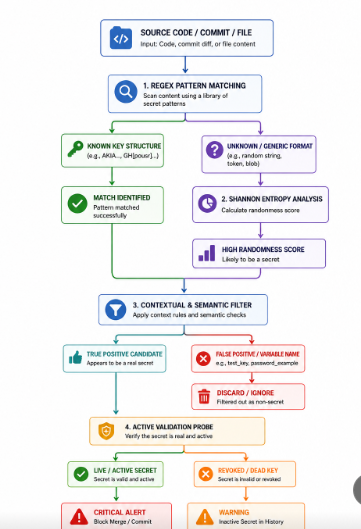
1. Regular Expression (Regex) Pattern Matching
Many major service providers use distinctive prefixes, character lengths, and encodings for their credentials. Secret scanners use curated regular expression rule sets to identify these deterministic structures instantly.
- AWS Access Key ID: Typically starts with
AKIAorASIAfollowed by 16 alphanumeric characters (AKIA[0-9A-Z]{16}). - Stripe Secret Key: Follows the format
sk_live_[0-9a-zA-Z]{24,}. - GitHub Personal Access Token: Begins with
ghp_orgithub_pat_. - Slack Webhook URL: Follows
https://hooks.slack.com/services/T.../B.../....
Regex is exceptionally fast and produces very low false positives for known vendor patterns. However, it cannot catch unstructured or custom credentials, such as custom database passwords or private API tokens.
2. Shannon Entropy Analysis
To detect unstructured keys and high-strength passwords, scanners calculate Shannon entropy, a mathematical measure of randomness and information density within a string of text.
Standard human-readable English words and standard programming syntax have relatively low entropy because certain characters repeat frequently in predictable orders. In contrast, cryptographically secure hashes, base64-encoded strings, and randomly generated passwords exhibit exceptionally high Shannon entropy.
Entropy H(X)=−i=1∑nP(xi)log2P(xi)
When a string exceeds a predefined entropy threshold (typically between 3.0 and 4.5 bits per character for base64 or hex sets), the scanner flags it for deeper evaluation.
3. Contextual & Semantic Analysis
High entropy alone can produce false positives by flagging compiled CSS hashes, image identifiers, or encrypted binary blobs. To prevent alert fatigue, advanced scanners evaluate the surrounding syntactic context:
- Variable Names: Flags strings assigned to variables containing terms like
api_key,secret,auth_token,db_pass, orprivate_key. - File Type Exclusions: Automatically applies different heuristics to test files (e.g.,
tests/fixtures/) versus core application logic. - Entropy Density: Evaluates whether high entropy is concentrated in a discrete literal string rather than distributed across minified code blocks.
4. Active Validity Probing
The most advanced scanners do not stop at string detection; they perform active validation. By sending a non-destructive, read-only handshake to the vendor’s authentication endpoint (e.g., querying the Stripe or AWS STS metadata API), the scanner verifies whether the exposed token is currently active and exploitable, or simply a revoked, historical artifact.
Secret Scanner vs. SAST: What’s the Difference?
A common question among engineering teams is whether an existing Static Application Security Testing (SAST) tool eliminates the need for a dedicated secret scanner.
While some SAST tools offer basic regex matching, SAST and secret scanning solve fundamentally different problems:
| Feature / Dimension | Dedicated Secret Scanner | Traditional SAST Tool |
|---|---|---|
| Primary Focus | Finding exposed authentication tokens, credentials, and private keys. | Finding software flaws (SQL injection, XSS, buffer overflows, memory leaks). |
| Core Analysis Engine | Regex patterns, Shannon entropy algorithms, and active endpoint validation. | Abstract Syntax Tree (AST) parsing, control-flow graphs, and data-taint tracking. |
| Git History Analysis | Scans full Git commit history, deleted branches, stashes, and tags. | Typically scans only the current state of files on disk. |
| False-Positive Profile | Highly tuned to differentiate random hashes from active credentials. | High noise ratio when attempting to identify custom passwords via generic rules. |
| Scanning Speed | Milliseconds to seconds (ideal for local pre-commit hooks). | Minutes to hours (often too slow for local pre-commit blocking). |
| Active Verification | Can query provider APIs to confirm if a credential is live. | Does not validate credential status against third-party endpoints. |
NOTE
For a deeper analysis on how dedicated tools compare with broader security platforms, read our in-depth PrivacyReport vs Semgrep comparison and PrivacyReport vs Snyk analysis.
Why You Need a Secret Scanner: The Real-World Risks of Secret Sprawl
Leaving secrets unprotected exposes organizations to severe operational, financial, and regulatory fallout.
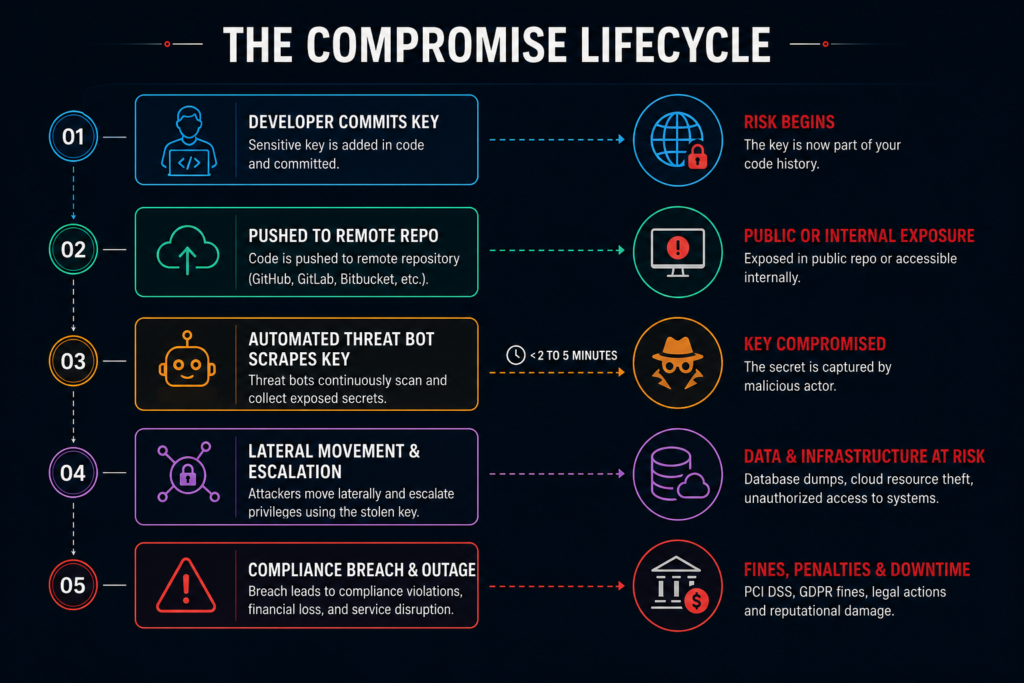
1. Automated Bot Scraping & Immediate Account Takeover
Public platforms like GitHub, GitLab, and Bitbucket are continuously indexed by threat actors using automated scraping tools. When an active AWS or OpenAI credential appears in a public commit, bots capture it within minutes.
Typical attack paths include:
- Cryptojacking: Spinning up hundreds of high-compute GPU instances in your cloud account to mine cryptocurrency, generating tens of thousands of dollars in infrastructure bills overnight.
- Database Exfiltration: Connecting to production databases to dump customer records, payment details, and personally identifiable information (PII).
- Supply Chain Infiltration: Using compromised package registry tokens (npm, PyPI) to inject malicious code into downstream libraries.
2. Lateral Movement Across Internal Repositories
Many organizations believe private repositories are completely safe. However, according to research cited in the GitGuardian State of Secrets Sprawl, internal repositories are six times more likely to contain exposed credentials than public ones.
If an attacker compromises a single developer’s workstation or phishing credentials, hardcoded secrets inside private repos allow them to move laterally across systems without ever having to exploit a software vulnerability.
3. The AI & “Vibe Coding” Multiplier
The rapid adoption of AI coding assistants (e.g., GitHub Copilot, Cursor, Claude Code) has dramatically accelerated code creation. However, these tools frequently output complete connection strings and API client instantiations containing placeholder keys or inadvertently extract sensitive environment values from open editor contexts.
Without automated scanning, teams ship AI-generated code to production before realizing client-side JavaScript bundles contain sensitive backend master keys.
4. Compliance Mandates and Regulatory Penalties
Modern compliance frameworks strictly prohibit hardcoding authentication credentials in application source code:
- PCI DSS v4.0.1 (Requirements 6.3.2 & 8.6): Explicitly requires organizations to prevent hardcoded credentials in custom software and scripts. Storing raw payment gateway keys or database passwords in code invalidates PCI compliance. See official documentation at the PCI Security Standards Council.
- NIST SP 800-218 (Secure Software Development Framework): Requires software producers to protect software from unauthorized access and identify vulnerabilities prior to deployment. Refer to NIST SP 800-218 Guidelines.
- MITRE CWE-798 (Use of Hard-coded Credentials): Classified by the Open Web Application Security Project (OWASP) as a top security risk. Read the technical definition on MITRE CWE-798 and follow the OWASP Secrets Management Cheat Sheet.
Where Should Secret Scanning Happen in the SDLC?
A robust security strategy does not rely on a single checkpoint. It implements a multi-layered “defense-in-depth” model across three primary stages of the software development lifecycle:
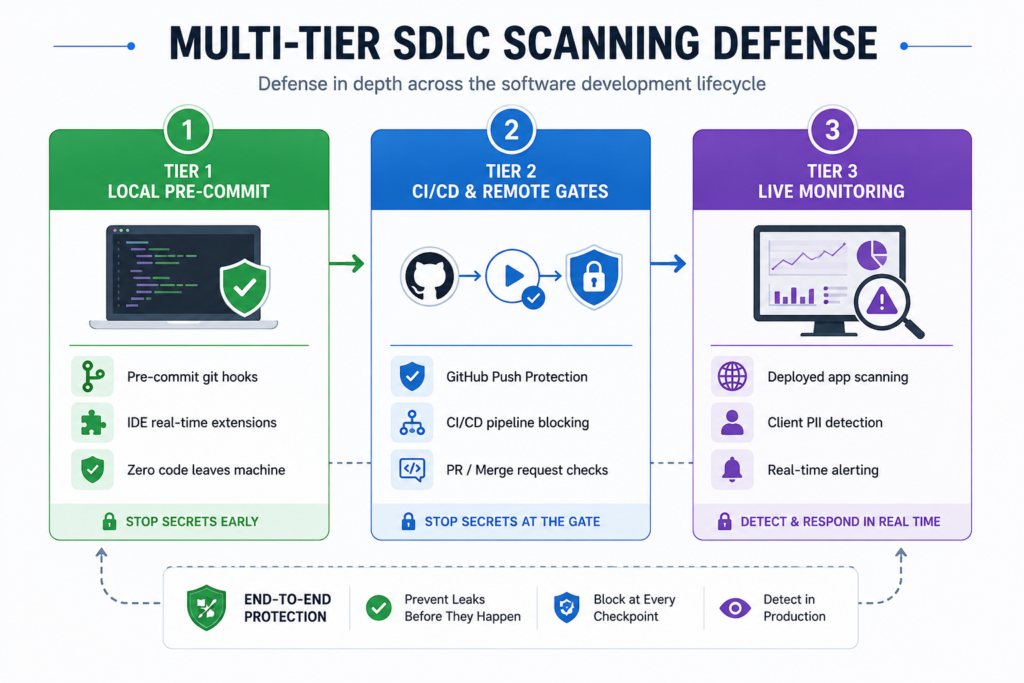
Tier 1: Local Developer Environment (Pre-Commit Hooks)
The most effective place to stop a secret leak is on the developer’s laptop before the code is ever committed to version control.
- How it works: Tools run locally as Git
pre-commithooks. If a developer accidentally stages a file containing a secret, the commit is immediately blocked with a local terminal alert. - Advantage: Zero remediation overhead; the secret never enters Git history.
- Tutorial: For detailed setup instructions, read our guide on how to scan for secrets in VS Code.
Tier 2: CI/CD Pipelines & Repository Push Protection
If a developer bypasses local hooks (e.g., using git commit --no-verify), centralized controls in your CI/CD pipeline act as a second layer of defense.
- How it works: GitHub, GitLab, or dedicated CI runners execute automated scans during pull request creation and branch merges.
- Advantage: Enforces organizational compliance across all contributors, contractors, and external pull requests.
Tier 3: Continuous Live Monitoring & Web App Scans
Static repository scans cannot detect every exposure vector, such as environment variables leaked via misconfigured public endpoints or client-side JavaScript bundles created during production builds.
- How it works: Automated tools periodically audit live deployed URLs, scanning frontend bundles and open endpoints for exposed keys and PII leaks.
- Advantage: Protects live applications in production. You can run automated checks using our free App Security Scanner or configure Continuous Monitoring for ongoing post-deployment verification.
The “Git History Fallacy”: Why Deleting a Secret Isn’t Enough
A frequent mistake made by development teams is misunderstanding how Git stores data.
CAUTION
The Common Mistake:
- A developer commits an API key in
config.js. - They realize the mistake, delete the key from
config.js, and create a new commit:"Remove accidental API key". - They push the branch to GitHub.
Why this fails: Git is a directed acyclic graph (DAG). Every commit stores a snapshot of the entire repository at that point in time. The secret remains permanently readable in the commit history, accessible to anyone who clones the repository or views the commit diff.
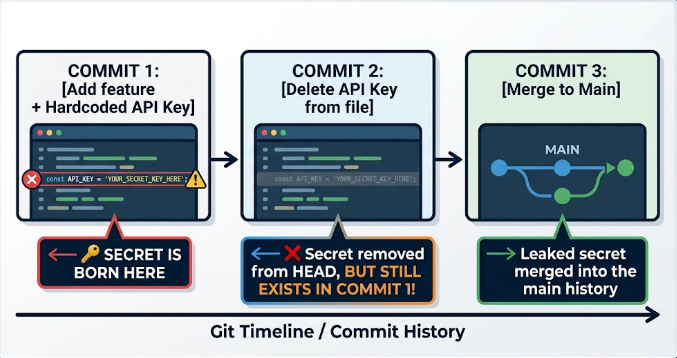
Even if you delete the entire repository, cached snapshots and forks can preserve the credential. The moment a secret is committed to a remote repository, it must be considered compromised.
What to Do When a Secret Is Leaked: 5-Step Incident Response Playbook
If a secret scanner alerts you to an exposed credential, follow this prioritized 5-step response protocol:
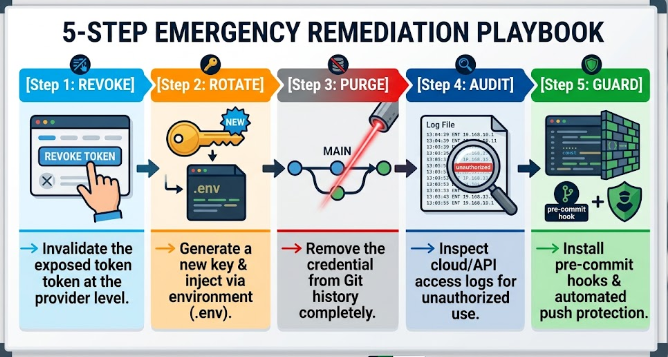
Step 1: Revoke the Credential Immediately
Do not waste time editing code first. Log into the service provider’s administrative dashboard (e.g., AWS IAM, Stripe, OpenAI) and immediately revoke or delete the compromised key. Once revoked, the credential cannot be used by threat actors, neutralizing immediate exploitation.
Step 2: Rotate and Inject a New Key via Environment Variables
Generate a replacement credential and store it safely in your environment variables (.env) or a dedicated secrets manager (e.g., AWS Secrets Manager, HashiCorp Vault, Vercel Environment Variables). Ensure the .env file is listed in .gitignore.
Step 3: Purge the Secret from Git History
To clean the repository history, use modern tools like git-filter-repo (the official Git-recommended replacement for the deprecated git filter-branch):
bash# Example: Purge a specific sensitive string across all commitsgit filter-repo --replace-text <(echo 'REPLACE_ME_OLD_SECRET==>REDACTED') --force
Alternatively, use specialized tools like BFG Repo-Cleaner to strip credentials from commit blobs.
Step 4: Audit Access Logs for Unauthorized Activity
Review the service provider’s audit trails (such as AWS CloudTrail or database query logs) for the time window between the commit and revocation. Check for unusual spikes in API requests, unauthorized IAM policy modifications, or new user creations.
Step 5: Install Preventive Scanning Guards
Implement local pre-commit hooks and repository push protection so that similar mistakes are caught before reaching version control. For full emergency instructions, see our guide: My API Key Was Exposed: What Do I Do Now?.
How to Choose the Right Secret Scanner for Your Team
When evaluating secret scanning solutions, match the tool to your team’s technical workflow and infrastructure complexity:
| Scanner Category | Representative Examples | Best For | Pros & Cons |
|---|---|---|---|
| Open-Source CLI Tools | Gitleaks, TruffleHog | Developers, DevOps engineers, CI/CD pipeline automation. | Pros: Highly customizable, fast, free. Cons: Requires manual CLI/hook configuration and maintenance. |
| Platform-Native Scanners | GitHub Secret Scanning, GitLab Secret Detection | Teams hosting code primarily on GitHub or GitLab. | Pros: Turnkey integration, automatic partner revocation. Cons: Limited visibility outside the specific code host platform. |
| Lightweight App & Web Scanners | PrivacyReport App Security Scanner | Founders, SaaS builders, indie developers, and privacy officers. | Pros: Zero-install URL/repo scanning, plain-English fix instructions, client-side leak detection. Cons: Designed for application-level scanning rather than complex multi-repo enterprise SIEM pipelines. |
| Enterprise DevSecOps Platforms | GitGuardian, Snyk, Checkmarx | Large enterprise security operations teams. | Pros: Deep SIEM integration, role-based access, historical compliance logs. Cons: Expensive, complex enterprise onboarding. |
Key Evaluation Criteria
- Low False-Positive Rate: Does the scanner use Shannon entropy and contextual filtering, or does it overwhelm developers with dozens of harmless test string alerts?
- Active Token Verification: Can the tool verify whether detected credentials are live, helping you prioritize real risks over dead code?
- Ease of Deployment: Can developers run it locally without a complex multi-day DevOps setup?
- AI & Modern Stack Coverage: Does it understand modern frontend frameworks, AI boilerplate code, and cloud deployment pipelines?
Frequently Asked Questions (FAQ)
Can a secret scanner detect encrypted or hashed passwords?
No. Secret scanners are designed to identify plain-text credentials, high-entropy tokens, and known API key patterns. Properly hashed (e.g., bcrypt, Argon2) or encrypted values are generally treated as opaque data or excluded by semantic filters.
How do secret scanners minimize false positives?
Scanners reduce noise by combining regex matching with Shannon entropy analysis, variable name context checks (looking for keywords like api_token), and automatic ignore lists for common public hashes, dummy test values (e.g., 1234567890abcdef), and binary assets.
What is the difference between a secret scanner and a secret manager?
A secret manager (such as AWS Secrets Manager, HashiCorp Vault, or 1Password Developer Tools) is a secure storage vault where credentials live at runtime. A secret scanner is a monitoring tool that ensures developers don’t mistakenly hardcode those credentials into code instead of retrieving them from the vault.
Does running a secret scanner slow down CI/CD build pipelines?
Dedicated secret scanners are optimized for speed and typically analyze commits in seconds. When run locally as a pre-commit hook, they evaluate only staged diffs, adding virtually no perceptible delay to the developer workflow.
Conclusion: Building a Zero-Leak Development Workflow
Hardcoded credentials represent one of the most preventable yet catastrophic risks in modern software engineering. With threat actors utilizing automated bots to scrape public repositories in real time, manual code reviews and after-the-fact audits are no longer sufficient.
By deploying automated secret scanning at the local pre-commit level, enforcing repository push protection, and maintaining continuous post-deployment monitoring, organizations can eliminate secrets sprawl and build a resilient, secure development lifecycle.
To verify whether your live web applications or repositories have exposed sensitive credentials, run a free scan with the PrivacyReport App Security Scanner or evaluate your AI workflows using our AI App Security tools.

Abdullah Zulfiqar is a cybersecurity and application security writer at PrivacyReport.org, where he focuses on AI-driven security, privacy protection, and SaaS application risk analysis. His work explores how modern AI systems and digital platforms handle sensitive user data, with a strong emphasis on identifying vulnerabilities, preventing data leaks, and improving software security practices.
He writes about the intersection of artificial intelligence and cybersecurity, helping readers and developers understand emerging threats in AI-powered applications and how to build more secure, privacy-respecting systems.