
What Is a DeepSeek Proxy?
A DeepSeek proxy is a middleware layer that sits between your application and the DeepSeek API. Instead of calling DeepSeek’s servers directly, your requests are routed through a proxy server that forwards them, handles authentication, manages rate limits, and in some cases lets you access DeepSeek models through third-party platforms like OpenRouter or LiteLLM.
In 2026, DeepSeek has grown into one of the most widely used AI APIs in the world, rivaling OpenAI and Anthropic in both performance and adoption. As a result, setting up a reliable proxy layer has become a standard practice for developers, businesses, and AI hobbyists alike.
Who Needs a DeepSeek Proxy?
You need a DeepSeek proxy if you fall into any of these situations:
You are a developer who wants to call DeepSeek from a codebase already using the OpenAI SDK and do not want to rewrite your integration. You run a platform serving multiple AI models and want a single unified routing layer. You want to access DeepSeek from a third-party tool like JanitorAI, SillyTavern, TypingMind, or a custom chatbot interface. You are building a production application that needs fallback logic so that if DeepSeek experiences downtime, traffic automatically reroutes to another provider. You want to monitor token usage, enforce budget caps, log requests, or manage access across teams and projects.
The good news is that setting up a DeepSeek proxy in 2026 is easier than ever, because DeepSeek’s API is fully OpenAI-compatible, meaning tools built for OpenAI work out of the box with only minor configuration changes.
Understanding DeepSeek’s Official API in 2026
Before setting up any proxy, you need to understand what you are proxying.
DeepSeek’s API uses the official base URL https://api.deepseek.com. For OpenAI SDK compatibility it also supports https://api.deepseek.com/v1, though the /v1 path has no relationship to the model version — it is purely there for compatibility with tools that expect it.
The two main model aliases currently are deepseek-chat and deepseek-reasoner. Both map to DeepSeek-V3.2 with a 128K context window. The deepseek-chat alias runs in standard non-thinking mode. The deepseek-reasoner alias activates thinking mode with chain-of-thought reasoning.
The primary endpoint for chat completions is:
POST https://api.deepseek.com/chat/completions
The OpenAI-compatible endpoint is:
POST https://api.deepseek.com/v1/chat/completions
Because DeepSeek’s endpoint mirrors the OpenAI format exactly, most developers can migrate an existing OpenAI integration by changing just two values: the base URL and the API key. No restructuring of request logic and no new SDKs required.
DeepSeek Models Available in 2026
DeepSeek’s 2026 lineup covers the full spectrum from fast general-purpose chat to deep logical reasoning.
deepseek-chat is the general-purpose workhorse. It handles creative writing, conversational agents, document summarization, coding, and agentic tool-use. It supports a 128K context window and is the default model for most production use cases.
deepseek-reasoner is the dedicated reasoning model. It is optimized for chain-of-thought processing, mathematical proofs, multi-step logic, structured outputs, and research synthesis. It is the right choice when accuracy on hard structured problems matters more than latency.
DeepSeek-V3.2 is the underlying architecture powering both aliases. It introduces DeepSeek Sparse Attention (DSA), a fine-grained sparse attention mechanism that reduces training and inference cost while preserving output quality in long-context scenarios. It also integrates thinking directly into tool-use, supporting tool calls in both thinking and non-thinking modes.
For third-party providers like OpenRouter and DeepInfra, the model string is typically deepseek/deepseek-v3.2 or deepseek-ai/DeepSeek-V3.2 depending on the platform.
DeepSeek API Pricing in 2026
DeepSeek’s pricing makes it one of the most cost-efficient frontier model APIs available. Current rates are approximately $0.028 per million tokens for cached input, $0.28 per million tokens for uncached input, and $0.42 per million tokens for output. This is typically 10 to 30 times cheaper than comparable OpenAI or Anthropic models.
DeepSeek uses context caching by default. When a later request reuses an exact prefix stored from a previous request, those tokens are billed at the cheaper cached rate. For applications that reuse the same system prompts and knowledge base context across many requests, caching can dramatically reduce costs.
A realistic customer support bot handling 10,000 conversations per month would cost roughly $2.71 in total API fees, making DeepSeek a serious option for high-volume production deployments.
Method 1: Direct DeepSeek API Proxy (Official Setup)
This is the simplest and cheapest approach. You connect directly to DeepSeek’s own servers with no third-party involved.
Step 1: Get your API key
Go to platform.deepseek.com and create an account. Navigate to the API Keys section and click Create API Key. Give it a descriptive name, copy the key immediately, and store it securely. The key will only be shown once.
Step 2: Set your environment variable
export DEEPSEEK_API_KEY="sk-YourDeepSeekKeyHere"Step 3: Make your first API call with curl
curl https://api.deepseek.com/chat/completions \
  -H "Content-Type: application/json" \
  -H "Authorization: Bearer ${DEEPSEEK_API_KEY}" \
  -d '{
    "model": "deepseek-chat",
    "messages": [
      {"role": "system", "content": "You are a helpful assistant."},
      {"role": "user", "content": "Hello!"}
    ],
    "stream": false
  }'
Step 4: Use with the Python OpenAI SDK
Install the OpenAI SDK if you have not already: pip install openai
python
import os
from openai import OpenAI

client = OpenAI(
    api_key=os.environ.get("DEEPSEEK_API_KEY"),
    base_url="https://api.deepseek.com"
)

response = client.chat.completions.create(
    model="deepseek-chat",
    messages=[
        {"role": "system", "content": "You are a helpful assistant"},
        {"role": "user", "content": "Hello"},
    ],
    stream=False
)

print(response.choices[0].message.content)
Step 5: Use with Node.js
Install the OpenAI Node.js SDK: npm install openai
javascript
import OpenAI from "openai";

const openai = new OpenAI({
  baseURL: "https://api.deepseek.com",
  apiKey: process.env.DEEPSEEK_API_KEY,
});

const completion = await openai.chat.completions.create({
  model: "deepseek-chat",
  messages: [{ role: "user", content: "Hello" }],
});

console.log(completion.choices[0].message.content);
That is all you need for a basic direct DeepSeek proxy. Your application now routes through DeepSeek’s official endpoint.
Method 2: DeepSeek Proxy via OpenRouter
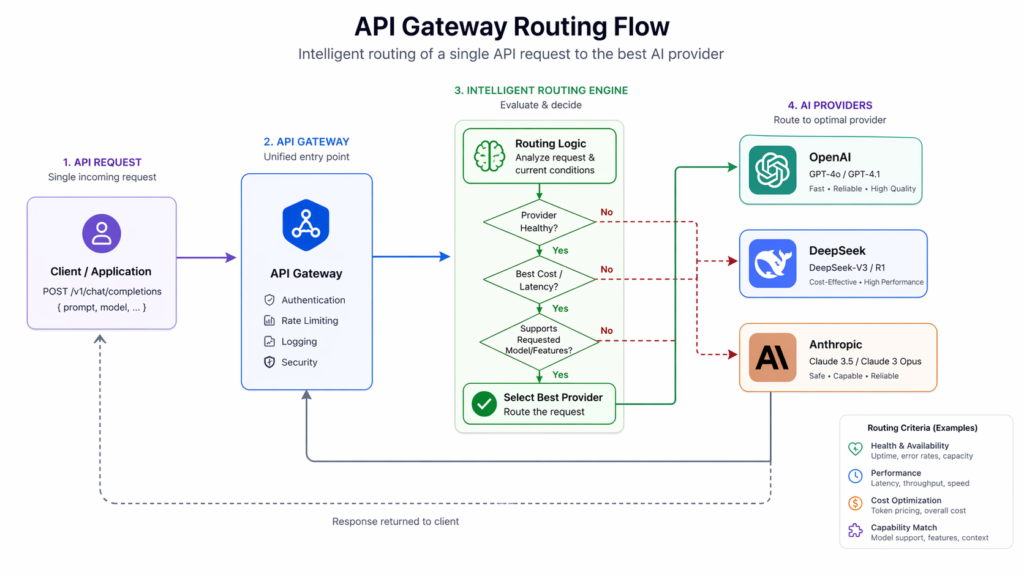
OpenRouter is a unified AI gateway that provides access to 300+ models through a single OpenAI-compatible API. It is one of the most popular ways to set up a DeepSeek proxy in 2026, especially for users who want free access or a fallback layer.
OpenRouter offers free API access to DeepSeek’s flagship models including deepseek/deepseek-r1:free and deepseek/deepseek-v3.2 at no cost, making it an excellent starting point for developers who want to experiment without a financial commitment. DeepSeek-V3.2 via OpenRouter is priced at approximately $0.00026 per input token and $0.00038 per output token on the paid tier.
Step 1: Create an OpenRouter account
Go to openrouter.ai and sign up. Once logged in, navigate to the API Keys section in your account dashboard.
Step 2: Create an API key
Click Create API Key. Give it a descriptive name such as “DeepSeek-Project” and copy it immediately. Store it securely in a password manager or encrypted secrets file. OpenRouter will only display it once.
Step 3: Configure your proxy URL and model
The OpenRouter proxy URL for DeepSeek is:
The model strings for DeepSeek on OpenRouter are:
deepseek/deepseek-v3.2for the latest general modeldeepseek/deepseek-r1:freefor the free reasoning modeldeepseek/deepseek-chatfor the standard chat model
Step 4: Call the API
python
import os
from openai import OpenAI

client = OpenAI(
    api_key=os.environ.get("OPENROUTER_API_KEY"),
    base_url="https://openrouter.ai/api/v1"
)

response = client.chat.completions.create(
    model="deepseek/deepseek-v3.2",
    messages=[{"role": "user", "content": "Hello from OpenRouter"}]
)

print(response.choices[0].message.content)
Step 5: Set up fallback routing on OpenRouter
One of OpenRouter’s most useful features for production use is automatic fallback. You can configure it so that if DeepSeek is unavailable, your requests are automatically rerouted to a backup model like GPT-4o or Claude. This requires no changes to your application code, only a setting in the OpenRouter dashboard.
Method 3: DeepSeek Proxy via LiteLLM
LiteLLM is an open-source Python library and proxy server that provides a unified interface to 100+ LLMs. It is the most powerful option for teams that want full control over routing, logging, rate limiting, and fallback behavior.
Step 1: Install LiteLLM
pip install litellmStep 2: Set your DeepSeek API key
export DEEPSEEK_API_KEY="sk-YourDeepSeekKeyHere"Step 3: Call DeepSeek through the LiteLLM SDK
python
from litellm import completion
import os

os.environ['DEEPSEEK_API_KEY'] = "your-key-here"

response = completion(
    model="deepseek/deepseek-chat",
    messages=[{"role": "user", "content": "Hello from LiteLLM"}]
)

print(response.choices[0].message.content)
Note that all DeepSeek models use the deepseek/ prefix in LiteLLM. So deepseek-chat becomes deepseek/deepseek-chat and deepseek-reasoner becomes deepseek/deepseek-reasoner.
Step 4: Enable reasoning mode for DeepSeek Reasoner
python
from litellm import completion
import os

os.environ['DEEPSEEK_API_KEY'] = "your-key-here"

response = completion(
    model="deepseek/deepseek-reasoner",
    messages=[{"role": "user", "content": "What is 2+2?"}],
    thinking={"type": "enabled"}
)

print(response.choices[0].message.reasoning_content)
print(response.choices[0].message.content)
Step 5: Run LiteLLM as a proxy server
This is the most powerful use of LiteLLM. It spins up a local proxy server that translates any OpenAI-formatted request into a DeepSeek call, while adding logging, rate limiting, and routing.
Create a config.yaml file:
yaml
model_list:
  - model_name: deepseek-chat
    litellm_params:
      model: deepseek/deepseek-chat
      api_key: os.environ/DEEPSEEK_API_KEY

  - model_name: deepseek-reasoner
    litellm_params:
      model: deepseek/deepseek-reasoner
      api_key: os.environ/DEEPSEEK_API_KEY
Then start the proxy:
litellm --config config.yaml --port 4000Your proxy is now running at http://0.0.0.0:4000. Any application pointed at that URL with any OpenAI-compatible client will route through DeepSeek automatically.
Test it with curl:
curl -X POST 'http://0.0.0.0:4000/v1/chat/completions' \
  -H 'Content-Type: application/json' \
  -H 'Authorization: Bearer sk-1234' \
  -d '{"model": "deepseek-chat", "messages": [{"role": "user", "content": "Hello"}]}'
Method 4: DeepSeek Proxy for JanitorAI and Third-Party Chat Tools
Many users set up a DeepSeek proxy specifically to use DeepSeek models inside chat platforms like JanitorAI or SillyTavern. These tools support custom proxy configurations out of the box.
Using the Official DeepSeek API Directly in JanitorAI
Open JanitorAI and go to Settings. Select Using Proxy and click Add Configuration. Enter a name such as “DeepSeek Official”. For the model, use deepseek-chat for the standard model or deepseek-reasoner for the reasoning model. For the Proxy URL, paste exactly: https://api.deepseek.com/v1/chat/completions. For the API Key, paste your DeepSeek API key from platform.deepseek.com. Save your settings and refresh the page.
Using OpenRouter as a Free DeepSeek Proxy in JanitorAI
The proxy URL for OpenRouter is https://openrouter.ai/api/v1/chat/completions. The model string for free DeepSeek access is deepseek/deepseek-r1:free. Paste your OpenRouter API key in the API Key field. Save and refresh.
For long roleplay sessions, setting Max Tokens to 1200 to 1500 is recommended to allow richer and more detailed replies.
Method 5: Self-Hosted DeepSeek Proxy with Node.js on AWS EC2
For developers who need full control and want to keep their AI backend isolated from external traffic, running a self-hosted proxy on a cloud server is the most secure option.
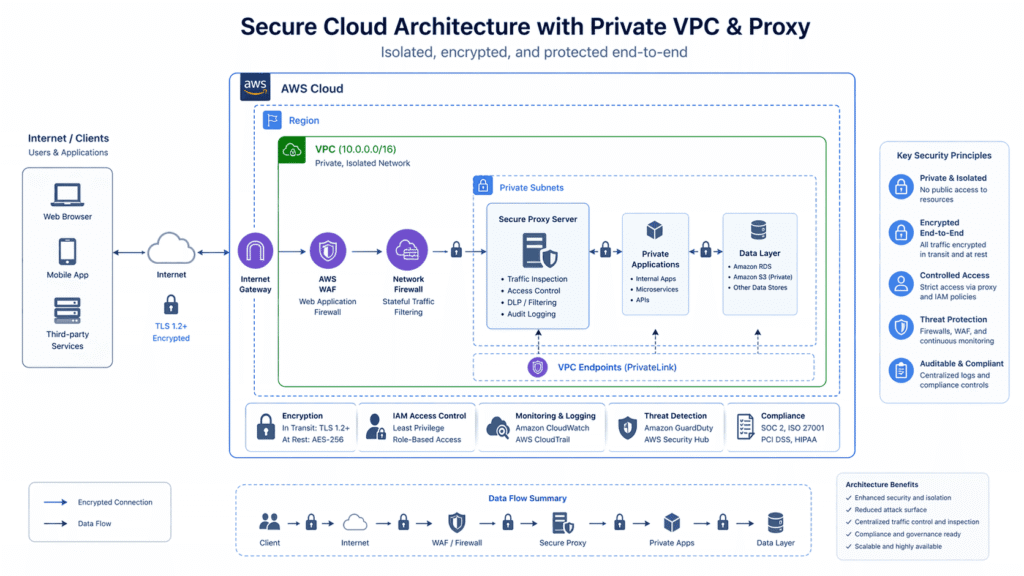
This setup uses Docker, Node.js, and Ollama to host the DeepSeek model locally, with a Node.js proxy server exposed to external clients while the model itself runs on localhost inside the instance.
Ollama operates locally by default, running models on localhost. Exposing it directly to external clients creates security challenges including unauthorized access risks. A proxy layer solves this by acting as the only public-facing entry point.
The high-level architecture is: Node.js proxy server receives external requests, validates authentication, applies rate limiting, and forwards requests to the Ollama model server running on localhost. The model response is returned through the same proxy to the caller.
Key additions to consider for a production-grade self-hosted proxy include authentication to secure the proxy, rate limiting to mitigate abuse, integration with CI/CD pipelines for automated updates, and monitoring tools to track server health and model performance.
Adding Fallback Routing to Your DeepSeek Proxy
Because DeepSeek’s API uses the OpenAI format, adding a fallback provider requires no changes to your request structure, only to your routing logic. Tools like LiteLLM and multi-provider AI gateways handle this at the infrastructure level.
In LiteLLM, you can configure fallbacks directly in your config.yaml:
yaml
router_settings:
  fallbacks: [{"deepseek-chat": ["gpt-4o"]}]
  num_retries: 2
  timeout: 30
This means if DeepSeek returns an error or exceeds your latency threshold, the request is automatically rerouted to GPT-4o with no changes needed in your application.
DeepSeek Proxy Security and Data Privacy Considerations
This is an important section that most setup guides skip. If you are routing sensitive data through a DeepSeek proxy, there are real risks to understand.
Multiple governments and agencies restricted or banned DeepSeek on official devices and networks during 2025. The general rule of thumb for production deployment is to treat the DeepSeek API as a public external endpoint and design your data pipeline accordingly. Do not send personally identifiable information, confidential business data, or regulated data through DeepSeek unless you have reviewed their data handling policies and are compliant with relevant regulations in your jurisdiction.
For enterprise deployments, a self-hosted proxy that strips or anonymizes sensitive fields before forwarding to the DeepSeek API is a widely used mitigation pattern. LiteLLM supports input/output transformation hooks that can be used for exactly this purpose.
Common DeepSeek Proxy Errors and Fixes
Error: No API Access Make sure your account is active and that your API key is correctly set. On platforms like MegaNova or OpenRouter, certain premium models require a minimum deposit or verified plan before access is granted.
Error: Network Error or Connection Issues If the chat does not load, wait 5 to 10 minutes and reload. DeepSeek’s servers can experience brief periods of high demand. This is temporary in most cases.
Error: Rate Limited Double-check your configuration. If you are hitting rate limits frequently, consider distributing requests across multiple API keys or using a proxy with built-in rate-limit management like LiteLLM.
Error: Model Returns Reasoning Trace in Response This happens when you are using a reasoning model like deepseek-reasoner or deepseek/deepseek-r1. The model is showing its chain-of-thought before the final answer. You can simply ignore or strip the reasoning trace. It does not affect the quality of the final output. In LiteLLM, the reasoning content is available separately in response.choices[0].message.reasoning_content.
Error: Unstable or No Response If a specific model is unresponsive, try switching to an alternative model or reconfiguring your proxy. Reload the chat session.
Error: Wrong API URL Always double-check that you are using the exact proxy URL. For the official DeepSeek API it is https://api.deepseek.com/chat/completions. For OpenRouter it is https://openrouter.ai/api/v1/chat/completions. Do not add trailing slashes or extra path segments.
Choosing the Right DeepSeek Proxy Method in 2026
Direct DeepSeek API is best when you want the cheapest possible cost, maximum control, and are comfortable managing your own API key and integration. This is ideal for individual developers and small teams.
OpenRouter is best when you want free access to start, a single API key that also works for other models like GPT-4o and Claude, and automatic fallback routing without writing any infrastructure code.
LiteLLM is best when you are building a production system that needs full observability, team-level access control, budget caps, multi-provider routing, and a local proxy server that your entire application stack can point to.
Self-hosted proxy on AWS or similar is best when data privacy is a hard requirement, you are in a regulated industry, or you want complete isolation of the model backend from public traffic.
Third-party platforms like MegaNova or NebulaBlock are best for non-technical users and AI chat hobbyists who want DeepSeek access in tools like JanitorAI or SillyTavern without writing any code.
Frequently Asked Questions About DeepSeek Proxy
What is the DeepSeek proxy URL? The official DeepSeek API proxy URL is https://api.deepseek.com/chat/completions. For OpenAI SDK compatibility use https://api.deepseek.com/v1/chat/completions. For OpenRouter, the proxy URL is https://openrouter.ai/api/v1/chat/completions.
Is there a free DeepSeek proxy? Yes. OpenRouter offers free access to several DeepSeek models including deepseek/deepseek-r1:free and deepseek/deepseek-v3.2 with no cost at the free tier. LiteLLM is also free and open source to run as your own proxy.
Can I use DeepSeek with the OpenAI SDK? Yes. DeepSeek’s API is fully OpenAI-compatible. You only need to change the base URL to https://api.deepseek.com and update your API key. No other changes are required.
What models does DeepSeek support through the API in 2026? The two primary model aliases are deepseek-chat (non-thinking mode, 128K context) and deepseek-reasoner (thinking mode with chain-of-thought). Both are powered by DeepSeek-V3.2.
How do I use DeepSeek proxy in JanitorAI? Go to Settings in JanitorAI, select Using Proxy, add a configuration with the proxy URL https://api.deepseek.com/v1/chat/completions, choose your model, and paste your DeepSeek API key. Save and refresh.
Is a DeepSeek proxy safe to use? Using the official DeepSeek API or reputable gateways like OpenRouter and LiteLLM is safe for general use. For enterprise or regulated use cases, review DeepSeek’s data handling policies carefully and avoid sending sensitive personal or business data unless you have proper compliance controls in place.
How much does a DeepSeek proxy cost? Routing through the official DeepSeek API costs approximately $0.28 per million input tokens uncached and $0.42 per million output tokens. Via OpenRouter, DeepSeek-V3.2 is priced at roughly $0.00026 per input token and $0.00038 per output token. LiteLLM as a proxy server is free and open source.
Summary
A DeepSeek proxy in 2026 is easy to set up, highly flexible, and supported by a strong ecosystem of tools. Whether you are a solo developer calling the official API directly, a team routing through LiteLLM for full observability, or a chat hobbyist connecting JanitorAI to DeepSeek via OpenRouter, the core setup follows the same pattern: get an API key, set your proxy URL to a DeepSeek-compatible endpoint, pick your model, and send your request.
The OpenAI-compatible format means almost any existing AI integration can be pointed at DeepSeek with minimal changes. The pricing is among the lowest of any frontier model available today. And with proper proxy architecture including fallback routing, rate limiting, and data hygiene, DeepSeek can be a reliable and cost-efficient backbone for production AI applications in 2026.
Last updated: April 2026. All API endpoints, model names, and pricing figures are based on verified current DeepSeek documentation and third-party provider data.

Abdullah Zulfiqar is a cybersecurity and application security writer at PrivacyReport.org, where he focuses on AI-driven security, privacy protection, and SaaS application risk analysis. His work explores how modern AI systems and digital platforms handle sensitive user data, with a strong emphasis on identifying vulnerabilities, preventing data leaks, and improving software security practices.
He writes about the intersection of artificial intelligence and cybersecurity, helping readers and developers understand emerging threats in AI-powered applications and how to build more secure, privacy-respecting systems.

Leave a Reply