
Yes — but not with a single setting. An API key reaches an AI coding agent through three different routes, and each one needs its own fix. A .gitignore entry stops git from committing your .env file. It does nothing about the agent reading that same file while it works, nothing about a key you paste into a prompt, and nothing about a key the agent writes into your code for you.
The rule that matters most is simple: an AI agent should never see a real production key. Everything in this article is a way of enforcing that rule — test keys for local work, deny rules and ignore files so the agent cannot open secret files, approval prompts so you see what it runs, and a secret scan outside the agent that catches whatever slips through. Set it up once, in about ten minutes, and it protects every session after that.
How an API key reaches an AI agent
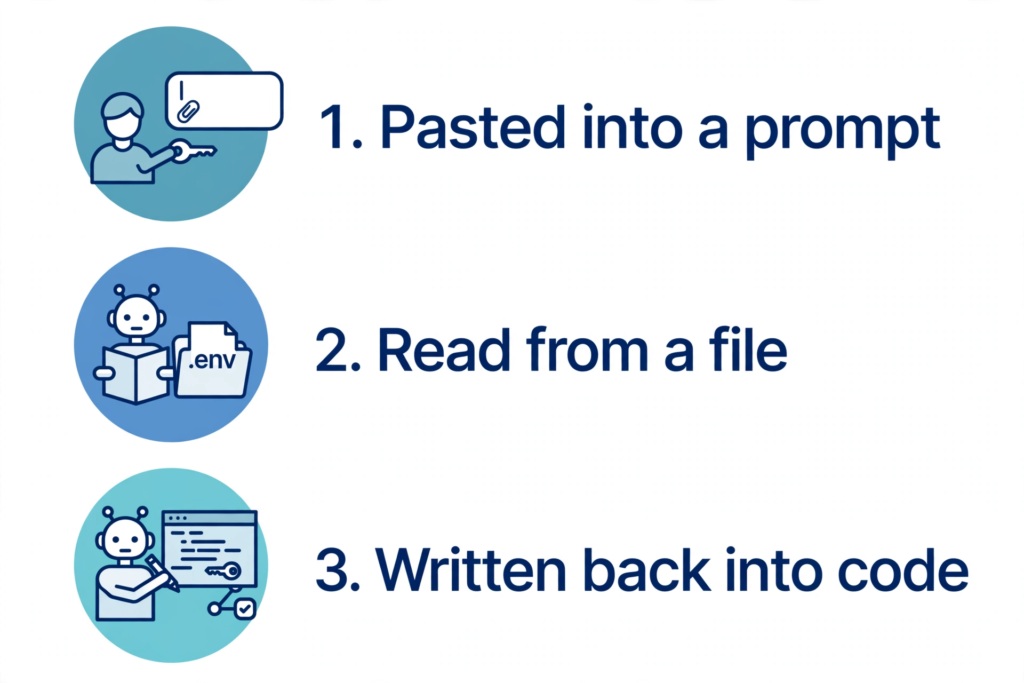
Route 1: you paste it into a prompt. This is the most common leak, and the most avoidable. You are debugging an auth error, so you paste the failing request with the real key in it, or you paste a whole .env file and ask the agent to “fix my config”. The key is now in the conversation, which the agent sends to the model provider with the rest of the prompt. Anthropic’s own guidance for API keys puts it first: never share your API key, and if the model needs to understand a value, describe its shape, not the value itself. Share the error message, the request ID and the status code — never the key.
Route 2: the agent reads it from a file. Claude Code and Cursor run with your user account’s permissions, inside your project folder. In Claude Code’s default (manual) mode, file reads inside the working directory do not need your approval at all — reading is a read-only action, so the agent can open .env, credentials.json, a private key or a cloud config file simply because it is there. Cursor indexes your project so it can answer questions about it. .gitignore does not stop either of them: it tells git which files to skip, and it has no effect on what a tool running in your project can read. If the key is in a file the agent can open, assume the agent can see it.
Route 3: the agent writes it back. This is the route people miss. You ask the agent to “make the Stripe call work”, and it helpfully pastes the key from .env into a config file, a test fixture or a debug log line — because that is the fastest way to make the code run. Or it commits the .env file you forgot to ignore. Or it prints the key in terminal output, which lands in the session history on your machine. The agent is not being careless. It is doing what you asked, with the material you gave it. The fix is to make sure the material it can reach contains no real secrets in the first place, and to scan what it writes before that code leaves your machine.
The rule that makes the rest optional: use test keys locally
Before any settings, change what the agent can possibly find. Keep production keys out of your development machine entirely. Production keys live in your hosting provider’s settings — Vercel, Netlify, Railway, your cloud console — where the deployed app reads them as environment variables and no agent ever touches them.
On your own machine, use test or restricted keys: Stripe test-mode keys instead of live keys, a separate development Supabase project, an API key with a low spend limit and only the permissions the app needs. Anthropic’s API key guidance recommends exactly this — separate keys for development, testing and production, so that a compromised key can be disabled without touching the others, and rotation on a regular schedule, for example every 90 days. If the agent ever does see a local key, the damage is a revoked test key, not a drained account.
One thing you do not need to hide: public identifiers. A Firebase web API key, a Supabase anon key and a Stripe publishable key are meant to live in client-side code — they identify your project, they do not grant access to anything on their own. The companion guides on the Firebase key and the Supabase anon key explain the distinction. What must stay away from an agent is anything that grants access or spending: secret keys, service account keys, database passwords, tokens.
Claude Code: deny rules, hooks and permission modes
Claude Code gives you three controls, and they work best together. The first is the strongest: deny rules in .claude/settings.json. Deny rules are evaluated before ask and allow rules, and they are enforced by Claude Code itself — not by the model, and not by instructions in a prompt. This blocks the agent from reading your secret files at all:
{
  "permissions": {
    "deny": [
      "Read(./.env)",
      "Read(./.env.*)",
      "Read(./secrets.json)",
      "Read(./credentials.json)"
    ]
  }
}
Add every file in your project that holds a secret, and commit this settings file so the whole team gets the same rules. You can manage the same rules with the /permissions command inside a session.
The second control is a rule in CLAUDE.md — the file Claude Code reads at the start of every session. Write it in plain language:
Security rules for this project:
- Never read or print .env, private keys, or cloud credential files.
- Use .env.example when documenting configuration.
- Never add API keys, tokens or passwords to code, tests, logs or commit messages.
- Ask before running any command that prints environment variables.
Be honest about what this does: it shapes what Claude tries to do, but it does not enforce anything. Anthropic’s permissions documentation says so directly — instructions in a prompt or in CLAUDE.md do not change what Claude Code allows. That is why the deny rules above come first, and the CLAUDE.md note is a backup, not the lock.
The third control is a PreToolUse hook: a small script Claude Code runs before every shell command, which can block a command before it runs. The script below is adapted from Anthropic’s own hooks documentation — it reads the command from the tool input and denies any command that would print a .env file. Save it as .claude/hooks/block-env-read.sh, make it executable with chmod +x, and register it in .claude/settings.json:
{
  "hooks": {
    "PreToolUse": [
      {
        "matcher": "Bash",
        "hooks": [
          {
            "type": "command",
            "command": "${CLAUDE_PROJECT_DIR}/.claude/hooks/block-env-read.sh",
            "args": []
          }
        ]
      }
    ]
  }
}
#!/bin/bash
# .claude/hooks/block-env-read.sh — needs jq installed
COMMAND=$(jq -r '.tool_input.command')
if echo "$COMMAND" | grep -qE 'cat[[:space:]]+[^|]*\.env|printenv'; then
jq -n '{
hookSpecificOutput: {
hookEventName: "PreToolUse",
permissionDecision: "deny",
permissionDecisionReason: "Blocked: this command would print secrets. Refer to the variable name instead of its value."
}
}'
else
exit 0
fiTwo more Claude Code habits matter. First, stay in the default manual permission mode, where edits and shell commands ask you first — and never use --dangerously-skip-permissions (the bypassPermissions mode) outside an isolated container or virtual machine. Anthropic’s documentation warns that it skips permission prompts, including for writes to protected paths such as .git and .claude, and says to use it only where the agent cannot cause damage. Second, treat a cloned repository as untrusted until you have read it: Claude Code shows a trust dialog for a folder you have not trusted, and a project’s .mcp.json can define MCP servers that run with your session — review them before you accept, because a server you did not expect can read what the agent can read.
Cursor: .cursorignore and Privacy Mode
Cursor’s main control is .cursorignore, a file in your project root that uses .gitignore syntax. Cursor blocks the files you list from the Agent, Tab and @ mentions. Create it with the patterns from Cursor’s own documentation:
# .cursorignore — keep secrets out of the agent's context
**/.env
**/.env.*
**/credentials.json
**/secrets.json
**/*.key
**/*.pem
**/id_rsa
Cursor already ignores files in your .gitignore plus a default list that includes .env*, but the default list applies to indexing — the file that actually blocks the agent from opening something is .cursorignore. You can also set the same patterns once for every project in Cursor’s global ignore list, which is empty by default. Commit .cursorignore so the whole team benefits; it contains no secrets itself.
Now the honest caveat, in Cursor’s own words: “complete protection isn’t guaranteed due to LLM unpredictability.” The ignore file blocks the Agent, Tab and @ mentions from reading a file, but it does not stop the agent running a terminal command such as cat .env — terminal commands need your approval, so read each one before you click Run. And .cursorindexingignore is a different file: it keeps files out of the codebase index and search results, which is useful for noise, but it is not the file for secrets.
The second Cursor setting is Privacy Mode, in Cursor Settings under General. What it does is specific, and worth stating precisely, because it is often misunderstood. With Privacy Mode on, Cursor does not use your code for training, and it holds zero data retention agreements with its model providers, so they do not store or train on your data. That is a retention control: it decides what happens to your code after it arrives. It does not stop the code being sent in the first place — using Cursor’s AI features sends prompts and code context through Cursor’s backend to a model provider, even when you supply your own API key, because that is where the final prompt is built. And there are exceptions: prompts flagged by abuse detectors may be stored for investigation, models that require data retention are labelled and need admin approval, and if you use your own API key, retention follows your contract with the model provider rather than Cursor’s agreement. Cloud Agents are the one feature that stores a copy of your repository while they work. So turn Privacy Mode on — it is on by default for Enterprise teams — but do not treat it as a substitute for keeping secrets out of the agent’s reach.
GitHub Copilot and other agents
The same pattern applies to every agent: an exclusion setting, approval prompts, and scoped keys. For GitHub Copilot, the control is content exclusion in the repository settings — Settings, then Copilot, then Content exclusion — where a repository administrator lists the paths Copilot should ignore, such as .env files. The limit to know: GitHub documents that content exclusion does not apply to Agent mode in IDE chats, the Copilot CLI or the cloud coding agent. If you use those, the exclusion does not protect you, and the scoped-keys rule matters more.
For any other agent — Codex, Windsurf, Replit Agent or the next one — ask three questions before you trust it with a project: does it have an ignore file or exclusion setting, does it ask before running terminal commands, and can it be started in a narrow working directory instead of your home folder? If the answer to any of them is no, keep real secrets out of that project entirely and work with test keys.
There are also community tools that mask secrets before the model sees them — for example osm, a Claude Code plugin that swaps a real key for a same-shaped fake and puts the real value back only when the agent runs a command, and keyshroud, which keeps keys in an encrypted vault on your machine and injects them into commands the agent runs. They are optional, and the same caution applies to them as to any plugin: they run with your permissions, so use only tools you trust and can inspect.
The check that catches what the agent writes
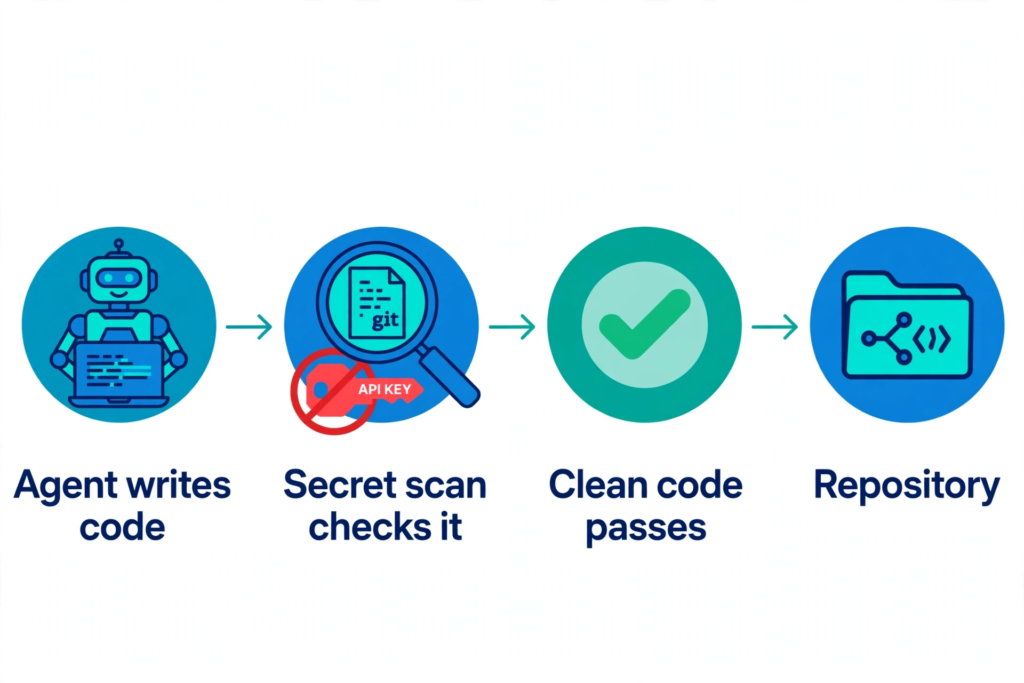
Every control above lives inside the agent or the editor — and the agent can edit its own settings file, turn off its own guard, or simply find a route you did not think of. So the final gate must sit somewhere the agent cannot reach: a secret scan that runs when code leaves your machine.
Run a scan before you push, and in your CI pipeline if you have one. Gitleaks is a free, open-source secret scanner for git repositories, with an official GitHub Action that can check pull requests and commits automatically. A quick manual check on any repo is:
gitleaks detect
git log --all -- .env
The first command scans the repository for keys and tokens. The second checks whether a .env file was ever committed — if it was, rotating every key in it is not optional, because git history keeps the old copy even after you delete the file. GitHub’s own secret scanning adds a second net for repositories hosted there. Anthropic’s API key guidance recommends the same habit: scan repositories for secrets regularly, and if you suspect a key is compromised, revoke it immediately and audit recent usage for it.
The 10-minute setup checklist
Work through this once per project, on your own machine and only on projects you own or have permission to test.
- Move production keys out. Production keys live in your hosting provider’s settings only. Locally, use test or restricted keys with low limits.
- Ignore the files. Add
.envand.env.*to.gitignore, and commit an.env.examplewith empty values so the agent documents configuration without seeing a real key. - Block the agent from secret files. Claude Code: deny rules in
.claude/settings.json. Cursor:.cursorignore. Copilot: content exclusion in repository settings. - Turn on the privacy and approval settings. Cursor Privacy Mode on; Claude Code in its default manual permission mode; never skip permissions outside an isolated environment.
- Check what the agent can load. Read
.mcp.jsonand any plugin list before trusting a cloned repo, and read each terminal command before approving it. - Add the outside gate. A secret scan before push — Gitleaks, or GitHub secret scanning — so a key the agent writes into code is caught before it reaches the repository.
- Check the history. Run
git log --all -- .env. If a.envfile was ever committed, rotate every key in it now.
Where PrivacyReport fits
If you would rather check first and fix second, PrivacyReport’s free scan takes a deployed app URL or a GitHub repo URL and returns a simple report, checking for exposed keys and more than 20 other issues, with a free tier of one to two scans a month. Use it as a first pass for the checks in this article — especially the search for secrets an AI agent pasted into your code or your repo — and follow up with the deny rules and ignore files above for anything it finds.
Frequently asked questions
Can Claude Code read my .env file?
Yes, unless you block it. Claude Code runs with your user account’s permissions, and in its default manual mode, file reads inside the working directory do not need your approval. Add deny rules for .env and other secret files in .claude/settings.json, and keep real secrets out of the project folder where possible.
Does .cursorignore fully protect my secrets?
No. Cursor blocks the files you list from the Agent, Tab and @ mentions, but it warns that complete protection is not guaranteed, and the ignore file does not stop the agent running a terminal command that prints a secret file. Treat it as one layer: combine it with Privacy Mode, approval for terminal commands, test keys locally, and a secret scan before push.
Should I paste an API key into a prompt to debug an auth error?
No. Describe the key’s shape instead of its value, and share the error message, request ID and status code. If the agent needs to test a call, point it at the variable name — process.env.STRIPE_API_KEY, for example — and run the call yourself, or let the agent run it with the variable already in the environment.
Does Cursor Privacy Mode stop my code being sent to the cloud?
No. Privacy Mode stops your code being used for training and gives you zero data retention with supported model providers. Your prompts and code context still travel through Cursor’s backend to a model provider on every AI request, even with your own API key. It is a retention control, not a guarantee that nothing leaves your machine.
What do I do if an agent already pasted my key into code or a commit?
Assume the key is compromised. Revoke it at the provider, create a replacement, update every place that used it, and check recent usage for anything you do not recognise. If it was committed, rewrite the history or delete the repository copy, and remember that removing the file from the current commit does not remove it from history. The companion guide on what to do when an API key is exposed walks through the same steps.
Do I need to hide a Firebase or Supabase key from an agent?
It depends on which key. A Firebase web API key and a Supabase anon key are public identifiers, meant to live in client-side code — hiding them gains nothing, and the agent needs them to build a working app. A service account key, a Supabase service role key or any other secret key must never reach the agent. The guides on the Firebase key and the Supabase anon key explain which is which.
Sources
- Anthropic, Claude Code security
- Anthropic, Claude Code permissions
- Anthropic, Claude Code hooks
- Anthropic, API key best practices
- Cursor, Ignore file
- Cursor, Data Use & Privacy Overview
- GitHub, Excluding content from GitHub Copilot
- Gitleaks
- kindacode, How to Protect API Keys and Sensitive Data When Using Claude Code
- nimblegate, How to stop Claude Code from pushing secrets to GitHub
Related reading on PrivacyReport
- How to Hide an API Key From the Browser Network Tab (and Why You Can’t)
- Is the Firebase API Key Secret? What Really Protects Your Data
- Firebase API Key Exposed on GitHub: Is It Actually a Problem?
- Is It Safe to Expose Your Supabase Anon Key? (Only If RLS Is On)
- What to do if an API key is exposed
- How to Scan for Secrets in VS Code
