
This is what happens if an API key is exposed: anyone who finds it can use it as if they were your app. An API key is a password your code uses to log in to another service, and most keys carry no second check — no login prompt, no confirmation, no way for the service to tell you from a stranger. Whoever holds the key spends your budget, reads what the key can read, and does what the key can do, until you kill it.
The bill is usually the first thing you notice, and it can arrive fast. In a honeypot experiment, researchers at Comparitech posted fake AWS credentials to public GitHub repositories and watched what happened: the first key was found and abused about one minute after it went public, and the first attack was over in under four minutes. A second key drew more than 1,000 requests to launch servers within a minute. The scale of the problem is growing — GitGuardian’s State of Secrets Sprawl report counted 28,649,024 new secrets exposed in public GitHub commits in 2025, a 34% rise on the year before.
So do not start by asking whether anyone saw your key. Assume they did, and assume the clock started the moment it became public. The rest of this article covers what attackers do with a key, what it actually costs, and a 10-minute fix plan you can run right now.
How fast an exposed key gets used
Automated scanners watch public code hosting around the clock. They are not people browsing GitHub — they are programs that pull every new public commit, search it for patterns that look like keys, and test what they find within seconds. That is why the window between “I pushed it” and “someone is using it” is measured in minutes, not days.
The Comparitech experiment is the clearest measurement of that window. The researchers set up dummy AWS accounts, published the credentials in public repositories, and logged the abuse with CloudTrail. The first key was abused about a minute after publication. The second key, which had permission to launch servers, received more than 1,000 launch requests within a minute, from 547 unique IP addresses. Most of the activity happened within an hour. Amazon’s own systems caught the suspicious activity and suspended the dummy account — but the key had already been used.
The same speed applies to keys that never touch GitHub. A key baked into a JavaScript bundle is visible to anyone who opens your site’s developer tools. A key pasted into a chat message, a screenshot or a shared document can be copied by anyone who sees it. And a key in a public repository stays dangerous long after you delete it: forks, caches and scrapers keep copies, and GitGuardian found that more than 64% of credentials that were valid in 2022 were still valid in January 2026. Deleting the commit does not delete the exposure. Only revoking the key does.
What attackers actually do with a key
Once a key is in hand, the playbook is short and fast.
They test what it can do. The first calls are usually cheap and quiet: list what the key can reach, check quotas, see whether logging is on. In the LLMjacking campaign documented by Sysdig in 2024, the attackers probed ten different AI services with stolen cloud credentials, checking which ones the credentials could use, and even checked whether model-invocation logging was enabled — so they could avoid the accounts that would leave a trail.
They spend it. If the key is tied to a paid service, the attacker uses it. For an AI model key, that means running prompts on your account. For a cloud key, it means launching servers — usually the largest, most expensive machines available, often to mine cryptocurrency. For a payments key, it means making charges. The attacker does not need your data. Your budget is the target.
They resell it. This is the part that changed the economics. Instead of using a stolen key themselves, attackers now put it behind a reverse proxy and sell access to other people at a fraction of the real price. The buyer’s requests are billed to your account, and the seller keeps the margin. Google’s threat intelligence team calls this LLMjacking, and in its November 2026 report it describes a whole resale layer — “LLM Mixers” — that pools stolen keys, meters them and sells subscriptions to underground buyers.
They pivot. A key that can read data is used to read it. A key that can create resources is used to create more access — new users, new keys, new permissions — so the attacker keeps access even after the original key is revoked. That is why checking the logs after you rotate matters: the key may not be the only thing they left behind.
What it actually costs
The honest answer is that it depends on the key, and the range runs from a ruined afternoon to a six-figure bill. These are the documented figures.
In May 2024, Sysdig’s Threat Research Team described the first LLMjacking campaign. Attackers used stolen cloud credentials to reach hosted AI models, including Anthropic’s Claude. Sysdig calculated the worst case: if the attackers ran Claude 2.x at its full quota across four regions, the cost to the victim would be over $46,000 per day. That was a calculation, not a bill — but it showed what the ceiling looked like.
In November 2026, Mandiant and Google’s Threat Intelligence Group published the follow-up, based on real incidents Mandiant had handled during the year. The calculation had become reality: across individual incidents, fraudulent charges exceeded $100,000 in a single day, with cumulative charges at some organisations reaching $1 million before access was revoked. In one case, a reseller service the report calls Jet Night made more than 500,000 API calls in under eight hours using stolen keys, passing nearly $1 million in token costs to a single victim.
Two things make AI keys expensive to lose. First, the cost is per request, so an attacker can burn through money as fast as the API will let them — and the report notes that some victims’ LLM services were not even enabled at the time of the compromise, so the enablement itself was the first warning sign. Second, the attacker gains almost nothing per dollar you lose: the victim pays for the biggest servers at full price, while the attacker keeps only whatever small value they can extract from them — a few hundred dollars of mined coin against tens of thousands in charges in the cases security researchers have documented.
What each type of key costs you
Not every exposed key is a disaster, and not every key is secret. The cost depends entirely on what the key unlocks.
| Key type | What an attacker can do with it | What it costs you |
|---|---|---|
| AI model key (OpenAI, Anthropic, Gemini) | Run prompts on your account; resell the access | Per-token spend, uncapped without a spend limit; quota drained so your own app stops working |
| Cloud key (AWS, Google Cloud, Azure) | Launch servers, read storage, create resources | Compute bills, often for crypto mining; data copied out of storage |
| Payments key (Stripe secret or restricted key) | Make charges, read customer data, disrupt your integration | Unauthorised charges; customer data exposed; your account at risk |
| Email or messaging key (SendGrid, Twilio) | Send mail or messages as you | Per-message charges; your domain used for spam, which damages its reputation |
| Maps or search key (Google Maps) | Make requests on your project | Per-request charges; quota drained |
| Database or service-role key (Supabase service role) | Read, write and delete data, bypassing your app’s rules | Data theft or deletion; a breach to deal with, not just a bill |
Publishable key (Stripe pk_, Firebase web key) |
Identify your project; nothing more | Nothing on its own — these are designed to be public |
Two rows in that table deserve emphasis, because they are the mistakes this series keeps coming back to. A Stripe publishable key (pk_live_...) is safe in browser code; a Stripe secret key (sk_live_...) is not, and Stripe’s own guidance says to rotate an exposed secret or restricted key immediately, even if you are not sure anyone saw it. A Firebase web API key is a public identifier, not a secret — what protects a Firebase project is Security Rules, App Check and Authentication, not the key. The companion guides on Stripe-style keys and Firebase keys explain the line in detail.
OWASP’s API Security Top 10 (2023 edition, still current) names the underlying problem directly: API4:2023, Unrestricted Resource Consumption — no limits on size, rate or cost lets a caller exhaust your resources or your bill. A key with no spend limit and no quota is an open tab.
The costs that are not on the invoice
The bill is the loudest cost, but it is rarely the worst one.
Your account can be suspended. When a stolen key is resold, the provider sees your account running a resale operation. Every major provider’s terms prohibit sharing credentials or reselling access without an agreement, and the provider cannot reliably tell you apart from the person who took the key. The account can be suspended or terminated while you prove it was not you — with invoices, logs and a written account of how the key leaked. That is a week of work, and it happens while your app is down.
Your quota gets drained. Even a small leak can empty a monthly allowance in hours, and then your own app stops working. OpenAI’s own guidance lists this among the consequences of a compromised key, alongside data loss, unexpected charges and interrupted API access. A drained quota is an outage you did not plan for.
A key can become a data breach. If the exposed key could reach personal data — a database key, a service-role key, a key with read access to customer records — the incident may count as a personal data breach, with notification duties attached. Under GDPR, for example, a controller must generally notify its supervisory authority within 72 hours of becoming aware of a breach, and notify affected individuals if the risk to them is high. That is a legal question, not a technical one, and the answer depends on what the key could reach and what was actually accessed. The older PrivacyReport guide on what to do when a key is exposed walks through the compliance side in more detail.
Your time is the hidden line item. Rotating keys, redeploying, reading logs, checking for new users or keys the attacker created, answering support tickets, documenting the incident — a leak that costs $200 in charges can easily cost a day of work. The 10-minute plan below is designed to keep that day from becoming a week.
The 10-minute fix plan
Work through this in order, on your own accounts and only on projects you own or have permission to test. The order matters: kill the key first, investigate second.
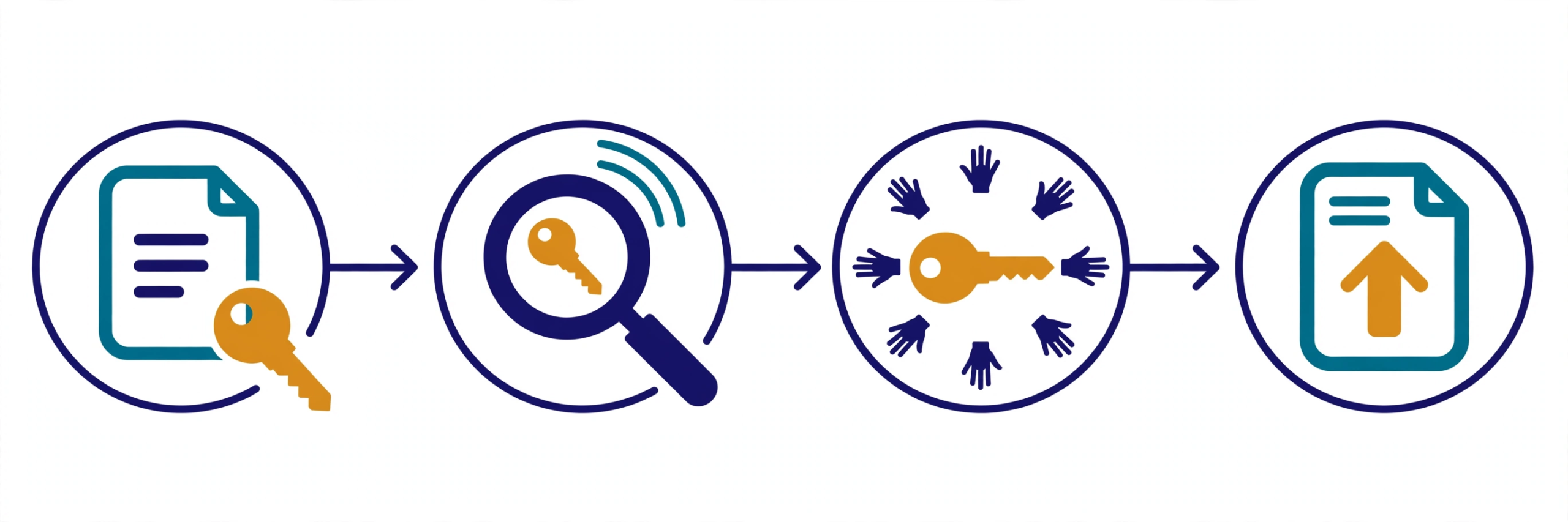
Minutes 0–2: Revoke or rotate the key. Open the provider’s console and revoke the exposed key, or rotate it so a replacement is generated and the old one stops working. Stripe’s guidance is to rotate immediately, even if you are not sure anyone saw it — treat any exposure as a potential compromise. OpenAI’s guidance is the same: a compromised key means data loss, unexpected charges, quota depletion and interrupted access until it is replaced. If you cannot tell which key leaked, rotate every key that project used. Do not start by deleting the commit or the file — that changes nothing about a key someone already copied.
Minutes 2–4: Deploy the replacement server-side. Put the new key in your hosting provider’s environment settings or a secrets manager — never back into the code, the browser bundle or a .env file that ships with the app. If the key was in client-side JavaScript, move the call to a backend route or proxy first; a new key in the same public place will leak the same way. Restart the app so it picks up the new value, and confirm the old key now fails.
Minutes 4–6: Check what the key did. Open the provider’s usage and billing pages and look for anything you do not recognise: requests from places you have never been, spikes in volume, calls to services you never use, new resources in a cloud account. In Stripe, check the request logs for the old key and recent payments, refunds and payouts. In OpenAI, check the Usage page by project. In a cloud account, check for new users, new keys and new permissions — the attacker may have created a second way in.
Minutes 6–8: Find where it leaked, and remove the copies. Search your repository history, not just the current files:
git log --all --oneline -S 'sk_live_'That searches every commit for the key’s prefix. Also check the shipped app — a key in a browser bundle is visible to anyone:
grep -r "sk-" dist/ build/Remove the key from the code and from anywhere it was pasted (chat, tickets, screenshots), fix the cause (the .gitignore, the build step, the client-side call), and turn on push protection or secret scanning so the next mistake is caught before it leaves your machine. GitHub’s secret scanning checks your history and raises an alert on known credential types; its advice is the same as this article’s — rotate first, because removing a secret from history is slow and often unnecessary once the key is dead.
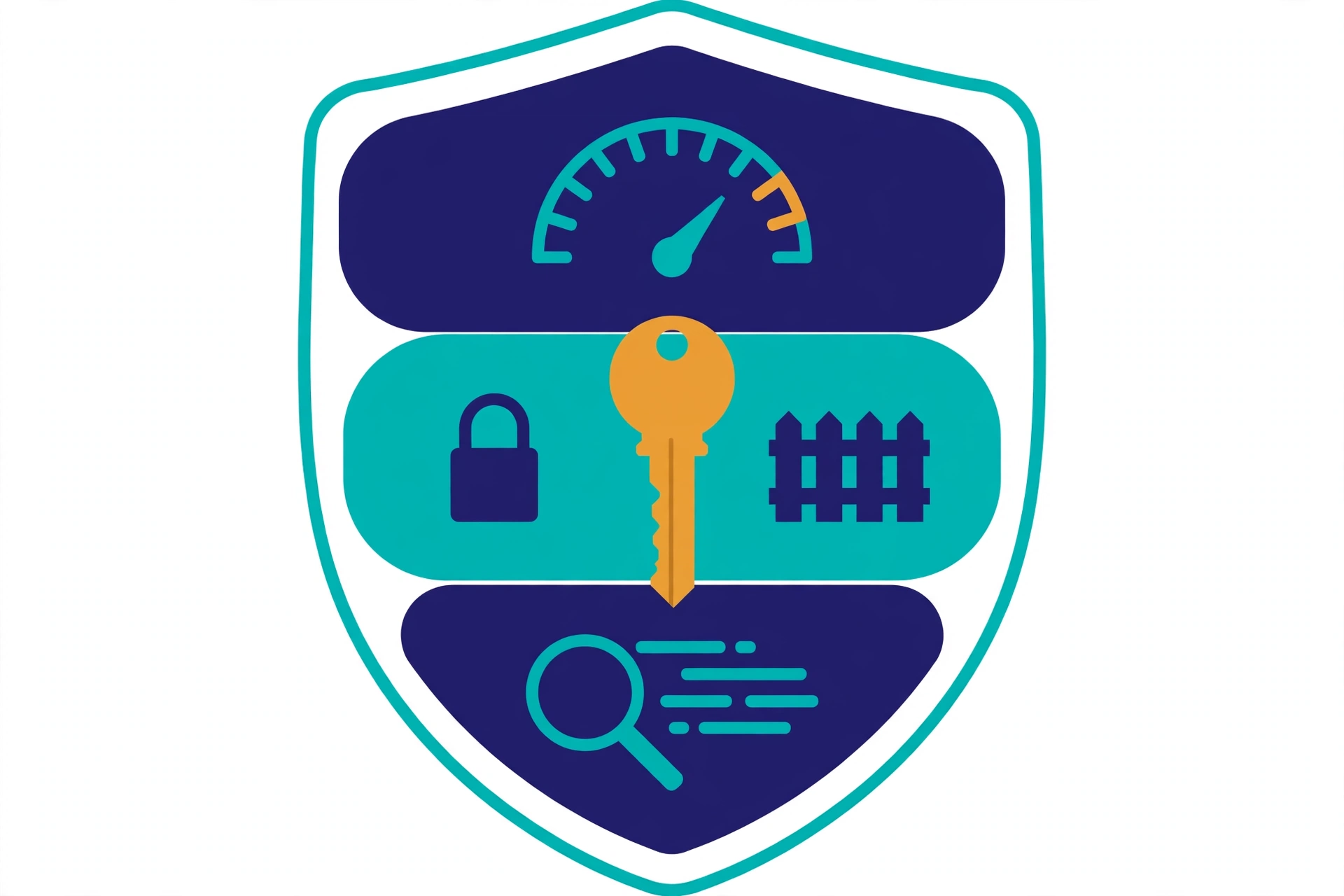
Minutes 8–10: Set the three caps. These are the controls that turn the next leak from an open-ended bill into a bounded one — the subject of diagram 2 below. Set them now, while the lesson is fresh.
The three caps that limit the damage
1. A spend limit. In OpenAI, set a monthly spend limit for the organisation or project and switch on hard enforcement. OpenAI is explicit that spend alerts alone do not stop API traffic — an alert tells you the money is gone; a hard limit stops the spending. Set the limit close to what you actually use, not ten times higher. In Google Cloud, set quotas on the APIs each key can call, and set up budget alerts so a spike reaches you within hours, not at the end of the billing cycle.
2. A restricted key. Use the narrowest key the job allows. Stripe recommends restricted keys (rk_...) with limited permissions over unrestricted secret keys for most integrations. Google Cloud lets you restrict a key to specific APIs and to specific IP addresses, referrer URLs or apps — so a stolen key can only be used from the places you chose, for the services you chose. A key that can only read one narrow resource is far less useful to an attacker than one with broad account access, and it is also less useful to a reseller.
3. Secret scanning, on by default. Turn on GitHub secret scanning and push protection for the repository, and run a scanner such as Gitleaks before you push. Scanning does not stop a leak that already happened — it stops the next one. Combined with one key per project and per environment, so a leaked development key cannot touch production, it keeps a single mistake from becoming a company-wide incident.
What to do about the bill
Once the key is dead and the caps are set, deal with the charges. Contact the provider’s support promptly, with the key’s identifier, the time you revoked it, and the usage logs showing what was not yours. Keep copies of everything — the logs, the revocation time, the support ticket — because you may need them for an internal record or a compliance report.
Be realistic about the outcome. A refund is not guaranteed, and no provider promises one for charges run up on a key you exposed. The control that works is the one you set before the leak: a spend limit with hard enforcement, a restricted key, and a quota. That is why the last two minutes of the plan matter more than the first eight — the first eight stop this leak, and the last two cap the next one.
Where PrivacyReport fits
If you would rather check first and fix second, PrivacyReport’s free scan takes a deployed app URL or a GitHub repo URL and returns a simple report, checking for exposed keys and more than 20 other issues, with a free tier of one to two scans a month. Run it after the 10-minute plan as a second pair of eyes — especially for keys hiding in a JavaScript bundle, which are easy to miss by hand.
Frequently asked questions
How fast is an exposed API key used?
In Comparitech’s honeypot experiment, a fake AWS key posted to a public GitHub repository was abused about one minute after it went public, and the first attack was over in under four minutes. Assume any key that reached a public place has already been copied, and rotate it before you investigate.
Can I just delete the commit that exposed the key?
No. Deleting the commit removes the key from the current files, but it stays in git history, and forks, caches and scrapers may already hold copies. GitGuardian found that more than 64% of credentials valid in 2022 were still valid in January 2026. Revoke the key at the provider first — that is the only action that makes a copied key useless.
Will the provider refund the charges?
Not necessarily. No provider promises a refund for charges run up on a key you exposed, so contact support promptly with your logs and revocation time, and do not count on getting the money back. The reliable protection is a spend limit with hard enforcement, set before a leak happens.
Is a Firebase API key or a Stripe publishable key a leak?
No. A Firebase web API key is a public identifier for your project, and a Stripe publishable key (pk_...) is designed to sit in browser code. What matters is the secret key behind them — the Firebase service account key, or the Stripe secret key (sk_...). If one of those is exposed, rotate it immediately.
Does rotating the key stop the bill?
Yes, for that key. Once revoked, any request made with it fails, so the spending stops. But it does not undo charges already made, and it does not remove other access the attacker may have created — new users, new keys, new permissions — so check the logs and the account after you rotate.
What if I do not know which key leaked?
Rotate every key that project used, and check the usage logs for each one. Then give each key a name, one per project and per environment, so the next leak is easy to trace. A key with no name and no owner is a key you cannot investigate.
Sources
- Mandiant and Google Threat Intelligence Group, The Rise of LLMJacking: How Threat Actors Monetize Compromised Cloud and Model Resources
- Sysdig, LLMjacking attack (via AI Incident Database, Report 4494)
- Comparitech, It takes hackers 1 minute to find and abuse credentials exposed on GitHub
- GitGuardian, When We Use AI To Ship Fast, Secrets Spread Fast
- OpenAI, Best practices for API key safety
- Stripe, Best practices for managing secret API keys
- Google Cloud, Manage API keys
- GitHub, Secret scanning
- OWASP, API Security Top 10 (2023)
- PrivacyReport, My API Key Was Exposed: What to Do Next
Related reading on PrivacyReport
- My API Key Was Exposed: What to Do Next
- How to Hide an API Key From the Browser Network Tab (and Why You Can’t)
- Is a .env File Secure? What It Protects and What It Doesn’t
- How to Keep API Keys Away From Claude Code, Cursor and Other AI Agents
- Is the Firebase API Key Secret? What Really Protects Your Data
- Firebase API Key Exposed on GitHub: Is It Actually a Problem?
- How to Scan for Secrets in VS Code
- Free Security Scanner for Vibe-Coded Apps: Check Yours in 60 Seconds
