

No — not on its own. A .env file is a plain text file. It has no encryption, no password, no access control and no record of who read it. Anything that can open the file can read every secret in it, in clear text.
That does not make it useless. A .env file protects you from one specific mistake: putting secrets directly into your source code. That is a real improvement over hard-coding an API key in a file you commit. But it is a filing habit, not a security control. If you treat it as a vault, it will fail you — usually in one of four ways, each of which needs its own fix. This article explains what a .env file does protect, the four ways it leaks, and what to use instead at each stage.
What a .env file actually is
A .env file is a text file of KEY=value pairs that sits in your project folder. A library such as dotenv, or Node.js itself since version 20.6, reads the file and loads the values into environment variables your app can read at run time:
# .env
STRIPE_API_KEY=<redacted>
DATABASE_URL=<redacted>
// index.js
console.log(process.env.STRIPE_API_KEY)node --env-file=.env index.jsThe idea comes from the Twelve-Factor App method: keep configuration in the environment, separate from code, so the same code can run in development, staging and production with different settings. That separation is the whole point of the file. It was never designed to keep secrets safe from anyone who can reach the machine or the repository — it was designed to keep them out of your source code.
What a .env file does protect
Three things, and they are worth having.
It keeps secrets out of your source code. A key that lives in .env never appears in a code file, a code review diff or a search across the repository. That alone removes the most common way beginners leak keys.
It keeps secrets out of git — if the file is ignored before the first commit. Add .env to .gitignore before you commit anything, and git will never track it. The dotenv project puts it plainly in its own documentation: “Should I commit my .env file? No.”
It separates configuration per environment. You can have different values for development and production without changing code. Node.js loads them with --env-file, and frameworks such as Next.js and Vite load .env, .env.local and .env.production in a set order. That is convenient. It is not protection.
Everything else people assume a .env file does — encrypting secrets, limiting who can read them, recording access — it does none of. A .env file on your laptop is readable by every program running as your user. A .env file on a server is readable by the web server process. And a .env file that ends up in the wrong place is readable by the whole internet.
The four ways a .env file leaks
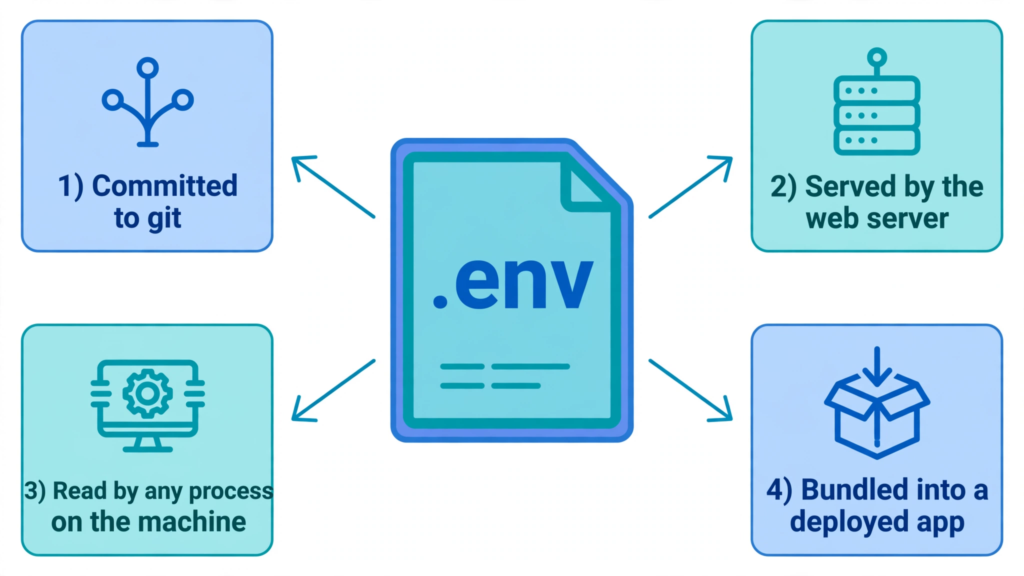
1. It gets committed to git. This is the biggest leak, and the numbers show it is getting worse. GitGuardian’s State of Secrets Sprawl report found 28,649,024 new secrets exposed in public GitHub commits in 2025 — a 34% rise on the year before, and the largest annual jump in the report’s history.
The trap is that .gitignore only stops future commits. If the file was committed even once, it stays in git history, and adding it to .gitignore afterwards changes nothing. A merge from another branch, a git add . typed too quickly, or a .gitignore typo can all put it in. Check whether yours is tracked:
git ls-files --cached .env
git log --all -- .env
If either command returns anything, the file is in your repository. Removing it from the current commit does not remove it from history, and bots scan public repositories for secrets within minutes of a push. If a .env file was ever committed, rotate every key in it — that is the fix; deleting the file is not.
2. It gets served by the web server. A .env file sitting in a website’s document root can be downloaded by anyone who asks for it. Check yours right now, on a site you own:
curl -I https://yoursite.com/.envA 200 OK means the whole file is public — database passwords, API keys, mail credentials, everything in one request. A 404 means the server is not serving it at that path. A 403 means access is denied, which is better, but the file is still on the server and one configuration change away from exposure.
This is not a theoretical risk. In 2024, Palo Alto Networks’ Unit 42 researchers documented an extortion campaign built on exactly this mistake: attackers scanned more than 230 million targets, checked 110,000 domains, and pulled over 90,000 unique variables out of publicly accessible .env files — including 7,000 credentials for cloud services and 1,500 linked to social media accounts. They used the stolen cloud keys to get into victims’ accounts, copy data out of cloud storage, and leave a ransom note behind.
The fix is structural. Point your web server’s document root at the framework’s public/ folder, not the project root, so .env and your source code sit above it. And block dotfiles at the server level as a second layer — for nginx:
location ~ /\. {
    deny all;
    return 404;
}
For Apache, in .htaccess:
<FilesMatch "^\.env">
    Require all denied
</FilesMatch>
Then move the secrets out of the file entirely and into your hosting provider’s environment variable settings, so there is no file on the server for a misconfiguration to expose.
3. Anything on your machine can read it. A .env file is protected only by your user account. Any program running as you can open it: a compromised npm package running a post-install script, a malicious editor extension, a debugging tool — and an AI coding agent. Claude Code, Cursor and Copilot all run with your permissions inside your project folder, and they read project files to build context. The companion guide on keeping keys away from AI agents explains the controls for each tool, but the underlying fact is simple: if the agent can open the file, assume it can see the secrets.
GitGuardian’s 2025 data backs up the scale of the problem: commits co-authored by Claude Code leaked secrets at roughly twice the baseline rate across public GitHub. The fix here is to change what the file contains, not just who can open it. Keep production keys off your laptop entirely and use test or restricted keys locally — a Stripe test-mode key, a separate development database, a key with a low spend limit. If the file is ever read, the damage is a revoked test key, not a drained account.
One small step helps on a shared machine: restrict the file’s permissions so other users on the same computer cannot read it.
chmod 600 .envBe honest about what this does. It stops other user accounts on the same machine. It does nothing against programs running as you.
4. It gets bundled into what you ship. The fourth leak happens at build or deploy time, and it is the one vibe coders hit most often. A .env file copied into a Docker image with COPY . ., zipped up and uploaded to shared hosting, or included in a deployment archive travels with your app — and anyone who gets the artifact gets the secrets.
The subtler version is the framework prefix. Next.js and Vite both let you mark a variable as safe for the browser: NEXT_PUBLIC_ in Next.js, VITE_ in Vite. Anything with that prefix is written into the JavaScript bundle at build time and sent to every visitor’s browser. Vite’s own documentation says it directly: “VITE_* variables should not contain sensitive information such as API keys. The values of these variables are bundled into your source code at build time.” Next.js documents the same behaviour for NEXT_PUBLIC_ variables. So a line like NEXT_PUBLIC_STRIPE_SECRET_KEY=<redacted> in your .env file is not a server secret at all — it is a public string in your shipped JavaScript, visible to anyone who opens the network tab. The companion guide on hiding keys from the browser network tab explains why nothing you put in the browser can stay secret.
The file-name trap: .env, .env.local, .env.production, .env.example
Part of the confusion is that these files look alike but behave differently. The table below is for Next.js and Vite, the two frameworks most vibe-coded apps use; the pattern is the same in most frameworks, but check your own framework’s documentation before trusting it.
| File | What it holds | Commit it? |
|---|---|---|
.env | Default values, loaded in every environment | Only if it holds no secrets |
.env.local | Your local overrides, including secrets | Never — gitignored by default |
.env.production | Production values | Never with real secrets in it |
.env.example | Placeholder names with empty values | Yes — this is the one to commit |
Two mistakes are common. The first is committing .env.production because the name sounds official — it is the worst file to commit, because it holds your live credentials. The second is treating .env.local as safe because of the word “local”. It is only safe because it is gitignored; the file itself is still plain text on your disk, readable by anything on your machine. The only file that belongs in git is .env.example, with placeholder values that teach a new developer which variables to set:
# .env.example — safe to commit
STRIPE_API_KEY=
DATABASE_URL=
OPENAI_API_KEY=
And a .gitignore that covers every variant, not just the one file:
# .gitignore
.env
.env.*
!.env.example
What to use instead
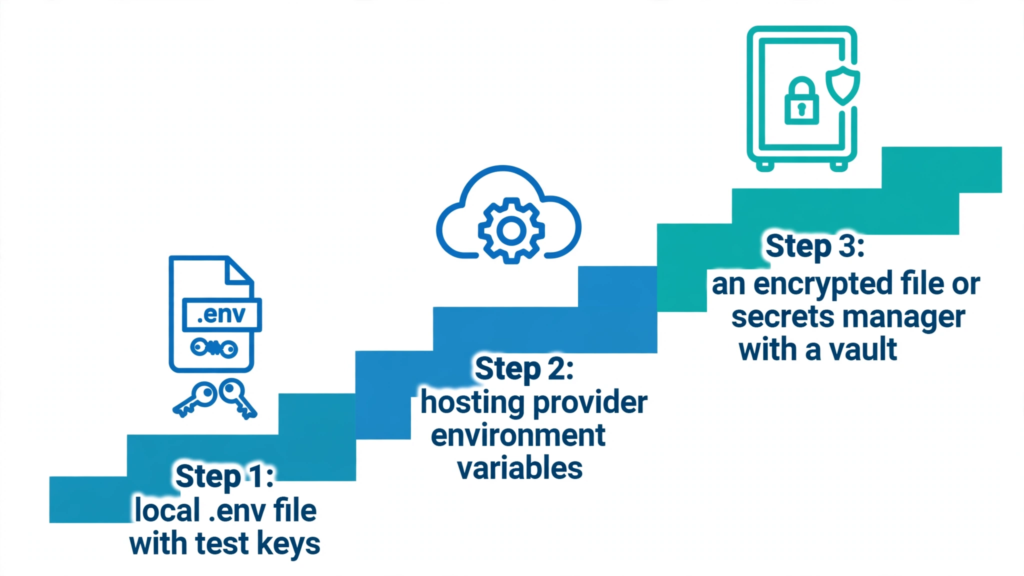
There is no single replacement. The right answer depends on where the secret lives, and it is a progression, not a switch.
Local development: a .env file is fine — with test keys. Keep using .env for local work, but only with test or restricted keys, gitignored, with a .env.example committed alongside it. Add a secret scan before you push, so a mistake is caught before it leaves your machine:
gitleaks detectGitHub’s own secret scanning adds a second net for repositories hosted there: it scans your entire git history on all branches and raises an alert when it finds a known credential type. If you get an alert, GitHub’s advice is the same as this article’s — rotate the credential immediately, because removing it from history is slow and often unnecessary once the key is dead.
Staging and production: your hosting provider’s environment settings. Vercel, Netlify, Railway, Render and every major host let you set environment variables in their dashboard. Your app reads them at run time from process.env, and no .env file ever exists on the server. This removes routes 2 and 4 entirely: there is no file for the web server to serve and nothing to copy into a Docker image.
Teams, or secrets that really matter: encryption or a secrets manager. If a .env file has to travel — shared with a team, or committed for a production deploy — encrypt it. dotenv’s own companion tool, dotenvx, encrypts .env files so they can be committed safely, with the decryption key kept separately. For anything bigger, use a real secrets manager — HashiCorp Vault, AWS Secrets Manager, Doppler or 1Password — which adds the three things a .env file cannot: encryption at rest, access control over who can read each secret, and an audit trail of who read what and when.
The 10-minute check for your own project
Work through this once per project, on your own machine and only on projects you own or have permission to test.
- Is the file tracked? Run
git ls-files --cached .envandgit log --all -- .env. If either returns anything, rotate every key in the file now. - Is the file served? Run
curl -I https://yoursite.com/.envand repeat for.env.local,.env.productionand.env.backup. Any200is an incident, not a warning. - Is the file readable by things it should not be? Run
chmod 600 .env, check that your AI agent cannot open it (deny rules or an ignore file), and confirm no production keys are in it. - Is anything prefixed for the browser? Search your
.envfiles forNEXT_PUBLIC_andVITE_. Any secret with that prefix is already public — rotate it and move the call to a server route or proxy. - Is the file bundled? Check your Dockerfile and deploy steps for
COPY . .or a zip of the project folder, and confirm no.envfile ships with the artifact. - Scan before you push. Run
gitleaks detectand turn on GitHub secret scanning, so the next mistake is caught before it leaves your machine.
If your .env file is already exposed
Do the steps in this order. First, rotate every secret in the file — database passwords, API keys, mail credentials, signing secrets — at each provider. Rotation is the only action that invalidates a stolen credential; deleting the file does not. Second, remove the file from the server and from git, and fix the cause: the document root, the .gitignore, the deploy step. Third, check recent usage for anything you do not recognise — unexpected logins, unfamiliar API calls, new resources in your cloud account. The companion guide on what to do when an API key is exposed walks through the same steps for a single leaked key; an exposed .env file means doing them for every key at once.
Where PrivacyReport fits
If you would rather check first and fix second, PrivacyReport’s free scan takes a deployed app URL or a GitHub repo URL and returns a simple report, checking for exposed keys and more than 20 other issues, with a free tier of one to two scans a month. Use it as a first pass for the checks in this article — especially the search for a publicly reachable .env file — and follow up with the hosting settings and ignore files above for anything it finds.
Frequently asked questions
Is it safe to put API keys in a .env file?
For local development, yes — with two conditions: the file must be gitignored, and it should hold test or restricted keys, not production ones. For production, no: set the values in your hosting provider’s environment settings instead, so no file exists on the server.
Is .env.local secure?
No more than .env. It is the same plain text file with the same risks. The only difference is that frameworks gitignore it by default, which protects you from committing it. It does not protect you from anything reading it on your machine, from the web server serving it, or from it being bundled into a deploy.
Can someone download my .env file from my website?
Only if your server serves it. Test it on a site you own with curl -I https://yoursite.com/.env. A 200 response means anyone can download it. A 404 means it is not served at that path. Fix it by pointing the document root at the framework’s public/ folder, blocking dotfiles in the server configuration, and moving secrets into the host’s environment settings.
Does .gitignore make my .env file secure?
It protects against one leak only: committing the file to git in future. It does not stop the file being read on your machine, served by your web server, or bundled into a deploy. And it does nothing for a file that was already committed — git history keeps the old copy.
Should I commit .env.example?
Yes. It is the one .env file that belongs in git, because it holds placeholder names with empty values and tells a new developer which variables to set. Never put a real value in it.
What should I use instead of a .env file in production?
Your hosting provider’s environment variable settings for most apps, or a secrets manager — HashiCorp Vault, AWS Secrets Manager, Doppler or 1Password — when you need encryption, access control and an audit trail. If a .env file has to travel, encrypt it with dotenvx and keep the decryption key separate.
Sources
- dotenv, README
- Node.js, Command-line API — –env-file
- Next.js, Environment Variables
- Vite, Env Variables and Modes
- GitHub, Secret scanning
- GitGuardian, When We Use AI To Ship Fast, Secrets Spread Fast
- Palo Alto Networks Unit 42, Leaked Environment Variables Allow Large-Scale Extortion Operation in Cloud Environments
- DataHogo, Your .env is Public. Here’s How to Fix It.
- Gitleaks
Related reading on PrivacyReport
- How to Keep API Keys Away From Claude Code, Cursor and Other AI Agents
- How to Hide an API Key From the Browser Network Tab (and Why You Can’t)
- What to do if an API key is exposed
- How to Scan for Secrets in VS Code
- Is the Firebase API Key Secret? What Really Protects Your Data
- Is It Safe to Expose Your Supabase Anon Key? (Only If RLS Is On)
- Free Security Scanner for Vibe-Coded Apps: Check Yours in 60 Seconds
