

Your Firebase API key is public by design, and that is fine. What decides who can read or change your users’ data is a short file you may never have looked at: your Firebase Security Rules. Auditing them means reading that file, checking it for the patterns that leak data, and then proving — with real simulated requests — that a stranger and another signed-in user cannot reach data that is not theirs. Every step in this article is free, and none of it touches your production data.
Start with the uncomfortable part. Firebase checks your rules on its servers for every request, and it does warn you about some bad rules: it emails project owners and shows a console banner when rules are fully open, and it emails you before test-mode rules expire. But there is one common open pattern it does not warn you about. In January 2026, a researcher scanned the top 1.5 million Android apps and found 11,126 with insecure Firebase projects exposing about 1.43 billion user records. He reported it to Google, which closed the report as “Won’t Fix (Intended Behavior)” — and, in Google’s own words, “there is no console warning for open auth rules”: rules that let any signed-in user read or write everything. A quiet inbox does not mean your rules are safe. This audit takes about an hour, and it checks exactly the things Firebase does not flag for you.
What you are actually auditing
Firebase has three separate rulesets, and each one needs checking:
| Product | Rules file | What it guards |
|---|---|---|
| Cloud Firestore | firestore.rules |
Documents and collections |
| Realtime Database | database.rules.json |
The JSON tree |
| Cloud Storage | storage.rules |
Uploaded files |
A vibe-coded app often uses Firestore and Storage together, and the Storage rules are the ones most often forgotten — an app can have locked-down Firestore rules and still serve every uploaded file to anyone. Check all three, even if you think you only use one.
Two things to know before you start. First, rules deny by default: if no rule allows a request, it is denied. Your job is to find the rules that allow too much, not to add more locks to a locked door. Second, code running with the Firebase Admin SDK — your server, your Cloud Functions — bypasses Security Rules entirely. Rules protect you from client requests only, so if your app writes data through a function, that function’s code is a separate audit.
Step 1: read the rules that are actually live
Open the Firebase console, pick your project, then open Firestore, Realtime Database or Storage and click Rules. The console always shows the most recently deployed version of your rules, so this is the version that is actually guarding your data right now.
If you keep rules in files and deploy with the Firebase CLI, check those too — but know which copy is live. Firebase’s own docs warn to edit rules consistently by one method, because editing in the console and then deploying from the CLI can silently overwrite a fix. The file named in firebase.json (usually firestore.rules) is your local copy; the console is the deployed truth. If they disagree, the console wins, and your local file needs updating to match.
Copy the live rules into a text file while you work. You will read them line by line in the next step, and you will want the exact text — not your memory of what you think they say.
Step 2: scan for the five patterns that leak data
Read the rules looking for these five patterns. Any one of them is a finding; the first three are the ones that show up in real breaches.
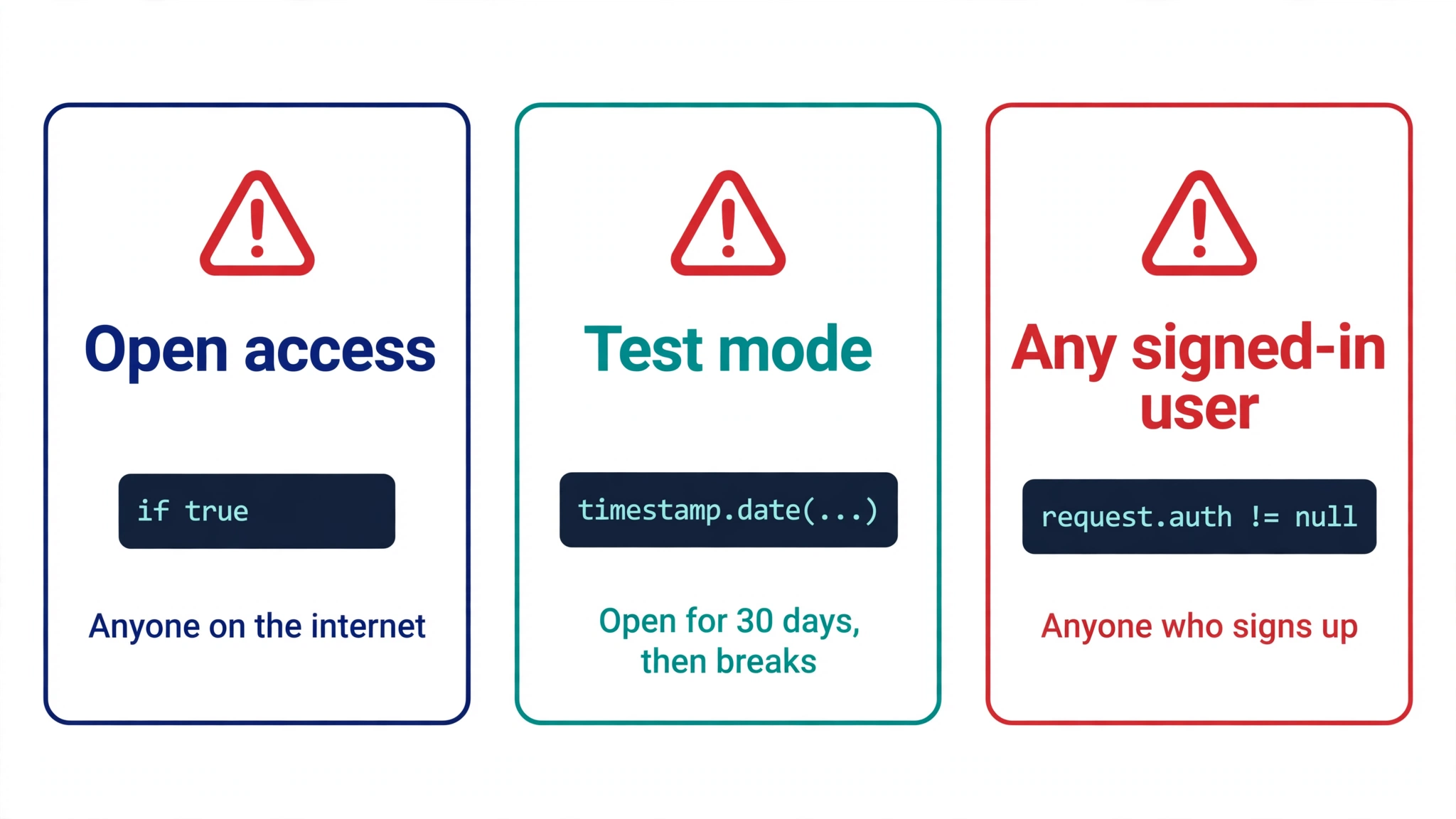
1. Open access: if true. The classic leak, and the one Firebase does warn about:
// Never use in production: anyone can read and write everything
service cloud.firestore {
  match /databases/{database}/documents {
    match /{document=**} {
      allow read, write: if true;
    }
  }
}
{document=**} matches every document in the database, and if true has no condition at all. Firebase’s own docs say never to use this in production because it allows anyone to overwrite your entire database. In March 2024, researchers scanned 5.2 million domains and found at least 900 websites with misconfigured Firebase databases, leaving at least 125 million user records publicly accessible — including about 19.87 million plaintext passwords. Most of them had a rule like this one.
2. Test mode that never got replaced. When you create a Firestore database in test mode, Firebase writes a rule with a clock in it:
rules_version = '2';
service cloud.firestore {
  match /databases/{database}/documents {
    match /{document=**} {
      // Test mode: fully open, and set to expire 30 days after creation
      allow read, write: if request.time < timestamp.date(2026, 12, 16);
    }
  }
}
Test mode expires 30 days after the database is created. Before that date, the database is fully open — anyone can read, change or delete everything. After the date, the same line denies every client read and write, and your app breaks with “Missing or insufficient permissions”. Firebase emails a warning before the expiry date, but the two common quick fixes both reopen the database: swapping the condition for if true, or pushing the date forward another month. If you see a timestamp.date(...) in your rules, that is a finding, whether the date is in the future or the past.
3. “Any signed-in user” — the one nobody warns you about. This is the pattern behind the Firewreck 2.0 finding above:
match /{document=**} {
  allow read, write: if request.auth != null;
}
It looks safe — only logged-in users can get in. But anyone can become a logged-in user in seconds by signing up, and then they can read and write every document, including other users’ data. Firebase’s own guide lists this as a common insecure pattern and says to narrow access using authentication properties, not just the fact that someone is signed in. If your app lets anyone create an account, request.auth != null on its own is not a lock. It is a door with a handle anyone can turn.
4. The update bypass: create and update do not match. Compare your create rule with your update rule. A user can create a valid document and then update it into a state your create rule would never have allowed — for example, changing the owner field to someone else’s ID, or changing their own role to admin. The fix is to check ownership on both sides of an update: the document as it is now (resource.data) and the document as it would be after the write (request.resource.data). This is the first item on the mandatory checklist of Firebase’s own free rules-auditor skill, and it is easy to miss because the create rule looks correct on its own.
5. The forgotten ruleset and the cascade. Check Storage rules even if you only remember writing Firestore rules — uploaded files are often public by default in a vibe-coded app. And if you use the Realtime Database, remember its rules cascade: a rule at a shallow path overrides deeper rules, and a child rule can only grant additional access, never take it away. A broad .read at the top of the tree cannot be fixed by a stricter rule further down.
A note on what a scan cannot tell you: it reads the file, not the behaviour. A rule can look tight and still allow a leak — for example, a list query that returns other users’ documents because the rule checks the wrong field. That is why the next two steps test the rules instead of just reading them.
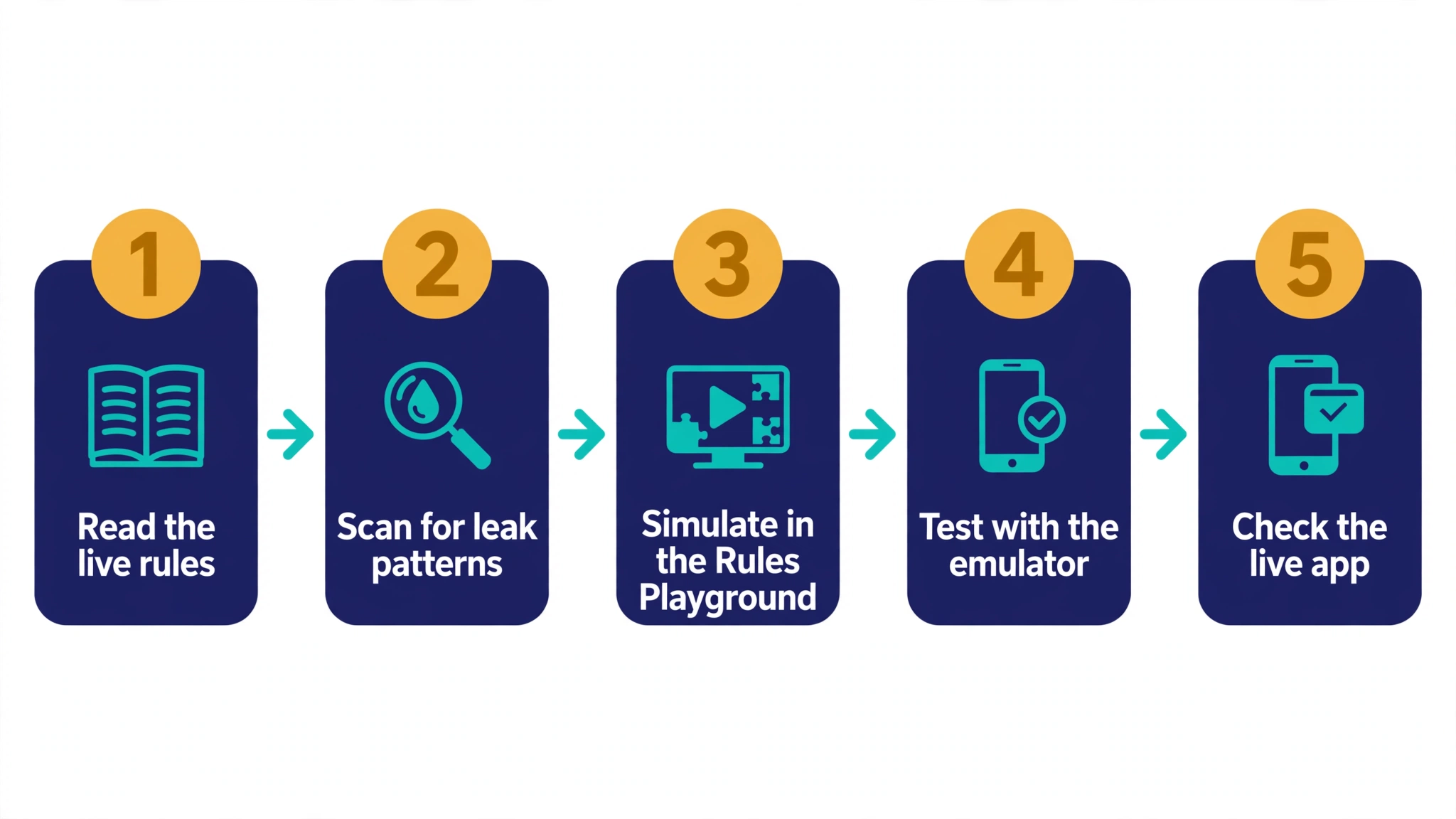
Step 3: let a free auditor read the file for you
You do not have to spot every pattern by eye. Two free tools do the static scan for you, both running locally — your rules never leave your machine:
| Tool | What it does | Cost |
|---|---|---|
| Firestore Rules Guard (VS Code extension, also on PyPI and as a web page) | Checks 13 patterns in the open .rules file, with line numbers: open access, expired or expiring test mode, missing owner checks, and more. Takes today’s date, so an expired ruleset and one about to expire are different findings. |
Free for one file; $29 once for a workspace sweep and a dated report |
| Firebase’s firestore-security-rules-auditor skill (firebase/agent-skills) | A free, open-source skill for AI coding agents. Runs a red-team checklist — update bypass, authority source, storage abuse, type safety — and returns a 1–5 score with structured findings and fixes. | Free |
Run one of them against each of your three rules files and write down every finding with its line number. These tools are good at the patterns in Step 2. They cannot test what the rules actually do when a real request arrives — that is the next step — and they cannot tell you whether a rule matches how your app really queries the data. Treat their output as a list of suspects, not a verdict.
Step 4: simulate requests with the Rules Playground
The Rules Playground is built into the Firebase console, and it is the fastest way to prove a single rule decision. Open Firestore, Realtime Database or Storage, click Rules, then Rules Playground. For each test, pick a simulation type — get, list, create, update or delete — enter the document path, choose the authentication (unauthenticated, anonymous, or a specific user ID), and add any document data your rules reference. Click Run and the banner tells you whether the request was allowed or denied.
Run at least these six simulations for every collection that holds user data:
| Caller | Request | Expected result |
|---|---|---|
| Signed out | Read your own document | Denied |
| Signed in as user A | Read user A’s document | Allowed |
| Signed in as user A | Read user B’s document | Denied |
| Signed in as user A | List the whole collection | Denied, unless the query filters to A’s own documents |
| Signed in as user A | Create a document with the owner field set to user B | Denied |
| Signed in as user A | Update user A’s document, changing the owner field to user B | Denied |
The last two are the update-bypass test from Step 2. If either one is allowed, your create rule is fine and your update rule is not.
Two honest limits. The Playground tests one request at a time, by hand, and it does not remember your cases — so a fix you make next week can quietly reopen a hole you already tested. And it simulates against the ruleset in your editor, not the deployed ruleset, so publish the rules you tested. For a set of tests that survives, use the emulator.
Step 5: turn the tests into code with the emulator
The Firebase Local Emulator Suite runs the real Firestore rules engine on your machine — the same evaluator that runs in production — and the @firebase/rules-unit-testing library lets you write automated tests against it. This is the step that turns a one-off audit into a check that runs every time the rules change.
Install the library and the Firebase CLI, then write one test per collection, acting as each kind of caller:
import {
  initializeTestEnvironment,
  assertFails,
  assertSucceeds,
} from "@firebase/rules-unit-testing";
import { doc, getDoc, setDoc } from "firebase/firestore";

// Signed in as Alice, reading her own document: allowed
await assertSucceeds(getDoc(doc(alice, "notes/n1")));

// Signed in as Alice, reading Bob's document: denied
await assertFails(getDoc(doc(alice, "notes/n2")));

// Signed out entirely: denied
await assertFails(getDoc(doc(anon, "notes/n1")));

// Alice creating a document owned by Bob: denied
await assertFails(
  setDoc(doc(alice, "notes/n3"), { ownerId: "bob" })
);
Three details that matter. First, seed your test data with withSecurityRulesDisabled, so the setup itself does not trip the rules you are testing. Second, the emulator reads the actual firestore.rules file from disk, so the tests always run against the exact rules you will deploy — never a stale copy pasted into a test. Third, if the emulator finds no rules file configured and none is explicitly loaded, it treats the project as having open rules, so a missing file looks like a pass. Check that the tests actually loaded your rules before trusting a green run.
Run the suite with firebase emulators:exec --only firestore, which starts the emulator, runs your tests and shuts everything down again. That is the shape a continuous-integration step needs: add it to your deployment pipeline, and a change that opens a collection fails the build before it reaches production.
Step 6: test the live app as a stranger
Static scans and simulations test the rules file. The last step tests the deployed app the way an attacker would see it — from outside, with no account. Sign out of your app completely, then try to read your own data: open a document URL directly, or send a read request to Firestore with no authentication, using only the public web config from your app’s JavaScript. If the request returns someone else’s data, the rules are open no matter what the Playground said — the deployed ruleset and the file you audited may not be the same one.
Do this only against your own project. Sending unauthenticated requests at someone else’s Firebase project is probing a system you do not own, and it is not part of this audit.
If you would rather not send requests by hand, PrivacyReport’s free scanner checks your live app for open Firestore and Realtime Database rules, exposed keys and open storage, and reports what a signed-out visitor can actually reach. Run it after you fix the rules, and again after your next publish — it is the fastest way to confirm the live app matches the rules you just tested.
Fixing what the audit finds
Most findings are fixed by the same shape of rule: deny everything, then allow each operation only for the owner, on both the old and the new document. Here is the corrected owner-only pattern for Firestore, using rules version 2:
rules_version = '2';
service cloud.firestore {
  match /databases/{database}/documents {
    match /notes/{noteId} {
      // Only the owner can read or delete their own note
      allow read, delete: if request.auth.uid == resource.data.ownerId;
      // Only the owner can create a note, and only in their own name
      allow create: if request.auth.uid == request.resource.data.ownerId;
      // Only the owner can update, and the owner field cannot change
      allow update: if request.auth.uid == resource.data.ownerId
        && request.auth.uid == request.resource.data.ownerId;
    }
  }
}
The same shape works for Realtime Database and Storage, with their own syntax — owner-only paths under $uid or user/{userId}. Two rules of thumb while you rewrite. First, split read and write into their parts (get, list, create, update, delete): a rule that allows write when you meant “create” also allows delete. Second, remember that rules are combined with OR — if any matching rule allows a request, it is allowed, and a broad rule elsewhere in the file can undo a careful one. A leftover match /{document=**} { allow read: if true; } from an early prototype overrides every owner check beneath it. Delete it; do not comment it out and leave it in the deployed file.
One more trap to check while you are here: rules are not filters. If a user runs a query that could return documents they are not allowed to read, Firestore rejects the whole query — even if every document it would actually return belongs to them. Your app’s queries must filter on the same field the rule checks (for example, where("ownerId", "==", user.uid)), or the list will fail for legitimate users after you tighten the rules.
After fixing, deploy with firebase deploy --only firestore:rules (or database or storage), then re-run the audit from Step 4 onward. Rule updates can take up to a minute to affect new queries, and up to ten minutes to reach active listeners, so wait before declaring the fix live. Then re-run the whole audit whenever the rules change — a new collection without a rule is denied by default, which is safe, but a new collection copied from an old, open rule is not.
FAQs
What is a Firebase security rules auditor? A check — a tool, a checklist or a test suite — that reads your Firebase Security Rules and tells you whether they let the wrong people read or change your data. Firebase itself has no single “auditor” button. The audit in this article combines a free static scanner, the built-in Rules Playground, emulator unit tests and a live stranger test.
Is my Firebase API key the problem? No. The API key in your app’s config is a public identifier, not a secret, and Firebase’s own docs say it does not control access to your data. Is the Firebase API Key Secret? What Really Protects Your Data explains the four controls that do — Security Rules, API key restrictions, App Check and Authentication — and how to check each one.
What happens when Firestore test mode expires? Every client read and write is denied until you publish new rules, and your app breaks with “Missing or insufficient permissions”. Firebase emails a warning before the expiry date. Do not fix it by pushing the date forward or swapping in if true — both reopen the whole database. Replace the rule with owner-based rules instead.
Firebase never warned me. Does that mean my rules are fine? No. Firebase warns about fully open rules (if true) and before test-mode rules expire, but it does not warn about rules that let any signed-in user read or write everything. Anyone can sign up, so that rule is effectively open. The January 2026 Firewreck 2.0 scan found 11,126 insecure Firebase projects exposing about 1.43 billion records, and Google closed the report as intended behaviour.
Can I audit my rules without the Firebase console? Yes, for the static part: a local scanner such as Firestore Rules Guard reads the .rules file on your machine, and the emulator runs tests without touching the console. But only the console shows the deployed ruleset, and only a live test proves what the deployed app actually allows. Use both.
Do Security Rules apply to my server code? No. Code using the Firebase Admin SDK — your server, your Cloud Functions — bypasses Security Rules entirely. Rules guard client requests only. If a function writes user data, review that function’s code separately; a tight rule does not protect a careless function.
My rules pass the Playground but the app still shows other users’ data. Why? The Playground tests the ruleset in your editor, not the deployed ruleset — publish the rules you tested. Or a second, broader rule elsewhere in the file is allowing the request: rules are combined with OR, so one open match can undo every owner check. Search the file for if true and for /{document=**}.
Sources
- Firebase — Avoid insecure rules
- Firebase — Security Rules language
- Firebase — Quickly validate Firebase Security Rules (Rules Playground)
- Firebase — Get started with Cloud Firestore Security Rules
- Firebase — Build unit tests for Security Rules
- Firebase — Fix insecure rules (Firestore)
- MrBruh — Firewreck 2.0
- Greenlight Scan — Firebase Security Rules check: the open rule Firebase won’t warn you about
- Firestore Rules Guard (VS Code Marketplace)
- firestore-security-rules-auditor skill (firebase/agent-skills)
- RedSight — Firebase: rules that look right but are not
- VibeAudits — Firebase Security Audit
Related reading
- Is the Firebase API Key Secret? What Really Protects Your Data
- Firebase API Key Exposed on GitHub: Is It Actually a Problem?
- Free Security Scanner for Vibe-Coded Apps: Check Yours in 60 Seconds
- Vibe-Coded App Security Checklist: 25 Checks Before You Launch
- Is a .env File Secure? What It Protects and What It Doesn’t
- How to Keep API Keys Away From Claude Code, Cursor and Other AI Agents
- Copy-Paste Security Prompts for Vibe Coders (Cursor, Lovable, Replit, Claude)
- Is Your Lovable App Leaking the Supabase Service Role Key?
- Supabase Security Checklist for Vibe-Coded Apps (2026)
- What to Do If Your API Key Is Exposed
