
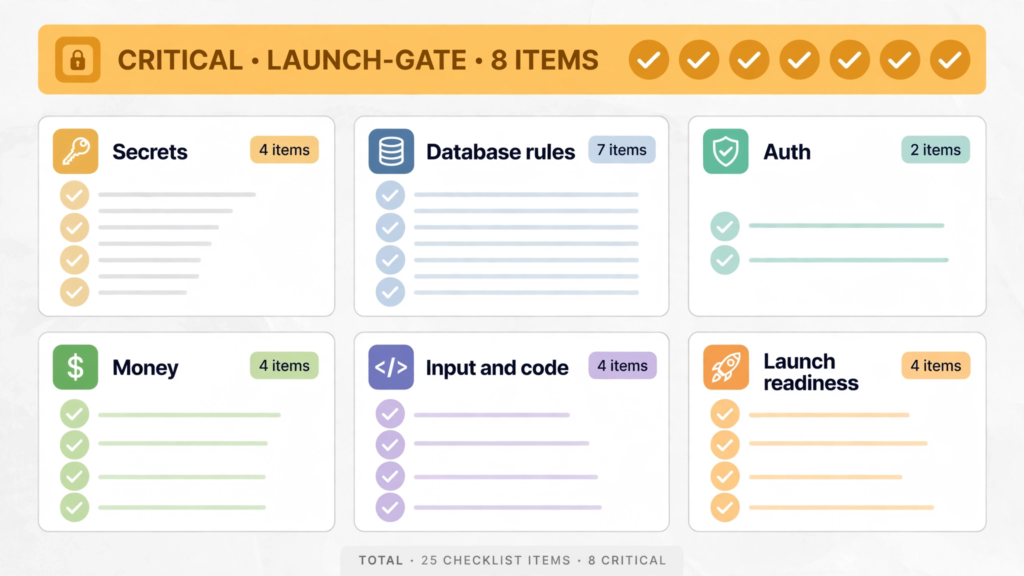
This is the vibe-coded app security checklist to run before you launch: 25 checks across six areas — secrets, database rules, auth, money, input and code, and launch readiness.
How to use this checklist
The critical eight are the launch gate. Checks 1, 5, 6, 10, 12, 14, 15 and 22 are marked ★ below.
Test, do not eyeball. Every check below names something you can verify: a search, a request, a second account, a restored backup. “It looks right” is not a pass.
Keep development and production apart. Several checks only work if your test data and your real users’ data live in different projects, with different keys. If you only have one environment, create the second one before you launch.
A. Secrets — what the browser must never see
★ 1. No secret keys in the shipped bundle
An API key is a password your code uses to log in to another service, and anything in the JavaScript your browser downloads is public. The trap is the prefix: NEXT_PUBLIC_ in Next.js and VITE_ in Vite deliberately bake a variable into the public bundle. AI tools often add that prefix to a secret to fix an “undefined” error, and your Stripe secret key or Supabase service-role key then ships to every visitor.
Check it: open your live site, press F12, go to Sources, and search the loaded scripts for sk_live, service_role, secret and AKIA. Also search the built files directly:
grep -r "sk-" dist/ build/Any match is exposed. Move the call to a server route or Edge Function, then rotate the key — deleting it from the file does not remove it from git history or from copies scanners already made.
2. .env files are not committed, and secrets live in hosting settings
Secrets belong in your hosting provider’s environment settings or a secrets manager — never in source files, never in a .env file that ships with the app, and never pasted into chat, tickets or screenshots. Check that .env is in .gitignore and that no .env file appears in your repository history.
3. One key per project and environment, and secret keys stay server-side
A Supabase service-role key (now called the secret key, sb_secret_...) bypasses every Row Level Security rule. A Stripe secret key can make charges. Both belong only on servers and in Edge Functions. Give each project and each environment its own key, with a name, so the next leak is easy to trace — a key with no name and no owner is a key you cannot investigate.
4. Secret scanning is on, and anything it finds gets rotated
Turn on GitHub secret scanning and push protection for the repository, and run a scanner such as Gitleaks before you push. Scanning does not fix a leak that already happened — it stops the next one. If a scan finds a key, rotate it first; removing the secret from history is slow and often unnecessary once the key is dead.
B. Database rules — who can read whose rows
★ 5. Row Level Security is on for every table in an exposed schema
With Supabase and Firebase, your app talks to the database straight from the browser using a public key. The only thing stopping a stranger from reading everyone’s data is access rules you enable yourself. In Supabase, that means Row Level Security (RLS) enabled on every table that holds user data. In Firebase, it means Security Rules written in production or locked mode — never test mode, which lets anyone read and write everything. Run the Supabase Security Advisor and fix every rls_disabled_in_public finding, and read Firebase’s own security checklist for its equivalents.
★ 6. Policies are scoped to the owner, not just to “signed in”
“Logged in” is not “owns this data”. A policy such as using (true), or a Firebase rule that only checks request.auth != null, lets any signed-up user — including an attacker who just registered — read everyone’s rows. Scope every rule to the owner, for example (select auth.uid()) = user_id in Supabase, and the equivalent ownership check in Firestore or Realtime Database rules. Roles and plan tiers belong in app_metadata or a table users cannot write to, never in user_metadata, which users can edit themselves.
7. Grants are explicit — the 30 October 2026 Supabase change
This is the check most checklists written before November 2026 get wrong. On 30 October 2026, Supabase stopped automatically exposing new tables in the public schema to the Data API. A new table now needs an explicit GRANT before the API can see it at all, and a missing grant returns error 42501. Existing tables keep their old grants, so your running app does not break — but the next table your AI tool creates will fail until you grant it.
Treat the grant, RLS and policies as one unit, in the same migration, using Supabase’s own pattern from its changelog:
-- 1. Grant the privileges the role needs
grant select, insert, update, delete on public.your_table to authenticated;

-- 2. Enable RLS
alter table public.your_table enable row level security;

-- 3. Add the policies you need
create policy "users can read their own rows"
  on public.your_table
  for select
  to authenticated
  using (auth.uid() = user_id);
Do not “fix” a 42501 error with the bulk rollback grant from the changelog FAQ — granting everything to every role on every table re-exposes the tables you meant to keep private. And never fix it by turning RLS off.
8. Storage buckets are private by default, with per-user folders
A public storage bucket is a public database. Buckets should start private, with policies that let each user reach only their own folder, and no listing on public buckets. The July 2025 Tea app incident, in which tens of thousands of images sat in an unsecured bucket, is the shape of this failure — and it is caught by the same two-account test as check 10.
9. No test-mode or allow-all rules anywhere
Search your rules for allow read, write: if true in Firebase and using (true) in Supabase. Either one in production means anyone can read and write everything it covers. Firebase’s own checklist is blunt about this: never use the open ruleset in production, and do not write security rules as a pre-launch afterthought — they are a schema, to be added when the documents are added.
★ 10. The two-account test: user A cannot touch user B’s data
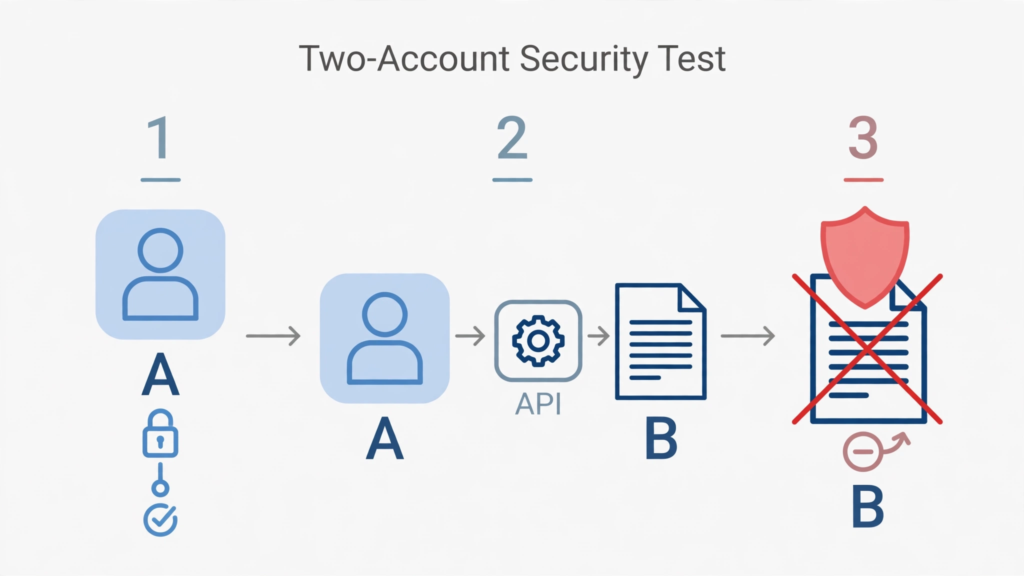
This is the single highest-value test on the list, and it is the one that would have caught CVE-2025-48757. Create two accounts. Sign in as A, then try to read and modify B’s data through the API directly — not through your app’s interface, which may hide the button while leaving the endpoint open. Change the ID in a URL or replay a request with a different record ID. If any of B’s data comes back, the policy is broken.
11. Admin actions are checked on the server, not hidden in the interface
Hiding a /dashboard or /admin page behind a client-side route check protects nothing: anyone can call the underlying API endpoint directly. Every admin and billing action must validate the user’s session and role on the server, on every request. The same applies to business rules worth forging — payment status, credits, roles — which should be written only by a webhook or a function holding the secret key.
C. Auth — proving who someone is, on the server
★ 12. Every protected page and API route checks login on the server
Authentication is who you are; authorisation is what you may touch. AI-built apps usually get login roughly right and authorisation badly wrong. Check that every page and API route showing private data verifies the session on the server, not only in the browser. A route that trusts a flag the browser set is an open route.
13. Roles come from server-side data, never from the client
A role stored in the browser, in a JWT claim the user can influence, or in user_metadata can be changed by the user. Keep roles and plan tiers where the user cannot write them — app_metadata, a server-side table, or a custom claim set by a trusted backend — and check them server-side on every request that depends on them.
D. Money — prices, webhooks and spend
★ 14. Prices are decided on the server, from a fixed price ID
If checkout sends an amount from the browser, an attacker changes it to 1. Decide prices on the server from a fixed price ID, and check subscription status server-side before unlocking paid features — not from a flag the browser set once.
★ 15. Webhook signatures are verified on the raw body
Your payment provider tells your server “payment succeeded” by calling a public URL, so anyone can POST a fake event to it. Verify the signature on every webhook using the provider’s official library, with the raw, unparsed request body — Stripe’s constructEvent() takes the raw body, the Stripe-Signature header and the endpoint secret (whsec_...). If verification fails, reject the event. A framework that parses or reorders the body before your code sees it will break verification, so check that path too.
16. A hard spend cap is set on AI and cloud services
If an endpoint that costs you money — an AI call, an email, a signup — has no limit, someone will hit it thousands of times. Set a hard monthly spend limit in your AI provider’s dashboard, with hard enforcement, not just an alert: an alert tells you the money is gone; a limit stops the spending. Set the limit close to what you actually use, not ten times higher.
17. Costly endpoints are rate-limited per user, with input-size caps
Rate-limit per user ID, not just per IP address, and require login before any expensive action. Cap input size as well — a rate limit controls how often a request arrives, not how expensive one request is. A single oversized prompt or upload can cost more than a hundred small ones.
E. Input and code — what the app accepts and runs
18. Input is validated on the server, on every form and endpoint
Browser validation is a convenience, not a control: anyone can send a request that never touches your form. Validate every field on the server — type, length, format and allowed values — and reject what does not fit instead of trimming it silently. This is also where prompt-injection risk lives for apps that pass user text to a language model: never let a model’s output trigger a sensitive action without a separate check.
19. Output is encoded, and raw HTML is sanitised or avoided
React escapes text safely, but dangerouslySetInnerHTML turns that protection off. Veracode found AI tools failed to defend against cross-site scripting in 86% of the relevant cases it tested — the worst category in its 2025 report. Sanitise with a library such as DOMPurify, or avoid raw HTML entirely. Use parameterised queries, never SQL glued together from strings.
20. Dependencies are audited, and every AI-suggested package is verified to exist
AI coding assistants invent packages. Endor Labs’ 2025 State of Dependency Management report found that 34% of the dependency versions AI coding agents recommended did not exist in any package registry, and 49% carried known vulnerabilities — only one in five was safe to use. A USENIX Security 2025 study found the same pattern at a larger scale: 19.7% of 576,000 recommended package references did not exist, and 43% of the invented names repeated on re-run, which is what makes them registerable by attackers — a trick now called slopsquatting. Look up every AI-suggested package on npmjs.com or PyPI before installing it, run npm audit on what you already have, and fix high and critical findings before launch.
21. Errors hide stack traces, and security headers are set
An error page that prints a stack trace hands an attacker your file paths, library versions and database shape. Confirm that production errors return a generic message, and check your grade on securityheaders.com for the standard headers. This is a small check with a large payoff: it costs minutes and closes a whole class of information leaks.
F. Launch readiness — surviving the first week
★ 22. Backups exist, and one has been restored
A backup you have never restored is a hope, not a backup. Confirm that automated backups run, that they cover the database and uploaded files, and that you have restored one to a test project and watched the app work. The Replit incident in July 2025, in which an AI agent deleted a live production database during a code freeze, is the reason this check is critical rather than nice to have.
23. Development and production are separate projects, keys and data
Test data, test keys and test users live in development; real users live in production. Separate Firebase projects, separate Supabase projects, separate API keys. Run the destructive tests — bad input, deleted rows, failed payments — against development, never against the project your users depend on.
24. Monitoring tells you when the app is down or being abused
Set up uptime monitoring and alerts for errors, failed logins and usage spikes, and know where the alerts go. Firebase’s own checklist says the same for its services: set up monitoring and alerting so abusive traffic reaches you within hours, not at the end of the billing cycle. A launch with no monitoring is a launch you will hear about from your users.
25. Privacy basics are in place: policy, deletion path, and a re-run date
Publish a privacy policy that says what you collect and why, and make sure a user can ask for their data to be deleted — and that you can actually do it. If you handle personal data, know your notification duties if it leaks; the details depend on your jurisdiction, so treat this as a prompt to check, not as legal advice. Then put a date in the calendar to re-run this checklist: after every major release, after adding new endpoints or integrations, and at least once a month while the app is live.
What to do with the failures
Fix the critical eight first, in the order above. Then work through the rest in groups: secrets and database rules before money, money before polish. Keep a short list of everything you change, so you can explain it later — and re-run the two-account test after every fix, because a fix to one policy can quietly break another.
You do not need a perfect score to launch. You need the critical eight: no secrets in the bundle, RLS on with owner-scoped policies, the two-account test passed, server-side auth, server-side prices, verified webhooks and a restored backup. Those protect your users. The other 17 protect your business, your bill and your ability to keep running it. If you handle health, financial or children’s data, or a breach would sink the business, pay a professional for a review as well.
Where PrivacyReport fits
If you would rather check first and fix second, PrivacyReport’s free scan takes a deployed app URL or a GitHub repo URL and returns a simple report, checking for exposed keys and more than 20 other issues, with a free tier of one to two scans a month. Run it after this checklist as a second pair of eyes — especially for keys hiding in a JavaScript bundle, which are easy to miss by hand.
Frequently asked questions
How long does this checklist take?
About an hour for a small app, most of it on the two-account test and the bundle search. The critical eight take roughly half of that. If a check fails, the fix is usually quick — the expensive part is discovering the failure after launch.
My app is Supabase-only. Do I need all 25 checks?
Yes — only checks 5 to 7 are Supabase-specific, and the rest apply to any vibe-coded app. The Supabase deep dive, with the full grant and policy patterns, is in the companion guide linked below.
What changed on 30 October 2026, and does it affect me?
Supabase stopped automatically exposing new tables in the public schema to the Data API. Existing tables keep their grants, so a running app does not break — but any table created after the change needs an explicit GRANT before the API can see it, or requests fail with error 42501. If your app uses Supabase’s Data API, check 7 is now part of every launch.
Is a failed check a reason to delay launch?
A failed critical check is. A failed non-critical check is a scheduled fix, not a launch blocker — but write it down with a date, or it will still be failing in six months.
Does passing this checklist mean my app is secure?
No. It means the common, documented failure modes of vibe-coded apps have been checked. It is a decision aid, not a guarantee of security, uptime or demand — and it is not a substitute for a professional review if the stakes are high.
How often should I re-run it?
After every major release, after adding new endpoints or integrations, and at least once a month while the app is live. The AI tools that built the app keep changing it, so the checklist has to keep up.
Sources
- Supabase, Breaking Change: Tables not exposed to Data and GraphQL API automatically
- Veracode, We Asked 100+ AI Models to Write Code. Here’s How Many Failed Security Tests
- Endor Labs, State of Dependency Management 2025
- OWASP, Top 10:2025
- Stripe, Receive Stripe events in your webhook endpoint
- Firebase, Firebase security checklist
- Matt Palmer, CVE-2025-48757
Related reading on PrivacyReport
- Supabase Security Checklist for Vibe-Coded Apps (2026)
- Supabase “RLS Disabled in Public” Warning: What It Means and How to Fix It
- Is It Safe to Expose Your Supabase Anon Key? (Only If RLS Is On)
- Is the Firebase API Key Secret? What Really Protects Your Data
- Firebase API Key Exposed on GitHub: Is It Actually a Problem?
- How to Hide an API Key From the Browser Network Tab (and Why You Can’t)
- Is a .env File Secure? What It Protects and What It Doesn’t
- What Happens If Your API Key Is Exposed? Real Costs and a 10-Minute Fix Plan
- My API Key Was Exposed: What to Do Next
- How to Keep API Keys Away From Claude Code, Cursor and Other AI Agents
- Free Security Scanner for Vibe-Coded Apps: Check Yours in 60 Seconds
- How to Scan for Secrets in VS Code
