
Yes, it might be — and this is the one leak in a Lovable app that no database setting can save you from. The Supabase service role key bypasses every Row Level Security rule you have. If it has reached your app’s browser bundle, anyone who opens your site can read, change or delete every row in every table, exactly as your server can. The fix is not another policy. It is to find the leak, rotate the key, and move it somewhere the browser can never reach.
That is different from the far more common Lovable problem, where the public anon key is visible and tables have no Row Level Security. That problem is real — in November 2026, German security firm Crissy Field reported that 24,664 Lovable apps sent database records on page load without a login — but it is bounded: turn RLS on with the right policies and the public key stops working. A leaked service role key has no such bound. RLS does not apply to it at all.
What the service role key is, and why it is different
Supabase gives every project four kinds of API key. Only one of them is dangerous in the wrong place.
| Key | Format | What it can do | Where it belongs |
|---|---|---|---|
| Publishable key | sb_publishable_… | Low. Only what Row Level Security allows | Browser, mobile app, anywhere public |
| Secret key | sb_secret_… | Elevated. Full access, bypasses RLS | Servers, Edge Functions, cron jobs only |
| anon (legacy) | Long JWT starting eyJ… | Low, like the publishable key | Browser — the older version of the publishable key |
| service_role (legacy) | Long JWT starting eyJ… | Elevated, like the secret key | Servers only — the older version of the secret key |
The names are changing. Supabase is replacing the two legacy JWT keys with the shorter publishable and secret keys, and the legacy keys are deprecated by the end of 2026. Whatever name your project uses, the rule is the same: the secret key and the legacy service role key both resolve to the service_role Postgres role, and that role carries the BYPASSRLS attribute. Supabase’s own documentation puts it plainly: policies never apply to a secret key.
Think of the publishable key as the key taped to the front door of a building — it only opens the lobby, and your RLS policies decide which rooms each visitor may enter. The secret key is the master key. Whoever holds it opens every room, and no policy can stop them.
One more detail matters, because it fools people. Supabase now blocks new secret keys in browsers: if a request carrying one comes from a browser, Supabase matches the User-Agent header and returns HTTP 401. That is a safety net, not protection. An attacker does not need a browser. The same key works fine from curl, a script, or any other tool, and the older legacy service_role JWT does not get the browser block at all.
How the key leaks from a Lovable app
Lovable builds your app with Supabase as the backend, and it already keeps the service role key in the right place: as a reserved secret called SUPABASE_SERVICE_ROLE_KEY, injected into your Edge Functions, where your functions can read it with Deno.env.get("SUPABASE_SERVICE_ROLE_KEY"). Lovable’s Secrets documentation is explicit that secrets are encrypted, injected into Edge Functions automatically, and never reach the browser.
So a leak is not the default. It happens when the key gets copied out of that safe home into a place the browser can see. There are three routes, and they all look like innocent fixes at the time.
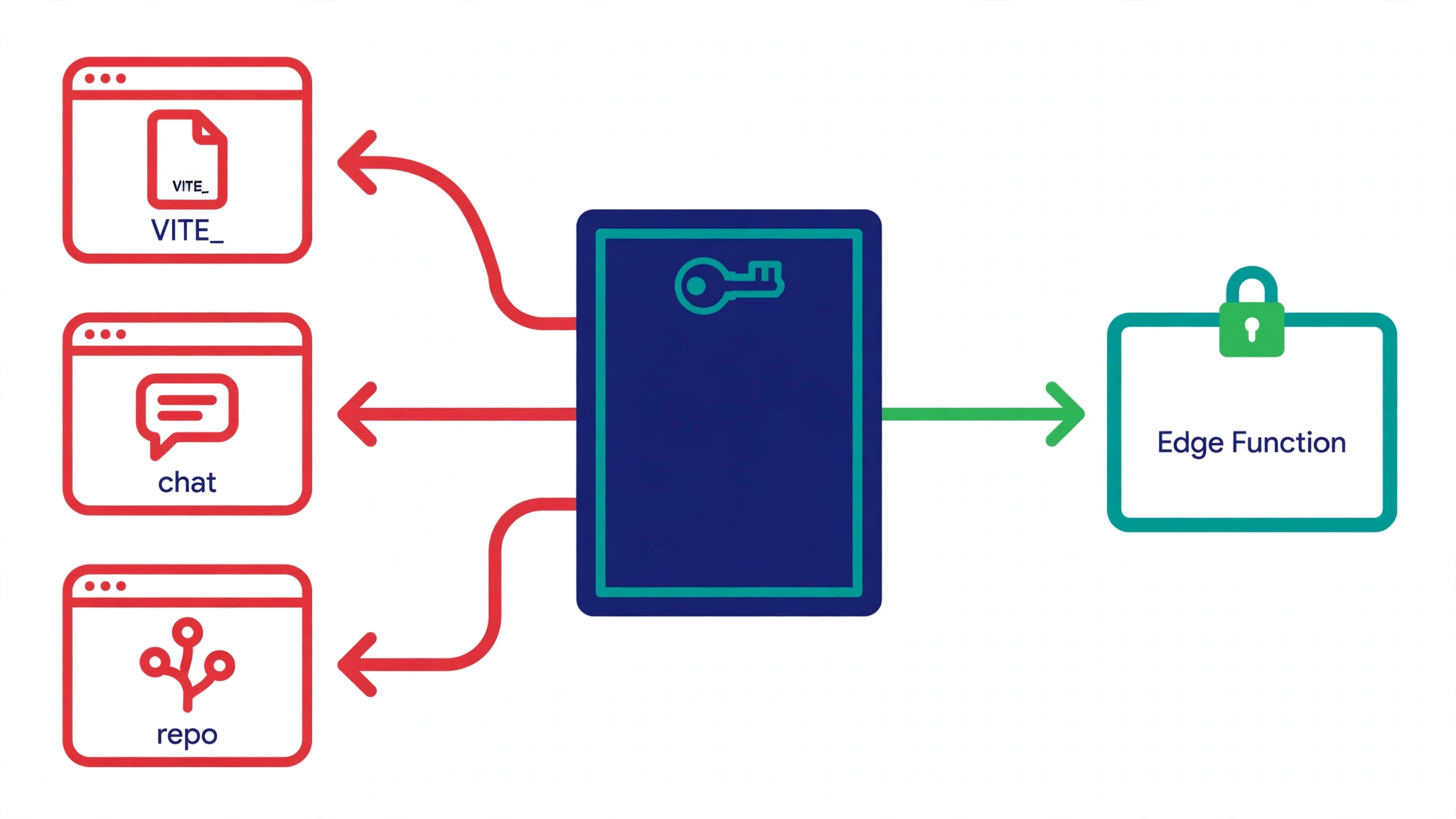
1. A VITE_ prefix in .env. Vite, the build tool Lovable uses, copies any variable starting with VITE_ into the JavaScript it sends to the browser. That is by design: VITE_SUPABASE_URL and VITE_SUPABASE_PUBLISHABLE_KEY are meant to be public. But if the service role key lands in a variable called VITE_SUPABASE_SERVICE_ROLE_KEY — often because an AI assistant added the prefix to make an “undefined” error go away — the master key ships to every visitor. Lovable’s docs say it plainly: anything prefixed with VITE_ is a build-time, browser-exposed value.
2. A key pasted into the project chat. When you paste an API key into Lovable’s chat, Lovable usually offers to store it as a secret. But if the AI then writes the value into your client code, or into a file the frontend imports, the secret is in the bundle. Lovable’s Secrets view is write-only — once saved, a value can never be viewed again in Lovable — which is good design, but it means a key that was pasted in chat and then copied into code is easy to lose track of.
3. A .env file pushed to GitHub. Lovable can sync your project to a GitHub repository. If .env is not ignored before the first push, every key in it is in the repository history, and deleting the file later does not remove it from past commits. Scanners watch public repositories constantly, and leaked keys have been found and abused within minutes of being published.
Check whether yours is leaking — in about ten minutes
Do these checks on your own app, with your own project. You need your Supabase dashboard open and, if your project is synced to GitHub, access to the repository.
Search the built bundle. Open your live site, press F12, go to Sources, and search the loaded scripts for sb_secret_ and service_role. Then search the built files directly:
grep -r "sb_secret_" dist/ build/
grep -r "service_role" dist/ build/
Any match in a shipped JavaScript file means the key is being served to every visitor.
Search your git history. A key that was committed once stays readable in the history even after the file is deleted:
git log -p | grep -i "service_role"
git log -p | grep "sb_secret_"
If either returns a match, the key value is in your history. Rotating the key is the essential step; rewriting history is optional clean-up once the key is dead.
Check what the key was used for. In the Supabase dashboard, open Logs and filter by the window in which the key may have been exposed — from your earliest commit containing it to the point you rotate it. Look for reads, writes or deletes you do not recognise, and for rows, users or files that should not be there. Supabase’s own rotation guide recommends the OWASP Risk Rating Methodology to judge the severity of the incident and plan your next steps.
Check the publishable key too, while you are here. A leaked service role key is the emergency, but the November 2026 research shows the wider problem: Crissy Field examined 159,041 Lovable projects found in the public Common Crawl archive from December 2025 to September 2026. Of the 34,545 that used Supabase, 24,664 sent database records as soon as the page loaded, without a login. With further read-only requests, the researchers found records containing email addresses in 10,560 tables across 7,403 of those sites. The worst cases included a lifestyle forum with more than 80,000 profiles and 200,000 chat messages, and a service provider with more than 1,000 records containing passport numbers.
Read those numbers with the researchers’ own limits attached: they warn that the 30% figure is not a confirmed leak rate, because some email addresses are public contacts or test data, and their method also misses personal records that contain no email address. They could not establish whether any of the exposed data had been misused, and no breach of Lovable’s own systems was reported. The cause in each case was access control inside the app’s own database, not a hack of Lovable. The same failure class was already recorded in May 2025 as CVE-2025-48757, when researcher Matt Palmer found 170 of 1,645 scanned Lovable apps letting anyone read or write data because Row Level Security was missing or wrong.
Rotate the key, in this order
Supabase publishes a rotation guide for exactly this situation, and the order matters. Do not start by deleting the old key.
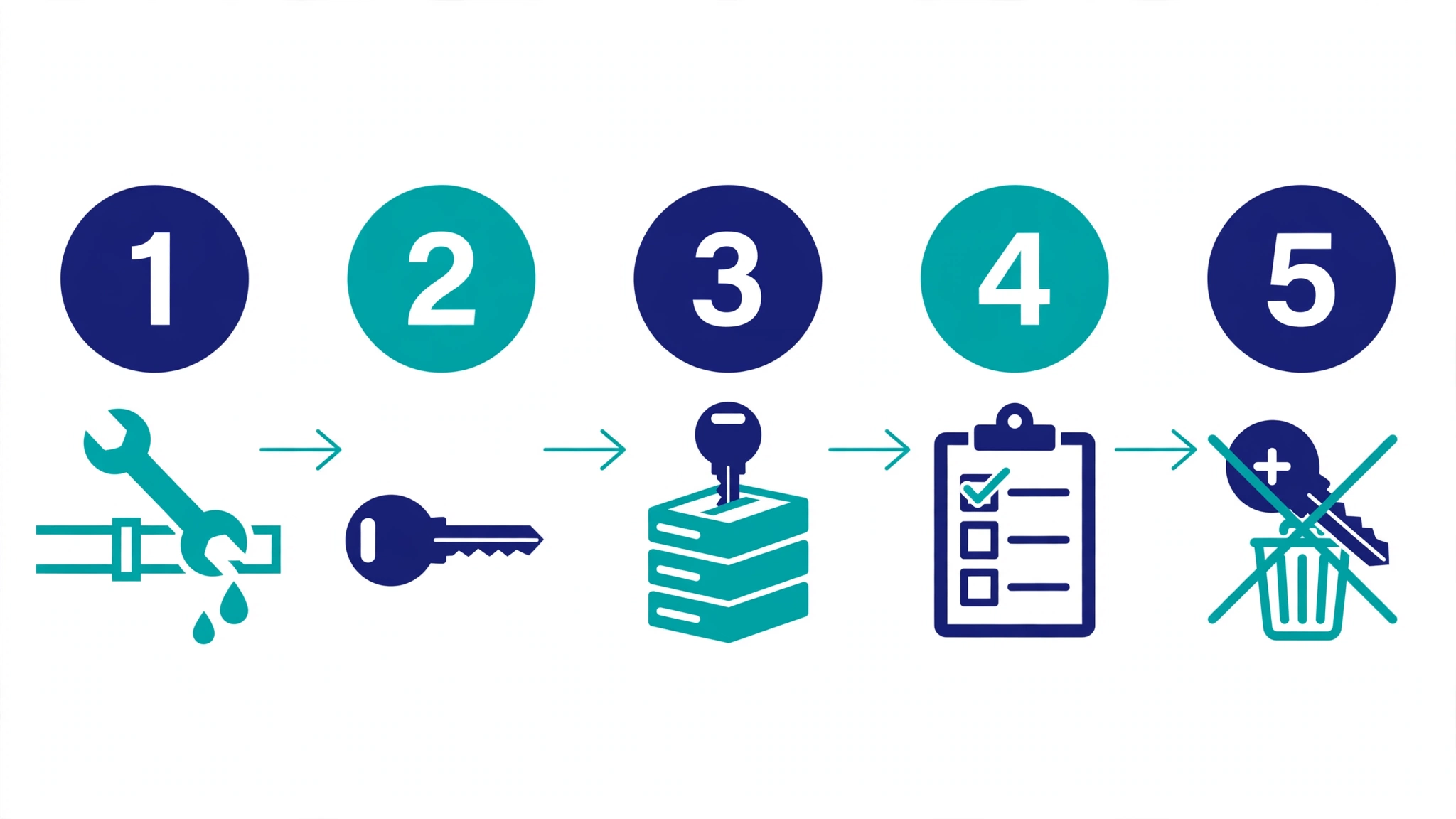
1. Fix the root cause first. Otherwise the new key leaks the same way. Remove the VITE_ prefix from the variable, take the key out of client code, and make sure .env is ignored in your repository. The one exception: if someone is actively using the leaked key right now, retire it immediately and accept that components using it will stop working until you replace it.
2. Create a new secret key. In the Supabase dashboard, go to Settings > API Keys and create a new secret key. If your project still uses the legacy JWT keys, replace the leaked one with a new secret key rather than another legacy key — the legacy keys are deprecated by the end of 2026.
3. Replace the old key everywhere your backend uses it. That means Edge Functions, servers, cron jobs and CI secrets. Two details from Supabase’s guide are easy to miss: if an Edge Function checks the key with withSupabase({ auth: 'secret' }), it accepts only the secret key named default, so update it to accept the new key by name, for example auth: 'secret:rotated_secret_key'; and if a Database Webhook or pg_net call sends the legacy service_role key on the Authorization: Bearer header, send the new secret key on the apikey header instead.
4. If the leaked key was a legacy service_role key, also replace the legacy anon key with a publishable key in your browser and mobile clients. Retiring the compromised key deactivates both legacy keys, so clients still on the old anon key will break unless you move them first.
5. Confirm every component now uses the new key. Redeploy, watch for errors, and do not move on until nothing is still calling with the old value. Unless someone is actively using the leaked key, wait until this is done before retiring it — deleting a secret key cannot be undone.
6. Retire the old key. For a secret key, delete it in Settings > API Keys. For a legacy anon or service_role key, deactivate the legacy keys in the same section. Deactivation is reversible, but do not re-enable them if you later find a client you missed — re-enabling restores the compromised key, so move that client to a new key instead.
7. If the leaked key was a legacy service_role key, also revoke the legacy JWT secret. The legacy keys are JWTs signed by that secret, so anything that still trusts the secret can accept the leaked key. Supabase’s guide points to its JWT signing keys guide for this step.
Move the key somewhere the browser can never reach
Rotation fixes this leak. Keeping the key server-side stops the next one. In a Lovable app, that means one of two places:
A Lovable Secret, read by an Edge Function. In Lovable, go to More → Settings → Secrets and add the value under the name your Edge Function reads — for example STRIPE_SECRET_KEY or OPENAI_API_KEY. Secrets are encrypted and injected into Edge Functions at runtime. They are write-only: after you save one, its value can never be viewed again in Lovable, only replaced or deleted. Never give a secret a VITE_ name — Lovable rejects those in Secrets, because VITE_ values belong in .env and are public by design.
The reserved Supabase secret, for Supabase’s own key. You do not need to add SUPABASE_SERVICE_ROLE_KEY yourself. Lovable populates it automatically when the built-in backend or a connected Supabase project is enabled, and your Edge Functions can read it directly. If your project uses an external Supabase connection instead of the built-in backend, Lovable’s backend view shows a Manage secrets button that opens your Supabase project’s dashboard, where the secrets are managed.
Two habits make this stick. First, use a separate secret key for each backend component, so the next leak forces one rotation instead of a whole-project scramble — Supabase recommends exactly this. Second, never log a key, even one that looks invalid: Supabase’s guidance is to log at most six characters from the random part after the prefix, and to store a SHA256 hash if you need to record which key was used.
What to do after the key is dead
Rotating the key stops further access. It does not undo what already happened, so check for damage before you move on.
- Review your data. Look for rows, users, files or settings you do not recognise, and for deletions you cannot explain. A service role key can write as well as read.
- Check your billing and usage. A leaked key can be used to run up charges through your own backend, for example by calling paid APIs your Edge Functions wrap. Compare the billing period against normal use.
- Review the RLS side too. The key may have leaked because RLS was getting in the way and someone reached for the service role key as a shortcut. If so, fix the policies properly instead — scope them to the owner, for example
(select auth.uid()) = user_idin Supabase — so the next person does not make the same shortcut. - Know your notification duties. If real users’ personal data was exposed, you may have obligations to tell them or a regulator. Those duties depend on where you and your users are, so check them rather than guessing. This is general information, not legal advice.
- Re-check after every big AI change. An AI agent that regenerates a migration, adds a table, or fixes an “undefined” error can quietly re-add a
VITE_prefix or paste a key into client code. The ten-minute bundle search above is worth repeating after each publish.
FAQs
Is the Supabase publishable key in my Lovable app a leak?
No. The publishable key (and the legacy anon key) is designed to be public. What protects your data is Row Level Security on every table. If RLS is off or the policies allow every row, the public key reads everything — that is the failure the November 2026 Crissy Field research documented. Fix the policies, not the key.
How do I tell a publishable key from a secret key?
By the prefix and the length. A publishable key starts with sb_publishable_, a secret key with sb_secret_. The legacy keys are long JWTs starting with eyJ...; the legacy service_role key is the dangerous one. If a value in your browser bundle starts with sb_secret_ or is a long eyJ token labelled service role, treat it as a leak.
Does Supabase’s browser block mean a leaked secret key is safe?
No. Supabase returns HTTP 401 when a new secret key is sent from a browser, matched on the User-Agent header. That stops accidental use from a web page, but anyone who copies the key can send it from curl, a script or another tool, where the block does not apply. The legacy service_role JWT does not get the block at all. Rotate the key either way.
I deleted the key from my code. Is that enough?
No. Deleting it from the file does not remove it from git history, from copies scanners already made, or from anyone who already read your bundle. Only retiring the key in the Supabase dashboard stops it granting access. Rotate first, then clean up the code and history.
Where should the service role key live in a Lovable app?
Only in server-side code: an Edge Function reading the reserved SUPABASE_SERVICE_ROLE_KEY, or a Lovable Secret. It must never appear in a web page, in source code, in a bundled app, in a VITE_ variable, in chat, in a URL, or in a log line.
A faster way to confirm the leak is closed
If you would rather not grep bundles and git history by hand, PrivacyReport’s free scanner checks your live app for exposed keys and open tables, including a service role key in a shipped bundle. Run it after you rotate, and again after your next publish — the check takes about a minute, and it is the fastest way to confirm the leak is actually closed.
Sources
- Supabase — API keys
- Supabase — Rotate a leaked or compromised API key
- Lovable — Secrets
- Crissy Field — Lovable: Many Apps Expose Sensitive Data
- Matt Palmer — CVE-2025-48757: Lovable / Supabase RLS disclosure
Related reading
- Is It Safe to Expose Your Supabase Anon Key? (Only If RLS Is On)
- Supabase “RLS Disabled in Public” Warning: What It Means and How to Fix It
- Supabase Security Checklist for Vibe-Coded Apps (2026)
- Vibe-Coded App Security Checklist: 25 Checks Before You Launch
- How to Hide an API Key From the Browser Network Tab (and Why You Can’t)
- Is a .env File Secure? What It Protects and What It Doesn’t
- What Happens If Your API Key Is Exposed? Real Costs and a 10-Minute Fix Plan
- What to Do If Your API Key Is Exposed
- How to Keep API Keys Away From Claude Code, Cursor and Other AI Agents
- Free Security Scanner for Vibe-Coded Apps: Check Yours in 60 Seconds
