
You built an app by describing it to an AI tool — Lovable, Bolt, Replit, v0, Cursor or Claude Code — and it works. The screens look finished, the buttons do what you asked, and friends who tried it said it feels like a real product. That is exactly the moment to ask the question this guide answers: is it safe to let strangers sign up and pay?
Here is the short answer. You can check that without reading a line of code. Security for a vibe-coded app comes down to four questions, three checks you can run yourself in an afternoon, and a short launch gate you work through before real users arrive. If you cannot answer the four questions, or the checks fail, do not launch yet — fix the gap first, or pay someone to check it properly. A working demo proves the app does what you asked. It proves nothing about who else can read your users’ data, move money, or delete everything.
This guide is written for the founder who cannot read the code. Every check below is something you can do in a browser or a dashboard, or ask a developer to demonstrate to you in a test version of the app. Where a technical term is unavoidable, it is explained once in plain words.
Why “it works” is not “it is safe”
AI builders are optimised to produce code that runs, not code that is secure. The features that make a demo feel finished — logins, forms, payments, file uploads — are exactly the places where security problems hide, because they only show up when someone does something the screens never offer: changing a number in a web address, calling the app’s data directly, or sending a fake payment message.
The large scans of 2026 all point the same way. Symbiotic Security scanned 1,072 vibe-coded apps that use Supabase, built with Lovable, v0, Bolt.new, Replit and Windsurf, and found at least one security flaw in 1,046 of them — 98%. One hundred and seventy-three had a critical flaw. In 172 apps, anyone could delete records without signing in. In 39, anyone holding the public key could read every table in full. In 308, the app’s database key was sitting in the JavaScript every visitor downloads.
A second, larger scan tells the same story at a different scale. Between 12 and 14 August 2026, Reeve passively scanned 30,998 live, deployed vibe-coded apps — just loading them the way any visitor would — and found that 57% of the ones with a reachable Supabase backend (2,096 of 3,680) let a stranger read database tables without signing in. One app in 23 (1,332 apps) shipped a secret key inside its public code. And an academic audit of 200 publicly deployed apps found 91% had at least one vulnerability, with broken access control — the wrong person reaching the wrong data — accounting for 36% of all findings.
Read those numbers with their limits in mind. These were samples of public, findable apps, not a census of every app ever built with AI. A private prototype on a different backend may be fine. But the pattern across three independent studies is consistent: the most common failure is not a clever hack. It is a missing rule about who may see, change or delete a record.
One named case shows how ordinary the failure is. In May 2025, a researcher disclosed CVE-2025-48757: 170 of 1,645 Lovable showcase apps he scanned had database rules that let anyone read or write data using the app’s public key. The score was 9.3 out of 10. The apps looked finished. Their databases were open.
None of this means you should stop building with AI. It means you should treat the launch like a handover: the builder finished the features, and now you check the locks before handing over the keys.
The four questions that decide everything
Before any checklist, ask these four questions about your app. If nobody on your team can answer one of them, that is your first gap.
1. Who can see whose data? Every record in your app belongs to someone — a customer, a seller, a patient, a student. The app must check, on the server, that the person asking for a record is allowed to see it. Hiding a button on a screen is not a check: anyone can call the app’s data directly, bypassing the screen entirely. This is the single most common failure in the scans above, and it is why the two-user test in the next section matters more than any other check.
2. Who can move the money? If your app takes payments, gives refunds, changes prices or pays people out, the server must decide the price and check that the payment message really came from your payment provider. A price that comes from the visitor’s browser can be changed by the visitor. A payment message that is never checked can be faked.
3. Where do the secrets live? A secret is any key, password or token that proves your app is allowed to do something — charge a card, send email, read the database. Secrets belong on the server, in the platform’s own secret storage, never in the code that ships to the browser, never in a chat with the AI builder, and never in a public repository. A secret that has ever been in one of those places must be replaced, not just deleted, because someone may already have copied it.
4. How do we recover when something breaks? Backups only count if someone has actually restored one. Accounts only count if you control them. An incident plan only counts if you have rehearsed it, even once, on paper.
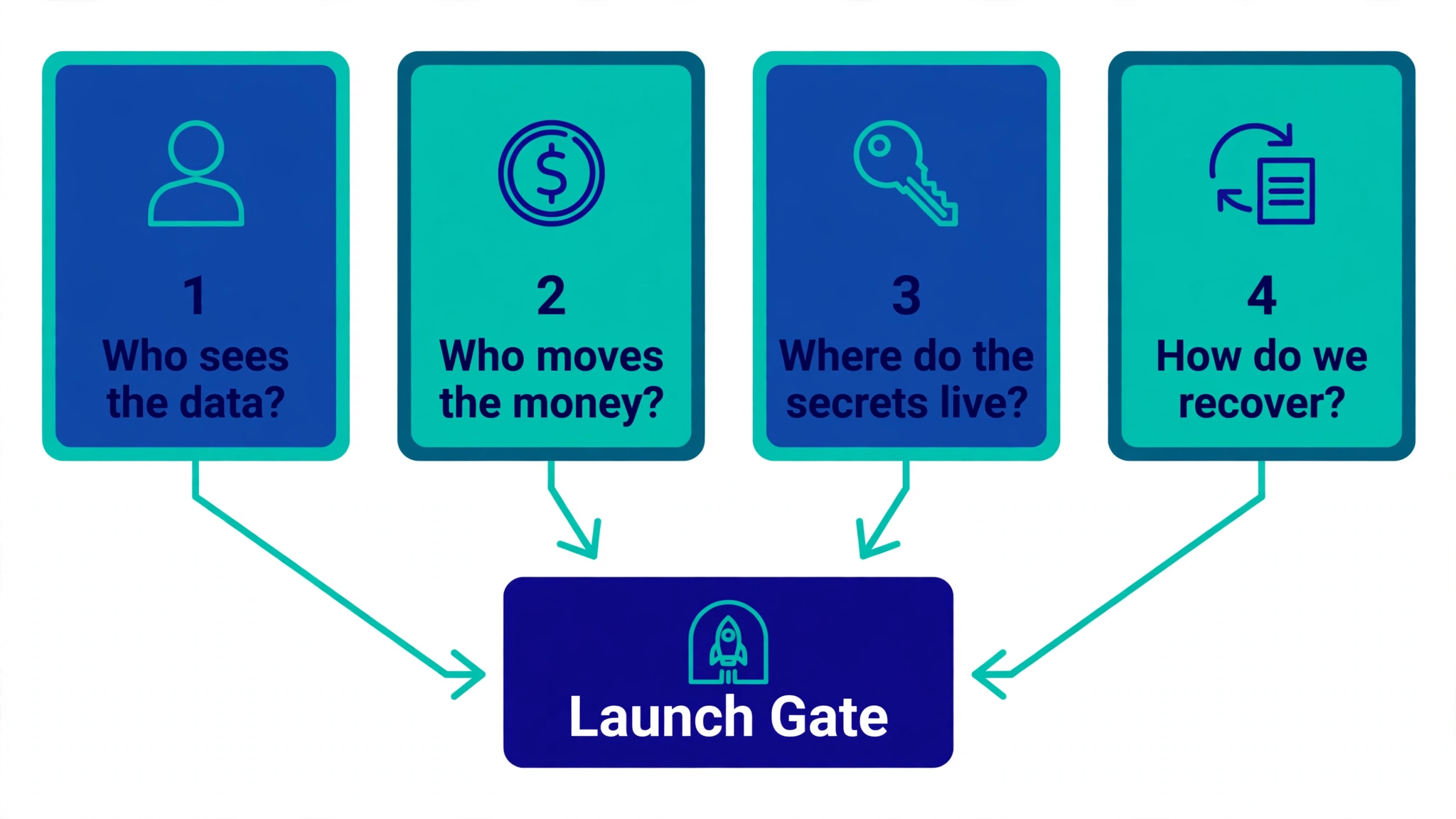
Keep those four questions in mind. Everything below is how you answer them with evidence instead of reassurance.
The three checks you can run yourself
Set aside an afternoon. You need two email addresses you control, the live app, and access to the dashboards for your code, hosting, database and payments. No code, no terminal, no developer needed for these three.
Check 1: Search the browser for leaked secrets (5 minutes)
This is a warning check, not a full audit, but it catches the most embarrassing leak in five minutes.
- Open the live app in Chrome or Edge.
- Press F12 on Windows, or Command + Option + I on a Mac, to open Developer Tools.
- Choose the Network tab, reload the page, and click through a few ordinary screens. Do not enter real personal data.
- Use the search box to look for
secret,service_role,sk_live,private_keyandpassword.
Some values you find are meant to be public: a Stripe key starting with pk_ and a Supabase publishable key (starting with sb_publishable_, or the older anon key) are public identifiers. They are safe in the browser as long as the database rules behind them are right. What must never appear is a Stripe live secret key (sk_live_), a Supabase secret key (sb_secret_, or the older service_role key), a private key, or a password. If one turns up, do not paste it into an AI chat or a support thread. Note where it appeared, hide the value, and hand it to a developer. The fix is to replace the key at its provider first, then remove it from the code. How to Hide an API Key From the Browser Network Tab (and Why You Can’t) explains the same check in detail, and Is Your Lovable App Leaking the Supabase Service Role Key? covers the most dangerous version of it.
Check 2: The two-user test (15 minutes)
This is the most important check in this guide, and it needs no technical skill at all.
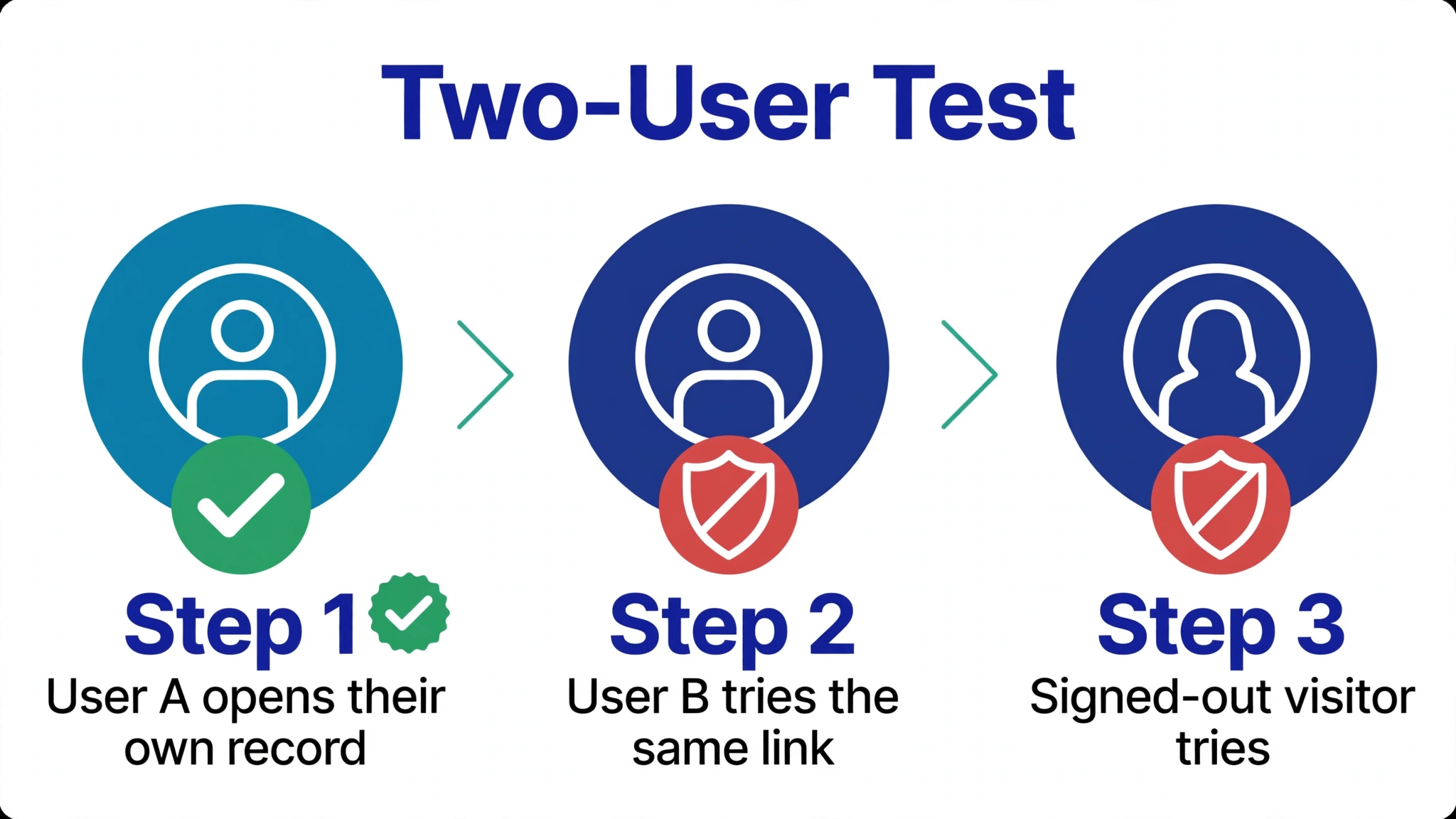
- Create two ordinary accounts in your app — user A and user B — with two email addresses you control.
- Signed in as user A, open one of your own records and copy its web address.
- Sign in as user B and paste that address in. Then sign out entirely and try again.
- If the record opens in either case, stop. That is exactly how one customer ends up reading another customer’s data, and it is a launch-blocking problem.
Repeat the test for the most sensitive things in your app: another user’s profile, their messages, their orders, an admin page, a download link. A record that opens for the wrong person is not a minor bug. It is the failure the 2026 scans found most often, and it is the failure behind CVE-2025-48757 above.
Ask your developer to repeat this test after every major feature, and to save the result — a dated note saying which records were tested and that the wrong user was refused. A screenshot of a working feature proves nothing. A saved refusal proves the check exists.
Check 3: Run an outside scan of the live app (10 minutes)
A scanner that looks at your live app from the outside can find what the browser check misses: keys in the JavaScript files, database tables readable without a login, reachable files that should be private, and missing security headers. PrivacyReport’s free scanner does exactly that — paste your app’s URL and it checks the live site from outside, the way a stranger would see it, and explains each finding in plain English with a fix.
One honest limit: a clean scan is a useful signal, not a certificate. A scanner reports what it recognises. It cannot know who should be allowed to issue a refund, or whether a payment message is properly checked. Use the scan as one layer, alongside the two-user test and the payment demonstrations below — never as the only check.
The three payment demonstrations to ask for
If your app moves money, do not launch on the strength of a successful checkout demo. A successful checkout only proves a real customer can pay. It says nothing about a fake payment, a changed price, or a duplicated refund. Ask your developer — or your technical co-founder, or your agency — to demonstrate these three cases in a test version of the app, where no real money moves:
- A changed price is ignored. A customer edits the price the browser sends — say, from $99 to $1 — and the server charges the real price anyway, because it recalculates the price itself instead of trusting the browser.
- A tampered payment message is rejected. A fake message pretending to come from Stripe is sent to your app, and the app refuses it, because it checks Stripe’s signature. Stripe sends every payment event with a signature header, and your app must verify that signature against the raw message and a signing secret that starts with
whsec_. Stripe’s own documentation is explicit: the raw message must not be changed before checking, or the check fails. - The same real event sent twice produces one action. Stripe can deliver the same event more than once — it retries deliveries for up to three days — so your app must recognise a repeated event and not charge, refund or grant access twice.
Ask for the results to be saved, not just shown once: a short note with the date, what was tested, and the outcome. If the answer is “the checkout works, that’s enough”, that is a red flag. Only a successful checkout demo is the weakest possible evidence.
Backups: ask for a restore, not a reassurance
“The cloud provider has backups” is not an answer. Ask for a dated record of a restore that actually worked: someone restored a copy of the database away from the live app, on a stated date, and the app ran on the restored copy. If nobody has ever done that, schedule it before launch. It is a one-afternoon job, and it is the difference between a bad day and a dead company.
While you are asking, confirm two more things. First, that test and live credentials are separate — a test payment key must never be able to move real money, and a live key must never sit in a test environment. Second, that you own the accounts: the domain, the code repository, the hosting, the database, the payment account and the email account should all be registered to the company, with every administrator listed and multi-factor authentication switched on wherever it is offered. If you cannot get into one of those dashboards without asking a former contractor, treat that as urgent. Keep the list in a company document, without any passwords or keys in it.
The packages the AI invented
AI builders choose the software packages your app depends on, and they sometimes invent package names that do not exist. Attackers register those invented names and fill them with malicious code — a trick called slopsquatting. Research covering 16 code-generating models found that at least 5.2% of package suggestions from commercial models, and 21.7% from open-source models, named packages that did not exist. Endor Labs’ 2025 study of AI coding agents found the same pattern from the other side: 34% of the dependency versions agents imported were hallucinated, and 49% had known vulnerabilities.
You do not need to audit package code yourself. Ask the developer to show that every package exists in the official registry, has a real publisher and history, is pinned to an exact version, and has been checked for known warnings. “The AI chose the packages” is not evidence.
One dated warning: your Supabase keys may stop working
If your app uses Supabase, there is a dated action to put on your list now. Supabase is retiring its old long keys — the ones starting with eyJ, called the legacy anon and service_role keys — in favour of short publishable keys (sb_publishable_...) and secret keys (sb_secret_...). Deletion is scheduled for late 2026, with the exact date still to be confirmed. Ask your builder to migrate before that date: the publishable key goes wherever the old anon key went, the secret key goes wherever the old service_role key went, and the old keys are switched off only once nothing uses them. The new secret keys add one safety net the old ones never had: Supabase refuses them when they arrive from a browser. Do not treat that as protection on its own — a leaked secret key still works from any other tool — but migrate anyway, because an app that still uses the old keys will break when they are deleted. Supabase Security Checklist for Vibe-Coded Apps (2026) covers the database side of the same job.
If AI runs inside your product
So far this guide has assumed AI only built your product. If a model also runs inside it — a support chatbot, a recommendation engine, an agent that takes actions — four more questions join the review, drawn from the OWASP Top 10 for LLM Applications 2025:
- What private data can enter the model’s context? Keep it to the signed-in user’s own data, and check the provider’s current rules for storing and using it. Never put other users’ data, or secrets, into a prompt.
- What can the model do? Give it only the actions it needs. A prompt saying “only refund authorised orders” is an instruction, not a lock. The permission check must live in ordinary application rules that give the same answer every time.
- What needs independent confirmation? Payments, deletions, permission changes and public posting should pass a separate fixed rule or a human approval — not the model’s say-so.
- How is use bounded? Set limits on requests, run time and spending, and alert someone when usage jumps. Unbounded model use is itself a listed risk (LLM10: Unbounded Consumption), and it is how a small app gets a very large bill.
The launch gate: twelve rows, one decision
Work through this table before your first public release, and again before every significant one. Mark each row Verified, Gap, or Not applicable, with a reason. An undocumented assumption counts as a gap. If any row marked as a launch-blocker below is a Gap, do not launch.
| Area | Question | Proof to file | Launch-blocker? |
|---|---|---|---|
| Ownership | Do we control the code, domain, hosting, database, payments and email? | Administrator list, company-owned accounts | Yes |
| Powerful accounts | Is multi-factor authentication on, and are former users removed? | Dated access review | Yes |
| Secrets | Are live secrets outside the code, and were exposed ones replaced? | Scan result and provider status | Yes |
| User data | Can two test users access only their own records? | Saved two-user test result | Yes |
| Payments | Does the server set amounts, verify provider messages, and ignore duplicates? | Three payment demonstration results | Yes, if you take money |
| Packages | Did a human verify every new package and its exact version? | Package list with versions | No — fix within a week |
| Data map | Do we know what private data is stored and shared? | Data and integration list | No — fix within a week |
| Recovery | Has the team restored a backup successfully? | Dated restore record and owner | Yes |
| Alerts | Will a named person receive and act on serious alerts? | Alert test and contact path | No — fix within a week |
| Releases | Can a serious failed check stop a release? | Repository and release settings | No — fix within a week |
| Emergency response | Can we stop damage, replace keys, communicate, and restore? | Rehearsed response plan | No — fix within a week |
| AI inside the product | Are the model’s data, actions, approvals, and spending limited? | Denied-action and spending-limit tests | Yes, if a model runs in the product |
The goal is not a perfect score. It is that every critical assumption is written down, has an owner, and has proof behind it. A product that is safe at launch can turn unsafe after the next feature, integration or team change, which is why this is a habit, not a pre-launch task. Re-run the three checks after every major release.
When to hire an independent review
Commission an independent review before real users or real money arrive if your team cannot produce four things: the ownership list, a two-user test result, the three payment demonstrations, and a dated restore record. That is the point at which a second pair of eyes is cheaper than an incident.
A good review gives you a prioritised plan — what to stop now, what to fix next, how each fix will be verified, and who owns the remaining risk — not a certificate. A penetration test, which imitates an attacker against an agreed test environment, can be useful for a mature or high-impact product, but it is a snapshot: it proves nothing about the next release. Whoever you hire, the review should look at access rules and business actions like refunds and payouts, not just run a scanner. A scanner alone is one layer; the reviewer is the layer that understands your business rules.
If something goes wrong: the first hour
Agree this sequence now, before you need it. Speed matters, but order matters more.
- Contain first. Switch off the unsafe function — admin actions, payouts, refunds, mass downloads — and replace any exposed key at its provider. Deleting a line of code does not help if someone already copied the secret; replacing it does.
- Save the evidence. Save the activity logs before you make broad changes. They may show what happened, and who was affected.
- Name one lead. One person leads the technical work and one person makes the business decisions, including what to tell users.
- Check the blast radius. Who could see whose data? Was money moved? Then work through the fix list in the launch gate, starting with the rows marked as launch-blockers.
If a production credential was exposed, or customer data was visible to the public, treat it as critical and work the sequence immediately. Do not wait for a full investigation before containing the exposure.
The short version
A vibe-coded app is not secure because it works. It is secure when four questions have evidenced answers: who sees whose data, who moves the money, where the secrets live, and how the app recovers. You can verify the first three yourself in an afternoon — search the browser for leaked secrets, run the two-user test, and scan the live app from outside — and you can ask a developer to demonstrate the payment checks and the backup restore. File the proof in the launch gate above, and do not ship while a launch-blocker is a gap. The checks cost an afternoon. The incident they prevent costs far more.
PrivacyReport’s free scanner checks your live app from outside for exposed keys, readable database tables and reachable private files, and explains each finding in plain English — run it now, and again after every major release, because a single AI edit can put a problem back.
FAQs
How can I check if my vibe-coded app is secure without reading code? Run three checks that need no code: search the live app’s browser traffic for secret keys, run the two-user test (user B must not open user A’s records, and neither must a signed-out visitor), and run an outside scan of the live URL. Then ask your developer to demonstrate the three payment tests and a backup restore, and file the results in the launch gate above.
Is my vibe-coded app safe to launch if it works fine? Not necessarily. In Symbiotic Security’s 2026 scan of 1,072 vibe-coded apps, 98% had at least one flaw and 16% had a critical one, while in Reeve’s August 2026 scan of 30,998 live apps, 57% of those with a reachable Supabase backend let strangers read database tables. A working demo proves the features run; it says nothing about who else can read, change or delete your users’ data. Run the checks in this guide before real users arrive.
What is the two-user test? Create two ordinary accounts. Signed in as user A, open one of your own records and copy its address. Sign in as user B and paste it in, then sign out and try again. If the record opens for user B or for a signed-out visitor, the app’s access rules are broken and that is a launch-blocking problem.
What should I ask my developer to prove before launch? Four things: the ownership list (who controls the code, domain, hosting, database, payments and email), a saved two-user test result, the three payment demonstrations (a changed price ignored, a tampered payment message rejected, a duplicate event producing one action), and a dated backup restore record. If the team cannot produce those four, commission an independent review before launch.
Are the keys I can see in my app’s JavaScript a problem? It depends which key. A Stripe key starting with pk_ and a Supabase publishable key (sb_publishable_..., or the older anon key) are meant to be public — what protects your data is the rules behind them. A Stripe live secret key (sk_live_), a Supabase secret key (sb_secret_, or the older service_role key), a private key or a password must never reach the browser. If one has, replace it at its provider first, then remove it from the code.
Do I need to worry about Supabase’s old API keys? Yes, if your app still uses them. Supabase is retiring the legacy anon and service_role keys — the long ones starting with eyJ — with deletion scheduled for late 2026 and the exact date still to be confirmed. Ask your builder to move to publishable (sb_publishable_...) and secret (sb_secret_...) keys before then, or the app may break when the old keys are deleted.
Does a clean security scan mean my app is safe? No. A scan reports what it recognises — exposed keys, open tables, reachable files, missing headers — and a clean result is a useful signal. It cannot judge business rules like who should be allowed to issue a refund, or whether payment messages are properly checked. Use several layers: the browser check, the two-user test, the payment demonstrations, a scan, and a human review for the rules a tool cannot know.
Sources
- Symbiotic Security — We Scanned 1,072 Vibe Coded Apps, 98% Had Security Flaws
- VibeEval — Vibe Coding Security Report August 2026: 30,998 Apps Scanned, 57% Open Supabase, 4.4x More Flaws
- Phrivo — Someone Scanned 30,998 Vibe-Coded Apps. Over Half Let Anyone Read the Database.
- OWASP Top 10
- OWASP Top 10 for LLM Applications 2025
- Supabase — API keys
- Stripe — Receive Stripe events in your webhook endpoint
- Matt Palmer — CVE-2025-48757 disclosure
- Veracode — We Asked 100+ AI Models to Write Code
- Endor Labs — State of Dependency Management 2025
- Halborn — Lovable Data Leak: BOLA Vulnerability and App Security Risks
- Roobykon — AI App Security Checklist for Founders: From Working Demo to Safe Product
- Google Search Status Dashboard — November 2026 core update
Related reading
- Vibe-Coded App Security Checklist: 25 Checks Before You Launch
- Lovable Security Issues: The 7 Mistakes We See Most Often
- Is Your Lovable App Leaking the Supabase Service Role Key?
- Supabase Security Checklist for Vibe-Coded Apps (2026)
- Is It Safe to Expose Your Supabase Anon Key? (Only If RLS Is On)
- How to Hide an API Key From the Browser Network Tab (and Why You Can’t)
- Is a .env File Secure? What It Protects and What It Doesn’t
- What Happens If Your API Key Is Exposed? Real Costs and a 10-Minute Fix Plan
- “API Key Exposure Detected in Your Repository”: What the Alert Means and How to Clean Up
- Copy-Paste Security Prompts for Vibe Coders (Cursor, Lovable, Replit, Claude)
- How to Keep API Keys Away From Claude Code, Cursor and Other AI Agents
- Free Security Scanner for Vibe-Coded Apps: Check Yours in 60 Seconds
