
Lovable apps keep leaking the same way. In November 2026, the Hamburg security firm Crissy Field published a study of 159,041 Lovable projects and found personal data — passport numbers, payment records, more than 200,000 private chat messages — readable without logging in. Nobody hacked Lovable, and nobody hacked Supabase. The apps’ own database rules let strangers in. If you built an app with Lovable, the question is not whether the platform is safe. It is whether your app repeats one of the seven mistakes below — and most of them take minutes to check.
Is Lovable safe?
Short answer: the platform, yes; your app, only if you locked it down. None of the public reports describe a break-in to Lovable’s own systems. What they describe, again and again, is an app whose owner never set the access rules, put a secret key where a browser could read it, or trusted a scan that never looked at the right thing. Lovable’s own documentation says the same thing in plainer terms: its security scans “do not replace a thorough security review”, and you are responsible for making sure your app meets the security requirements of its use case. The seven mistakes below are the ways that responsibility usually goes wrong.
What the November 2026 study actually found
Crissy Field worked with the German newspaper Handelsblatt, which reported the findings on 2 November 2026. The researchers identified 159,041 Lovable projects in the public web archive Common Crawl, covering December 2025 to September 2026. Of those, 34,545 used Supabase. On 24,664 of those sites, database records arrived as soon as the page loaded, with no login — which the report itself says is not a problem on its own, because the data may be meant to be public. With further read-only requests using the same public key every visitor’s browser already has, the researchers found records containing email addresses in 10,560 tables across 7,403 of those sites — 30% of the sites they examined more closely.
Read the limits with the numbers, because the report states them clearly. An email address can be a public contact address or test data, and the method misses personal records with no email field, so the 30% figure “should not be read as a confirmed data leak rate”. It applies only to the 24,664 sites examined closely, and the Common Crawl sample is not representative of all Lovable apps. The researchers downloaded only parts of the data, did not publish how to access it, and could not establish whether any of it had been misused. What they could show is the shape of the problem: a German lifestyle forum exposed more than 80,000 profiles and more than 200,000 chat messages; a service provider exposed more than 1,000 records with passport numbers, expiry dates and nationalities; and 280,000 emails sent to one provider’s customers were accessible. Lovable’s position, as reported, is that this is an industry-wide configuration problem and that customers are responsible for their own apps’ data. Whoever is right about the blame, the data belongs to the app owner — and the fix is in the app, not the platform.
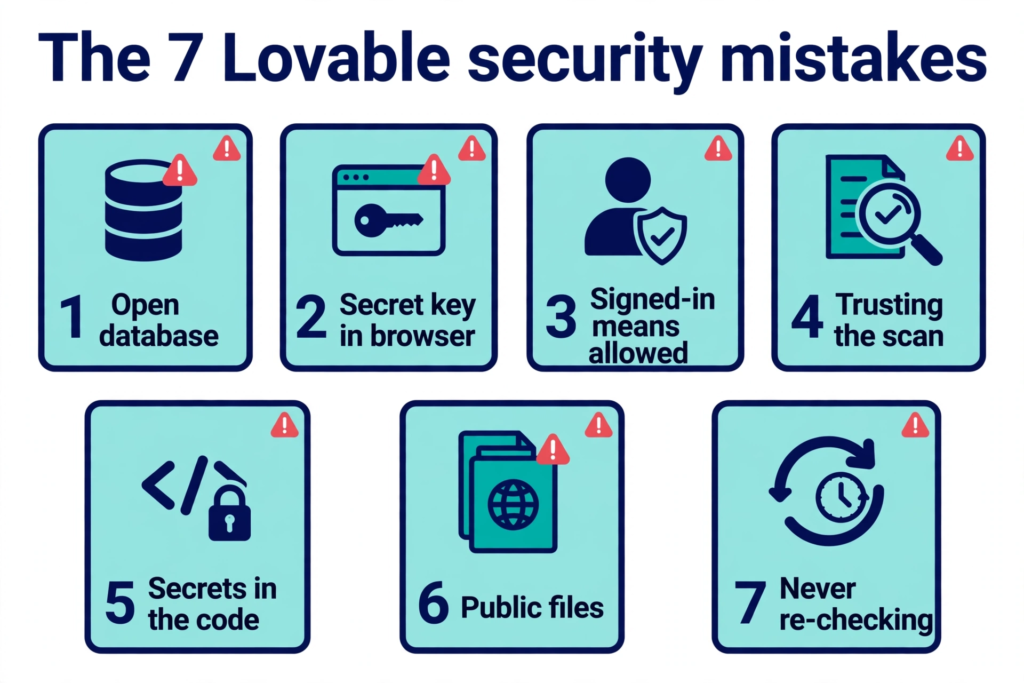
The seven mistakes
| # | Mistake | What goes wrong |
|---|---|---|
| 1 | The database is open | Row Level Security off, or a policy that lets everyone through |
| 2 | A secret key is in the browser | The service role key, or a third-party key, shipped in frontend code |
| 3 | “Signed in” is treated as “allowed” | Any-user policies and checks that only run in the browser |
| 4 | The publish scan is treated as a verdict | The Quick scan is static and never reads your code |
| 5 | Secrets travel with the code | Keys in components, in the synced repo, and in the AI chat |
| 6 | Files are public by bucket default | Storage buckets anyone with a link can read |
| 7 | Nobody re-checks after the AI edits | Fixes undone by the next build request, and never tested again |
1. The database is open
This is the mistake behind almost every headline. A Lovable app talks to its Supabase database straight from the browser, using a public key that is designed to be visible. What stops a stranger reading your tables is Row Level Security (RLS): rules inside the database that decide which rows each caller may see. If a table has no RLS, or a policy that allows everyone, the public key reads it — and writes to it.
The evidence is now three studies deep. In May 2025, researcher Matt Palmer scanned the home pages of 1,645 apps from Lovable’s public showcase and found 303 endpoints with inadequate RLS across 170 projects, about one in ten. That became CVE-2025-48757, rated 9.3 Critical by the assigning CNA; Lovable disputes the CVE on the grounds that each customer is responsible for protecting their own app’s data. In October 2026, UpGuard reported 16,326 Supabase databases with publicly readable tables out of roughly 300,000 candidate domains. And in November 2026 came the Crissy Field study above. The pattern is the same in all three: a table with no access rules, reachable with the key the site itself hands every visitor.
The fix. Turn RLS on for every table in the public schema, then give each table one policy per operation that ties rows to their owner:
alter table public.orders enable row level security;

create policy "Users read their own orders"
  on public.orders for select
  to authenticated
  using ( (select auth.uid()) = user_id );
Two details people miss. First, a policy that reads using (true) is just as open as no policy at all — Supabase’s own docs say it defeats the purpose of RLS. Keep it only on tables that really are public, like a product list. Second, policies and grants are two separate checks. Supabase’s docs warn that adding policies does not take grants back: a table protected only by policies still hands the anonymous role an insert path if you never revoke the grant. Set both. Then test it: Supabase’s own guide says to write a test per table asserting allow and deny for select, insert, update and delete, for both signed-out and signed-in callers, and run it with supabase test db. Until the suite passes, you do not know whether the policies do what you intended.
One more reason to do this now rather than later: since 30 October 2026, new tables in the public schema are no longer automatically published to the Data API in existing projects — an explicit grant is required. Existing tables keep their current permissions, so the change does not fix anything already open. It does mean a new table created by an AI agent now starts closed, which is the direction the defaults are moving.
2. A secret key is in the browser
The public key is safe to ship in the browser. The secret key is not. Supabase’s secret key — the sb_secret_ key, formerly the legacy service_role key — bypasses every RLS policy. Put it in frontend code and there is no lock left to pick: anyone who opens your site’s JavaScript can read, change or delete any row in any table. The same goes for third-party keys — an OpenAI key, a Stripe secret key — hardcoded in a component. Anyone with browser developer tools can copy them in seconds.
It gets into the browser three ways in a Lovable project. A variable with a VITE_ prefix in .env is embedded in the JavaScript bundle at build time — that is what the prefix means. A key pasted into the project chat can end up written into client code by the AI. Or a key written directly into a component ships with the app. Lovable’s own Secrets docs draw the line clearly: Secrets are encrypted, injected into Edge Functions automatically, and never reach the browser; anything prefixed with VITE_ is a build-time, browser-exposed value and must live in .env, not Secrets.
The fix. Move every secret into Lovable Secrets and call it only from server-side code — an Edge Function or a server function — never from a component. The Supabase service role key already has a correct home in every Lovable project: the reserved SUPABASE_SERVICE_ROLE_KEY, readable inside Edge Functions and never sent to the browser. If a secret key was ever in your frontend code, removing it is not enough. It was public, so rotate it, and check the rotation traps first: retiring a legacy service role key also deactivates the legacy anon key, and the legacy JWT secret must be revoked separately or the leaked key can still be accepted. Is Your Lovable App Leaking the Supabase Service Role Key? walks through the full rotation sequence.
3. “Signed in” is treated as “allowed”
This is the mistake that survives a security scan, because it looks like a lock. A policy like this one is common in Lovable apps:
create policy "Signed-in users can read everything"
  on public.notes for select
  to authenticated
  using ( auth.uid() is not null );
It reads as “only logged-in users”. But anyone can become a logged-in user in seconds by signing up, and then they can read every row — including other users’ notes, orders and messages. The same confusion shows up in the app itself: a page that hides an admin dashboard behind a login check in the frontend. Lovable’s own security best practices are blunt about this: all frontend code runs in the browser and can be inspected, modified or bypassed, so frontend code should never make security decisions, and client-side auth checks “should never be relied on for access control”. The check has to happen on the server, or in the database policy, where the caller cannot change it.
The server side has its own version of the same mistake. Server code that uses the service role key bypasses RLS entirely, so it must check permissions itself — and Lovable’s docs say exactly that. An Edge Function or server function that trusts the caller’s word about whose data to fetch, or that never checks the caller’s identity at all, is an open endpoint with a server’s privileges. Lovable’s Deep scan looks for this, but the Quick scan does not.
The fix. Every policy should compare the signed-in user with the row’s owner — (select auth.uid()) = user_id — for select, insert, update and delete separately, and the update policy must also check the row as it would look after the write, so a user cannot reassign a document to someone else. Every server function must verify who is calling and whether they may perform the action, including functions called directly without going through your app’s interface. Use frontend auth state only to decide what to show, never to decide what is allowed.
4. The publish scan is treated as a verdict
Lovable runs a Quick scan automatically every time you publish. It finishes in seconds and checks your database access rules, your npm dependencies and whether an MCP server is exposed without authentication. That is genuinely useful — and it is not a verdict. Lovable’s docs describe both built-in scans as static analysis: they read code and configuration and flag patterns that look risky. A scan can flag a rule that lets everyone through, but it cannot tell you which data was meant to be private to one user, one team or one role. Only you know that.
The gap that catches people is the difference between “RLS on” and “RLS right”. An October 2026 review of 38 public Lovable codebases found only 2 of 826 tables with RLS switched off — but 10 of the 38 apps, about one in four, had a policy that let anyone, or any signed-in user, update or delete every row of at least one table. The switch was on. The rules were open. A scan that checks whether a policy exists will pass an app like that; only a test that acts as a second user will catch it.
The Deep scan goes further — it reviews all your application code in seven areas, including access control and unauthenticated endpoints — but it runs only when you start it. And when a project using the built-in backend has unresolved critical findings, Lovable opens a review dialog on publish and lets you publish anyway. “Publish anyway” is a real button, and pressing it with a critical finding open is a decision, not a formality.
The fix. Run the Deep scan before every launch, not just the Quick scan that runs on publish. Then test what no static scan can: open the live app logged out in a private window and click through every page — anything private that appears, a stranger can see too. Then create two test accounts, add data as the first, sign in as the second, and try to open the first user’s records. That second-account test is the one check that catches mistake 3, and no outside scanner can do it for you, because it needs to know which user should see which row.
5. Secrets travel with the code
A key in your code does not stay in your code. Lovable syncs your project to a Git repository, and the repository carries the code — including any key hardcoded in a component. The synced .env file carries the backend URL and publishable key, which are public by design, but anything else that found its way into .env or a component travels with the sync. A repository that starts private and later becomes public, or a fork, or a screenshot of the code, all spread the same secret further. And before December 2025, free-tier Lovable projects were public by default — project code included.
There is a sharper version of this mistake, and it happened on Lovable itself. Between 3 February and 20 April 2026, a backend regression made the AI chat history of public Lovable projects readable by other Lovable users. The chat is where builders paste API keys, credentials, error logs and real data while debugging — exactly the material that should never leave their machine. Lovable fixed it within two hours of the public report, converted public projects to private, and apologised after first calling the visibility “intentional behavior”. The platform bug is fixed. The lesson is not: never paste a secret into a chat, because a chat history is a record that outlives the conversation, and you do not control who can read it later.
The fix. Search your own shipped JavaScript and your repository for secret keys — the sb_secret_ and sk- prefixes, and any key you have ever pasted into the project chat. Anything you find has to be rotated, not just deleted, because it was readable. Check your project’s visibility setting, and set project access to workspace for anything that should not be publicly accessible. If your project was public between February and April 2026, rotate any key you ever pasted into its chat, even if you have never seen evidence it was read.
6. Files are public by bucket default
Databases get all the attention; files get forgotten. Supabase Storage buckets hold the uploads — profile photos, invoices, contracts, ID documents — and a bucket with a public read policy serves every file in it to anyone with the link. No login, no key, no guessing: the link is the access. The Crissy Field study’s examples included personal photo albums, contracts and invoices readable without a login, and the same failure shows up in the Firebase world, where Storage rules are the ruleset most often forgotten.
The trap is that a public bucket is a legitimate pattern — a bucket of product photos or avatars is meant to be public. The mistake is applying that pattern to files that belong to one user, or copying a public policy from a tutorial into a bucket that holds private documents. Supabase’s own docs note that by default Storage allows no uploads at all without RLS policies on the storage.objects table; the openness comes from a policy someone added, usually by asking the AI for “a bucket my app can read”.
The fix. List every bucket and ask, for each one, who should be able to read its files. Buckets holding user files should be private, with a policy that ties access to the file’s owner folder — the same owner check as the database, applied to storage.objects. Then test it the same way: open a file’s URL in a private window, logged out. If it loads, it is public. Move the files, fix the policy, and check the old URLs again — a file that was public may still be cached or linked elsewhere.
7. Nobody re-checks after the AI edits
Security in a Lovable app is not a setting you switch on once. It is a state the AI can undo. The most common undo is also the most understandable: the app throws a permission error, the builder pastes the error into the chat, and the AI “fixes” it by loosening a policy — or by switching RLS off entirely — so the feature works again. The feature works. The data is open. Nobody notices, because nothing looks broken. The same thing happens with a new table the AI creates without policies, a new Edge Function that skips the ownership check, or a new bucket copied from the public example.
This is also why a one-off audit is not enough. Lovable’s own docs say to review RLS policies regularly, especially before publishing or after changes to sign-in or database structure. The November 2026 study shows the same failure still widespread more than a year after the CVE made it famous, and the February 2026 Moltbook case shows the same shape at the extreme — a vibe-coded social network whose Supabase database had no working RLS, exposing about 1.5 million API tokens and about 35,000 email addresses before Wiz reported it and the team fixed it within hours. The fix took several rounds, because each round revealed another open table.
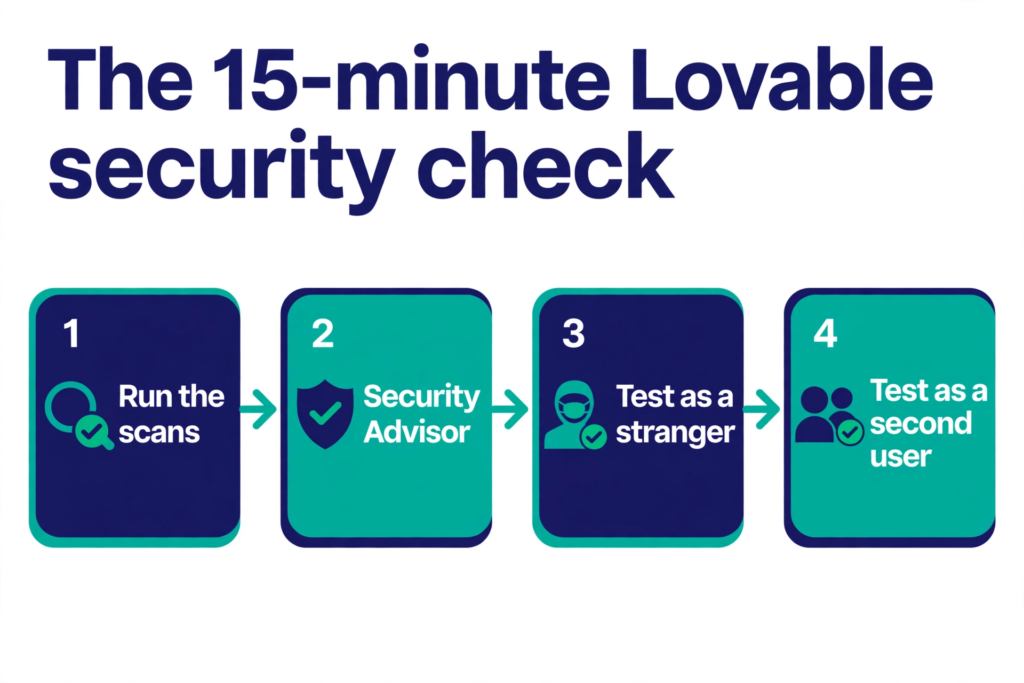
The fix. Re-run the checks after every significant change, not just before launch. The whole check takes about 15 minutes, and it is the same four steps every time.
The 15-minute check
- Lovable’s scans (3 minutes). In the project Security view, run the Quick scan, then start a Deep scan and read its findings. Fix the critical ones before you publish — and do not press “publish anyway” with a critical finding open.
- Supabase Security Advisor (3 minutes). In the Supabase dashboard, open Security Advisor and fix these first: “Table publicly accessible” (RLS off), “Sensitive data publicly accessible” (RLS off on a table with password, token or ID columns), “Security policy allows unrestricted access” (a
using (true)policy), and “View bypasses row-level security” (a view that ignores RLS). - Test as a stranger (3 minutes). Open the live app in a private window, logged out, and click through every page. Then, for one table, send a read request with only the public key, using the curl test from Is It Safe to Expose Your Supabase Anon Key? — if rows come back, anyone can read that table. Do this only against your own project.
- Test as a second user (5 minutes). Create two test accounts. Add data as the first, sign in as the second, and try to open the first user’s records — by changing an ID in the URL, if your app uses IDs there. The second user should see nothing of the first user’s data.
- Scan the live URL from outside (1 minute). PrivacyReport’s free scanner checks your live app the way a stranger would — open Supabase tables, secret keys in the shipped JavaScript, exposed
.envfiles and missing security headers — and reports what a signed-out visitor can actually reach. Run it after you fix things, and again after your next publish, because an AI edit can undo a fix.
If real people’s personal data may have been readable, take advice on your legal duties. In the UK, start with the ICO’s guidance on reporting a breach; in the US, the duties depend on your state and the kind of data involved, so get advice rather than guessing. The technical fix is quick. The notification question is not, and it should not wait for the technical fix to be finished.
FAQs
Is Lovable safe? Lovable the platform is safe to build on; no public report describes a break-in to its own systems. Whether your Lovable app is safe is a different question, and it comes down to your database rules, your keys and your checks. The November 2026 Crissy Field study found data readable without a login in thousands of Lovable apps — not because Lovable was hacked, but because the apps’ own access rules allowed it.
What did the November 2026 Lovable study actually find? Crissy Field, working with Handelsblatt, identified 159,041 Lovable projects and found email-bearing records in 10,560 tables across 7,403 of the 24,664 sites it examined closely — 30% of that group. The researchers say that 30% is not a confirmed leak rate, and their sample is not representative of all Lovable apps. Examples included more than 80,000 forum profiles, more than 200,000 chat messages and more than 1,000 passport records.
Is my Supabase anon key the problem? No. The anon key — or the newer publishable key — is designed to be public and ships in your app’s JavaScript. What it can reach depends entirely on your Row Level Security policies. Is It Safe to Expose Your Supabase Anon Key? explains the difference, and Supabase “RLS Disabled in Public” Warning: What It Means and How to Fix It explains the warning you see when a table has no RLS.
Does Lovable’s security scan mean my app is safe? No. The Quick scan runs on every publish and checks database rules, dependencies and exposed MCP servers, but it never reads your application code, and it cannot tell which data you meant to keep private. The Deep scan reviews your code, but it runs only when you start it. Lovable’s own docs say the scans do not replace a thorough security review. Run the Deep scan, then test as a stranger and as a second user.
My project was public on Lovable in early 2026. What should I do? Between 3 February and 20 April 2026, a Lovable backend regression made the AI chat history of public projects readable by other Lovable users. If your project was public then, rotate any API key, credential or password you ever pasted into its chat, and check the project’s visibility setting now. Lovable fixed the issue within two hours of the public report and converted public projects to private.
What is the single most common Lovable security mistake? An open database: a table with Row Level Security off, or a policy that lets everyone — or every signed-in user — read and write every row. It is the cause behind CVE-2025-48757, the Moltbook exposure and the November 2026 Crissy Field study. Enable RLS on every table, write owner-based policies for each operation, and test them as a stranger and as a second user.
Can I check my Lovable app for free? Yes. Lovable’s Quick and Deep scans are free, Supabase Security Advisor is free, and the logged-out and second-account tests cost nothing but time. PrivacyReport’s free scanner also checks your live app from outside for open tables, exposed keys and missing headers.
Sources
- Crissy Field GmbH — Lovable: Many Apps Built on the Platform Expose Sensitive Data
- NVD — CVE-2025-48757
- Lovable — Security overview (Quick and Deep scans)
- Lovable — Security best practices for Lovable apps
- Lovable — Secrets
- Lovable — Sync your Lovable project code with GitHub, GitLab, or Bitbucket
- Supabase — Row Level Security
- Supabase — Storage Access Control
- Supabase — API keys
- Halborn — Lovable Data Leak: BOLA Vulnerability and App Security Risks
- Infosecurity Magazine — Vibe-Coded Moltbook Exposes User Data, API Keys and More
- UpGuard — Everything Everywhere: Systemic Data Exposure in Supabase Apps
- Dev.to — Supabase RLS checklist for Lovable and Bolt apps: what we found in 38 codebases
Related reading
- Is Your Lovable App Leaking the Supabase Service Role Key?
- Is It Safe to Expose Your Supabase Anon Key? (Only If RLS Is On)
- Supabase “RLS Disabled in Public” Warning: What It Means and How to Fix It
- Supabase Security Checklist for Vibe-Coded Apps (2026)
- Vibe-Coded App Security Checklist: 25 Checks Before You Launch
- How to Hide an API Key From the Browser Network Tab (and Why You Can’t)
- Is a .env File Secure? What It Protects and What It Doesn’t
- What Happens If Your API Key Is Exposed? Real Costs and a 10-Minute Fix Plan
- Free Security Scanner for Vibe-Coded Apps: Check Yours in 60 Seconds
- How to Keep API Keys Away From Claude Code, Cursor and Other AI Agents
- Copy-Paste Security Prompts for Vibe Coders (Cursor, Lovable, Replit, Claude)
- What to Do If Your API Key Is Exposed
