
"How secure is Supabase?" is the wrong question, or rather it is two questions wearing one label. The first is about the platform: the company, its data centres, its audits. The second is about your project: the database, tables, keys and sign-in settings you control. Supabase answers the first one well. The second one is yours, and the defaults are mixed — some protections are on from the start, and the ones that matter most depend on how your tables were created.
Here is the short answer. Supabase the platform is SOC 2 Type 2 audited and ISO 27001 certified, encrypts data at rest and in transit, and runs regular penetration tests. Your project is a different question: anyone with your public key can read any table that has no Row Level Security, and whether a table has it depends on whether a person or a coding agent created it. In September 2026, UpGuard found 16,326 Supabase databases with tables a stranger could read — every one of them on the same audited, encrypted platform. This guide gives you the full safe-by-default table, explains the argument about "secure by default", and ends with a ten-minute check for your own project.
What is safe by default: the platform
Supabase handles the infrastructure, and it does that part properly. These are the protections that need nothing from you, taken from Supabase's own security page, checked on 21 November 2026.
| Protection | What it means for you |
|---|---|
| SOC 2 Type 2 | Audited every year against controls for security, availability, processing integrity, confidentiality and privacy. The report is available to Team and Enterprise customers. |
| ISO 27001 | Certified, which means an outside auditor checks how Supabase runs its information security management, not just its code. |
| Encryption at rest, AES-256 | Your database is written to disk in encrypted form on every plan, so a copy of the disk taken away from Supabase's machines is unreadable on its own. |
| Encryption in transit, TLS | Every API refuses an unencrypted connection, so traffic between your visitors and Supabase cannot be read in passing. |
| Keys and tokens encrypted again | Access tokens and keys are encrypted at the application level before they are stored in the database. |
| HIPAA | Available with a signed Business Associate Agreement, for Team plan customers and above. |
| GDPR | Projects keep their primary database, Auth and Storage data in the region you pick, and a Data Processing Agreement is available. |
| Daily backups | Paid projects are backed up every day. Point in Time Recovery is an add-on from the Pro plan. |
| Penetration tests | Supabase works with outside experts on regular penetration tests, and scans its code with tools including GitHub, Vanta and DepthFirst. |
| DDoS protection | Cloudflare at the CDN level, plus fail2ban against brute-force logins, customisable rate limits on critical API routes, and spend caps against runaway bills. |
| Password storage | User passwords are stored as bcrypt hashes with a random salt, never in plain text. |
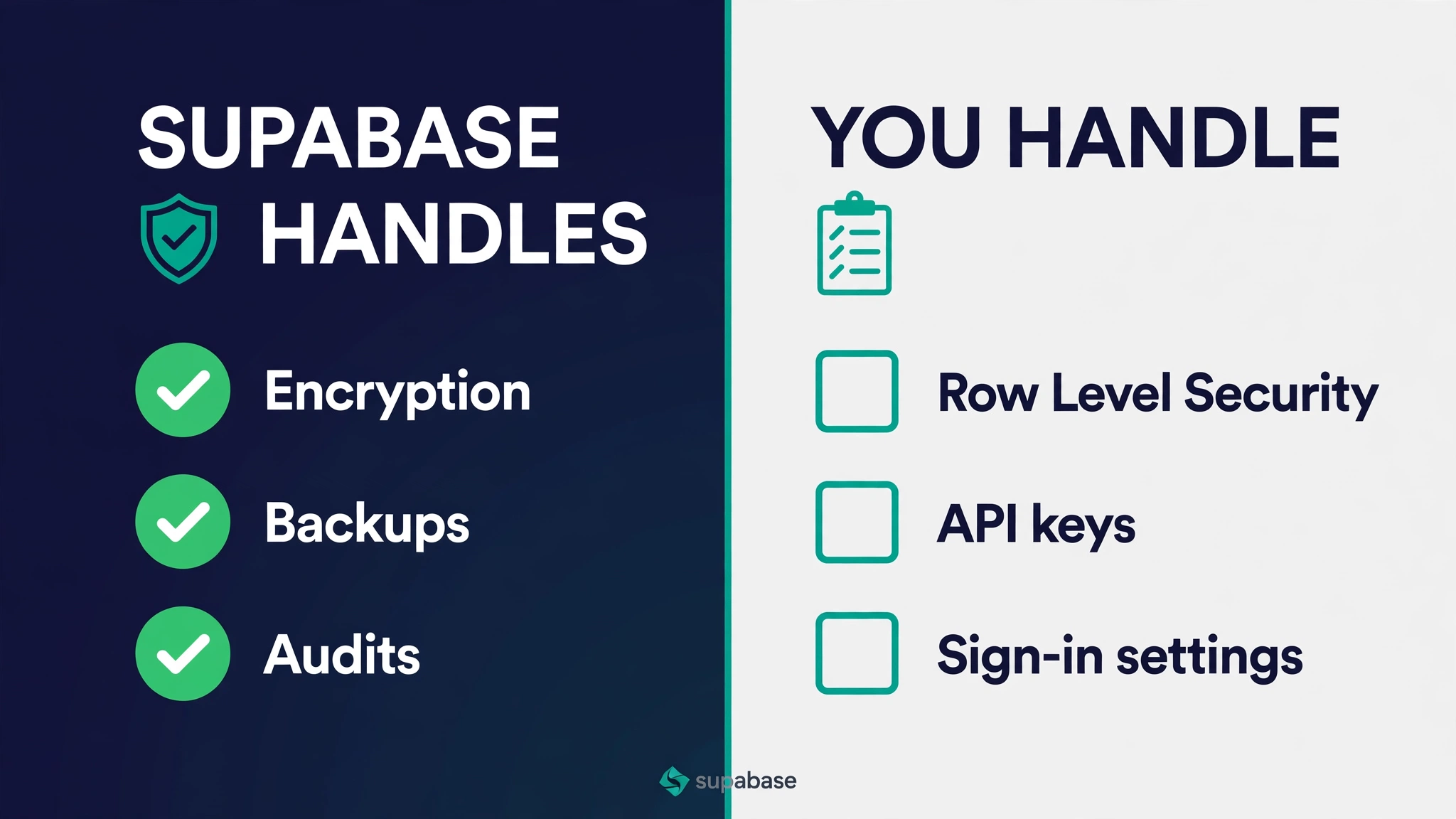
None of that is marketing fluff; the certificates are real and the encryption is on for every project. But none of it decides who can read your rows. Supabase's own SOC 2 document says the compliance "does not transfer to environments outside of the Supabase product or Supabase's control", and its shared responsibility model puts it in one sentence: "Supabase secures the infrastructure. You secure your application — RLS policies, API keys, and access controls."
That split is the whole article. The platform is a well-guarded building. Your project is a flat inside it, and the locks on the flat are yours to fit.
What is not safe by default: your project
This is the table that matters. Every row is a setting in your project, its default as Supabase documents it, and what to do about it.
| Setting | Default | What to do |
|---|---|---|
| Row Level Security on a table | On for tables created in the Table Editor; off for tables created with SQL, migrations or an API call — which is how coding agents create them | Enable RLS on every table in the public schema, then write a policy per operation. A table with RLS on and no policy returns nothing to the public key, which is the safe starting state. |
Grants to anon and authenticated | New tables need an explicit grant since 30 October 2026; tables created before then keep the old automatic grants | Check the grants on every existing table. A policy does not take a grant back: a table protected only by policies still hands anon an insert path if you never revoked the grant. |
Publishable key (sb_publishable_…) | Public by design — it ships in your JavaScript and anyone can read it | Nothing to hide; make sure the tables it can reach are locked by RLS. It is safe to expose only when RLS is on. |
Secret key (sb_secret_…) | Full access, bypasses RLS, must never leave a server | Search your built JavaScript and your repository for sb_secret_ and service_role. If either is there, rotate it. The new secret key is refused from a browser with a 401; the legacy service_role key has no such check. |
Legacy anon and service_role keys | Deprecated; Supabase says they will be deleted late in 2026, exact date still to be confirmed. New projects no longer get them. | Migrate to publishable and secret keys, then deactivate the legacy keys in Settings, then API Keys. |
| Sign-up | Open by default — anyone with your project URL and public key can create an account through the API, even if your app has no sign-up page | Turn "Allow new users to sign up" off for internal or invite-only apps. |
| Email confirmation | On by default on hosted projects; off by default on self-hosted and local projects | Check it is on in Authentication, then Sign In / Providers, then Email. With it off, anyone can sign up with an email address that is not theirs. |
| Anonymous sign-ins | Off by default | Leave it off unless your app genuinely needs guest accounts, and remember that an anonymous account still counts as signed in for your policies. |
| Leaked password protection | Off by default, and only on the Pro plan and above | Turn on "Prevent use of leaked passwords" in the Email provider. It checks new passwords against HaveIBeenPwned and rejects matches. On the Free plan, set a minimum length of 10 to 12 characters instead. |
| Site URL | Defaults to http://localhost:3000 | Set it to your real address in Authentication, then URL Configuration, or your login emails will link to a page on your user's own computer that does not exist. |
| Storage buckets | Private by default | Keep it that way for anything that belongs to one person. Marking a bucket public lets anyone with a file's URL read it, with no policy checked. Files still need policies on storage.objects for uploads, listing and deletes. |
Edge Functions verify_jwt | On by default — the platform validates the token before your code runs | Do not stop there. The check only proves the token is valid for your project; a publishable key passes it. Check who the caller is inside the function, for example with the auth: 'user' mode, and never turn the check off just to clear a 401. |
| Realtime | Postgres Changes follow RLS, except DELETE events, which RLS does not filter | For sensitive changes, use Broadcast with Realtime Authorization instead of relying on Postgres Changes. |
| SSL enforcement | Off by default | Turn it on in Database, then Settings, then SSL Configuration, so direct database connections cannot skip encryption. |
| Network restrictions | Off by default | Turn them on in Database, then Settings, then Network Restrictions, so only networks you expect can connect directly. |
| Account MFA | Off by default | Turn on multi-factor authentication for your Supabase account, and enforce it across the organisation if you are on Pro, Team or Enterprise. Add more than one owner so you cannot be locked out. |
| Connection logging | Off by default for new projects | Turn it on if you need an audit trail of who connected to your database. The Security Advisor warns when it is off. |
| Backups | Daily backups are for paid projects | On the Free plan there is no daily backup. Export your data yourself, or upgrade before real users depend on it. |
Two rows in that table deserve emphasis, because they are the ones that surprise people. First, RLS is not one default: it depends on how the table was made. A table you clicked into existence in the dashboard gets RLS on. A table your coding agent created with SQL does not, and the agent will never tell you, because the app works exactly the same either way — every screen shows the right data whether RLS is on or off. Second, grants and policies are two separate locks. Supabase's docs are blunt: "Adding policies doesn't take those grants back." Fixing only one of them leaves the other open.
"Secure by default": the argument, settled
When UpGuard's research came out in September 2026, Supabase's Chief Information Security Officer, Bil Harmer, told TechCrunch that the company had not seen the research and that its projects are "secure by default". UpGuard had just found 16,326 databases with tables a stranger could read. Both statements can be true at the same time, and the reason is the creation path.
Supabase's own documentation says that on existing projects, a new table in public starts with every privilege already granted to all three roles — anon, authenticated and service_role. That was the old default, and it was still in force for existing tables when UpGuard ran its scan. A table created in the Table Editor gets RLS switched on, which closes the hole. A table created through the API — the route coding agents use — does not. UpGuard's report states that distinction in its own words: "Tables created programmatically through the API, which is how coding agents interact with Supabase, do not enable RLS by default."
So the platform is secure by default and the project is not, and the gap between those two statements is exactly where the exposures live. The honest version of the claim is: Supabase is secure by default where Supabase controls the setting, and your project is secure only where you have set it that way. Supabase is closing the gap — see the timeline below — but it cannot close it for tables that already exist. Those keep their old grants until their owner acts.
What the 2026 numbers actually show
Four studies, all from 2025 and 2026, measured the same failure from different angles. Read them together, with their limits stated, because no single number tells the story.
UpGuard, September 2026. UpGuard Research collected about 300,000 domains showing signs of Supabase use and asked each database for a users table. It found 16,326 databases with readable tables. Over half showed signs of personal data in their table schemas; a smaller share appeared to hold passwords or authentication tokens; a very small number had plausible payment card data — most of the payment signal was Stripe or PIX reference IDs, not card numbers. The cases it checked by hand included a US valet service exposing more than 100,000 customer records, a Canadian immigration service with nearly 5,000 records including 884 passwords stored in plain text, an African government consulate with records on 25,000 people including emergency housing locations, a Philippines OTP service with over 100,000 text messages, and an Indian platform with 65,467 users and over 100,000 private messages. UpGuard assessed data types from table schemas rather than reading every row, and its scan only covered domains its sources could surface, so 16,326 is best read as a floor, not a total.
Wiz and Moltbook, February 2026. Wiz found a Supabase publishable key in Moltbook's client-side JavaScript and no Row Level Security behind it. That gave unauthenticated read and write access to the whole production database: 1.5 million API authentication tokens, 35,000 email addresses, private messages between agents, and about 4.75 million records in total. Wiz reported it on 31 January and published its write-up on 2 February; the tables were secured within hours.
Reeve, August 2026. A scan of 30,998 live apps built with Lovable, Base44, Replit, v0 and Bolt found 3,680 where the check could be completed, and 2,096 of those — 57% — had at least one table readable with no login. Of the apps checked, 1,332 shipped a secret key in their client code, and 792 of 27,269 had a storage bucket a stranger could list.
CVE-2025-48757, March 2025. Developer Matt Palmer scanned 1,645 Lovable showcase apps and found 170 of them serving data to the public key. That was the first public measurement of the pattern, and every study since has found the same cause.
None of these was a breach of Supabase. In each case the platform did exactly what the project's own settings told it to do. The encryption, the audits and the penetration tests were all in place while the data was readable, because those controls protect the platform against outsiders. The request that read the rows came through the front door, with the project's own public key, and was answered because no policy said no.
How Supabase is changing the defaults
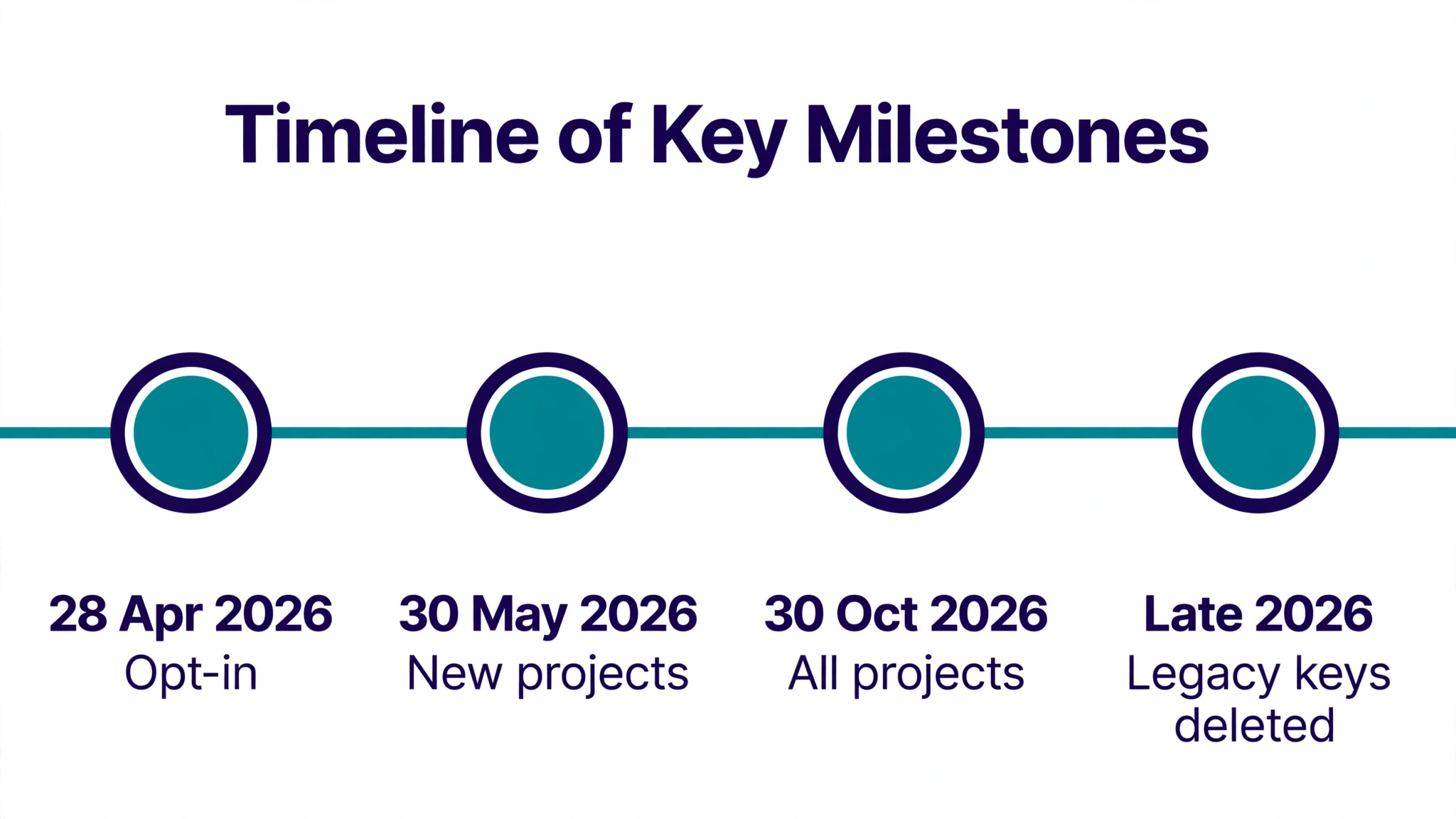
Supabase has spent 2026 tightening the defaults, and the change that matters most is already in force. Here is the timeline, from Supabase's own changelog and documentation.
| Date | What changed |
|---|---|
| March 2026 | Schema enumeration restricted, so a stranger cannot list your tables as easily. |
| 28 April 2026 | Changelog: new tables in the public schema will no longer be exposed to the Data API automatically. An opt-in setting appears at project creation, alongside a Data API exposure badge in the dashboard, granular per-table grants, and an RLS-on-by-default toggle. Supabase's stated reason names the cause directly: "Today, agents, CLI scripts, and AI platforms create tables too, and many of those operations do not have a human reviewing the diff." |
| 18 May 2026 | pg_graphql is no longer enabled by default on new projects. |
| 30 May 2026 | The no-automatic-exposure setting becomes the default for all new projects. |
| 30 October 2026 | The setting is applied to all existing projects. From this date, a new table in public needs an explicit Postgres grant before the Data API can see it, and a missing grant fails with 42501 permission denied. |
| Late 2026 | The legacy anon and service_role keys are deleted, exact date still to be confirmed. Migrate to publishable and secret keys before then, or your app will break. |
The 30 October change is real progress, and it stops the most common accident: a new table silently becoming reachable the moment it is created. But read the changelog's own limit carefully. Existing tables are not affected — they keep their current grants and stay reachable. The change covers only new tables, and only in the public schema; tables in storage, auth, realtime and custom schemas keep their previous defaults. And it changes grants, not RLS: a table with no grant is invisible to the API, which is safe, but a table with a grant and no RLS is exactly as open as it was. If your project was built before 30 May 2026, nothing about its existing tables changed on 30 October. Check them yourself.
The 10-minute check for your project
Run this on a project you own, with throwaway test rows. It is the same check our RLS tester guide gives in full; this is the short version.
- Security Advisor first (2 minutes). In your Supabase dashboard, open Advisors, then Security Advisor. Clear every RLS finding: no table with RLS off, no table with RLS on and no policy, no view exposing
auth.users. Also clear the leaked-password warning if your project is on Pro. - The stranger test (3 minutes). With only your project URL and public key — both already in your site's code — ask for a private table:
curl "https://YOUR-PROJECT.supabase.co/rest/v1/profiles?select=*&limit=5" \
-H "apikey: YOUR_PUBLIC_KEY"
Rows coming back means anyone on the internet can read them. An empty list
[]is what you want — but only if the table actually has rows. If it is empty, the result proves nothing. Seed known rows first. - The two-user test (5 minutes). Create two test accounts. Signed in as A, try to open B's record. Then sign out and try again. If the record opens in either case, stop — that is a launch-blocking leak. Then, signed in as A, try to change your own
roleorplancolumn. If it works, RLS is not the problem; a table-wide UPDATE grant is. Restrict it with a column-level grant that names only the columns users may change. - Buckets and keys (2 minutes, after the ten). In Storage, check each bucket's public switch — anything that belongs to one person stays private. In your built JavaScript, search for
sb_secret_andservice_role. Either one in client code means the database is already open, whatever your policies say.
If all four pass, your project held against a stranger and a second user. That is a useful signal, not a certificate. Re-run the stranger test after every prompt that touches data, because AI tools routinely add a table without policies, or "fix" a locked table by adding using (true).
What Security Advisor cannot see
Security Advisor is the right first step, and it is free and built in. It is also a settings reader, not a tester: it never sends a request as a stranger or as another user. These are the gaps it cannot close for you.
- A policy that is too loose.
using (true)on a private table passes the Advisor and still leaks. Only a request as another user catches it. - Columns. RLS filters rows, not columns. A user who can edit their own row can edit their own
rolecolumn unless a column-level grant stops them. - Views and functions. A view runs with its creator's rights unless it is set to
security_invoker, and asecurity definerfunction runs with full rights. Both can hand out rows your policies were meant to withhold. - Storage policies. A
selectpolicy onstorage.objectsthat only checks the bucket lets every signed-in user list and read every file in it. - Edge Functions. The Advisor does not read your function code, so a function that never checks its caller is invisible to it.
- Realtime DELETE events. RLS does not filter them, and no Advisor check will tell you.
- A secret key in your front end. No database check can save a project whose master key ships in its JavaScript.
The pattern is the same in every case: the Advisor checks settings, and the leak lives in behaviour. Test behaviour — as a stranger, and as a second user — and the settings checks become a safety net rather than the whole proof.
The short version
Supabase the platform is secure: audited, encrypted, pen-tested, and backed up on paid plans. Your project is secure only where you have made it so, and the defaults are split — encryption, backups and bucket privacy are on, while RLS on agent-created tables, grants, SSL enforcement, network restrictions, leaked-password protection and account MFA are all yours to switch on. The 2026 changes help new tables, not existing ones, so check the tables you already have. And remember the sentence Supabase itself writes at the top of the split: it secures the infrastructure, and you secure your application.
PrivacyReport's free scanner checks your live app from outside for exposed tables and readable database rows, the same way a stranger would see them — run it now, and again after every change that touches your data.
FAQs
Is Supabase secure? The platform is: SOC 2 Type 2 audited, ISO 27001 certified, encrypted at rest with AES-256 and in transit with TLS, with regular penetration tests. Your project is a separate question — it is only as secure as its Row Level Security policies, grants and keys. In September 2026, UpGuard found 16,326 Supabase databases with tables a stranger could read, all on the same audited platform.
Is Supabase safe by default? Partly. Encryption, backups on paid plans, private storage buckets and Edge Function JWT checks are on by default. Row Level Security is on only for tables created in the dashboard's Table Editor — tables created with SQL or by a coding agent start with it off — and SSL enforcement, network restrictions, leaked-password protection and account MFA are all off until you turn them on.
Is it safe to expose the Supabase anon key? Yes, if Row Level Security is on. The publishable key (the new name for the anon key) is public by design and ships in your JavaScript. What it can reach is decided by your policies and grants. The secret key is the opposite: it bypasses RLS entirely and must never appear in client code or a repository.
Can anyone read my Supabase database with the public key? They can read any table the public key can reach that has no effective Row Level Security. Test it yourself with a curl request from outside your app, using only your project URL and public key. If rows come back, anyone on the internet can read them.
What does the 30 October 2026 Supabase change mean? From 30 October 2026, new tables in the public schema need an explicit grant before the Data API can expose them, on all projects. It stops new tables becoming reachable by accident. It does not change existing tables, which keep their grants, and it does not turn RLS on — so check your existing tables yourself.
Does Supabase encrypt my data? Yes. All customer data is encrypted at rest with AES-256 and in transit with TLS, on every plan, with nothing for you to switch on. Encryption protects data taken from a disk or read from the wire; it does not decide which rows your public key may read. That is Row Level Security's job.
Is a clean Security Advisor result enough to launch? No. Security Advisor reads your settings; it never sends a request as a stranger or another user. A policy of using (true), an editable role column, a view that bypasses RLS, an Edge Function that never checks its caller, or a secret key in your front-end code will all pass it. Run the stranger test and the two-user test as well.
Sources
- Supabase — Security at Supabase
- Supabase — Shared Responsibility Model
- Supabase — Production security checklist
- Supabase — Row Level Security
- Supabase — Tables and data
- Supabase — Securing your API
- Supabase — Migrating to publishable and secret API keys
- Supabase — Storage Buckets
- Supabase — Securing Edge Functions
- Supabase — Password security
- Supabase — Password-based Auth
- Supabase — Breaking change: tables not exposed to Data and GraphQL API automatically
- Supabase — SOC 2 Compliance and Supabase
- UpGuard — Everything Everywhere: Systemic Data Exposure in Supabase Apps
- Wiz — Hacking Moltbook: AI Social Network Reveals 1.5M API Keys
- TechCrunch — Some Supabase customers are publicly exposing reams of people's data to the web
- BleepingComputer — Over 16,000 Supabase databases expose PII, passwords, auth tokens
Related reading
- Supabase "RLS Disabled in Public" Warning: What It Means and How to Fix It
- Is It Safe to Expose Your Supabase Anon Key? (Only If RLS Is On)
- Supabase Security Checklist for Vibe-Coded Apps (2026)
- How to Test Supabase RLS Policies (Free RLS Tester Options Compared)
- Is Your Lovable App Leaking the Supabase Service Role Key?
- Lovable Security Issues: The 7 Mistakes We See Most Often
- Vibe-Coded App Security Checklist: 25 Checks Before You Launch
- How to Secure a Vibe-Coded App: A Non-Technical Founder's Guide
- What Happens If Your API Key Is Exposed? Real Costs and a 10-Minute Fix Plan
- Is a .env File Secure? What It Protects and What It Doesn't
- Free Security Scanner for Vibe-Coded Apps: Check Yours in 60 Seconds
- How to Hide an API Key From the Browser Network Tab (and Why You Can't)
