
Row Level Security is the lock on your Supabase database. It decides which rows each person can read, add, change or delete. The trouble is that a policy can look right, sit in the right dashboard, and still leak — and nothing in the dashboard will tell you. The only way to know is to test it the way a stranger and a second user would.
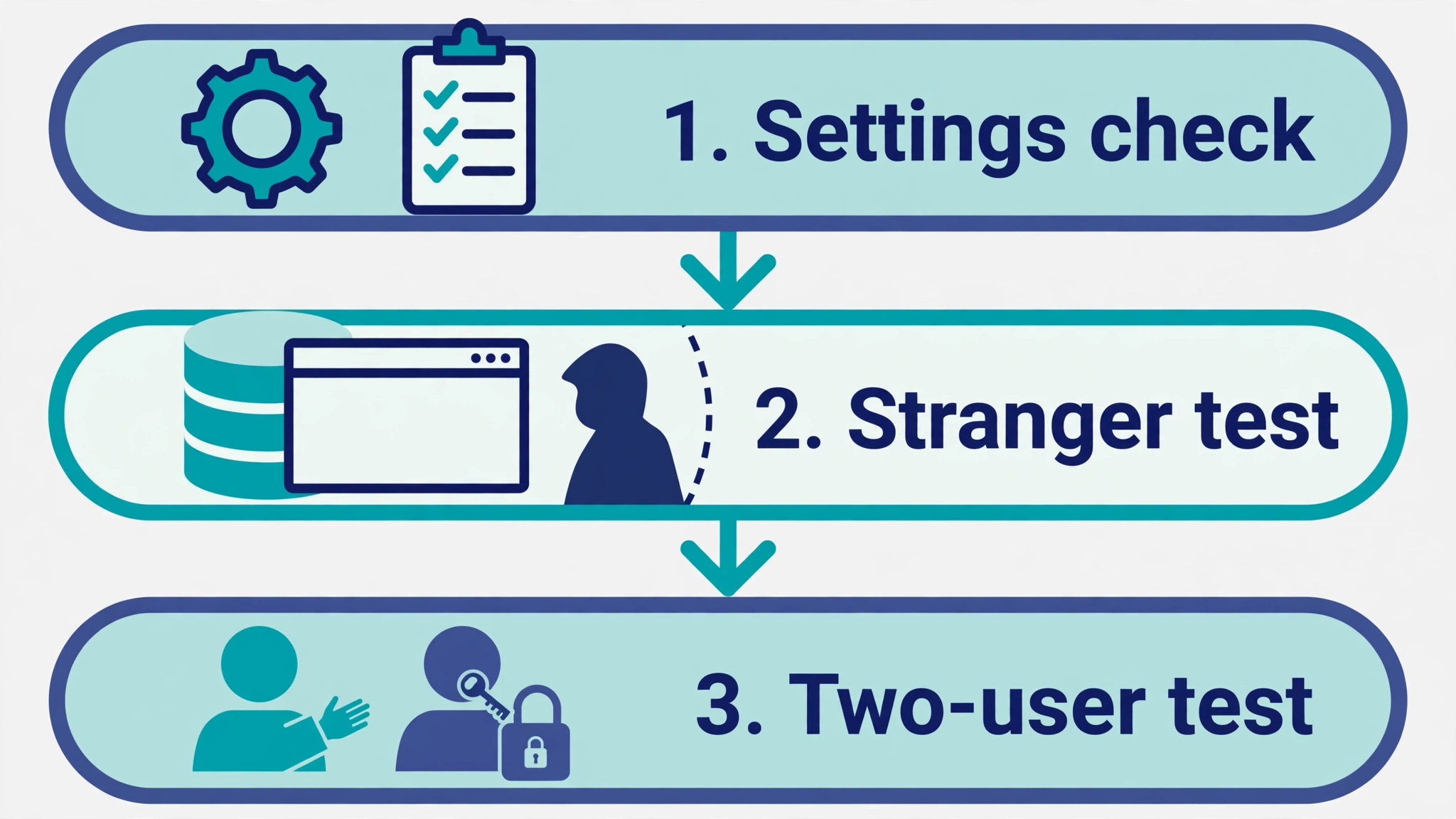
Here is the short answer. No single free tester proves your policies work. Use three layers: Supabase's own Security Advisor to catch settings mistakes, a URL scanner or a curl request to see what a stranger gets with your public key, and a two-user test to prove one signed-in user cannot reach another user's rows. Then lock the result in with pgTAP tests that run every time your database changes. This guide compares the free Supabase RLS tester options, shows what each one can and cannot see, and gives you a ten-minute test you can run with no code.
What "testing RLS" actually means
Testing RLS means answering three questions about every table your app exposes. A tester that answers only one of them has not finished the job.
1. Is RLS switched on? A table with RLS off hands every row to anyone holding your public key. Supabase's own docs put it plainly: once RLS is on, no data is accessible through the API with a publishable key until you create policies. Tables you create in the Table Editor have RLS on by default. Tables created with SQL, migrations or an AI builder often do not, and that is exactly how AI-built apps ship open tables.
2. Is the policy right? RLS on is not the same as RLS correct. A policy that says using (true) for the authenticated role lets every signed-in user read every row — and sign-up is usually open to anyone. A policy that checks login but not ownership has the same effect. A policy that covers reads but not writes leaves the door open the other way.
3. Does anything bypass the policy? A view runs with its creator's rights unless it is set to security_invoker, so it can hand out rows your policies were meant to withhold. A security definer function runs with full rights and can do the same. Storage buckets have their own policies, separate from table RLS. A tester that only reads tables will miss all of these.
Keep those three questions in mind while you read the comparison. Every option below is judged against them.
Two traps before you start
Two mistakes make most RLS testing worthless. Avoid them first, or every result after this point is suspect.
Trap 1: The SQL Editor lies to you
The Supabase dashboard's SQL Editor normally runs as a privileged database role, not as your app's users. A query that returns rows in the editor proves nothing about what a stranger or a signed-in user can see — the policies never ran. One guide puts it bluntly: test with SET LOCAL ROLE authenticated, not in the dashboard SQL editor, because the editor runs as superuser and "will happily lie to you".
The fix is to impersonate the role you are testing. Newer dashboards have a Role dropdown next to the Run button: choose anon, or pick a user for the authenticated role, and the query runs with that user's token. Without that option, impersonate inside a transaction in the SQL Editor:
begin;
set local role authenticated;
set local request.jwt.claim.sub = '11111111-1111-1111-1111-111111111111';
select * from public.profiles;
rollback;
Replace the UUID with a real user ID from your Auth dashboard. set local scopes the change to the transaction, and the rollback at the end means nothing is written. Repeat with set local role anon and cleared claims for the signed-out case. Supabase's own RLS guide documents exactly this pattern for its pgTAP tests.
Trap 2: A denial can be silent
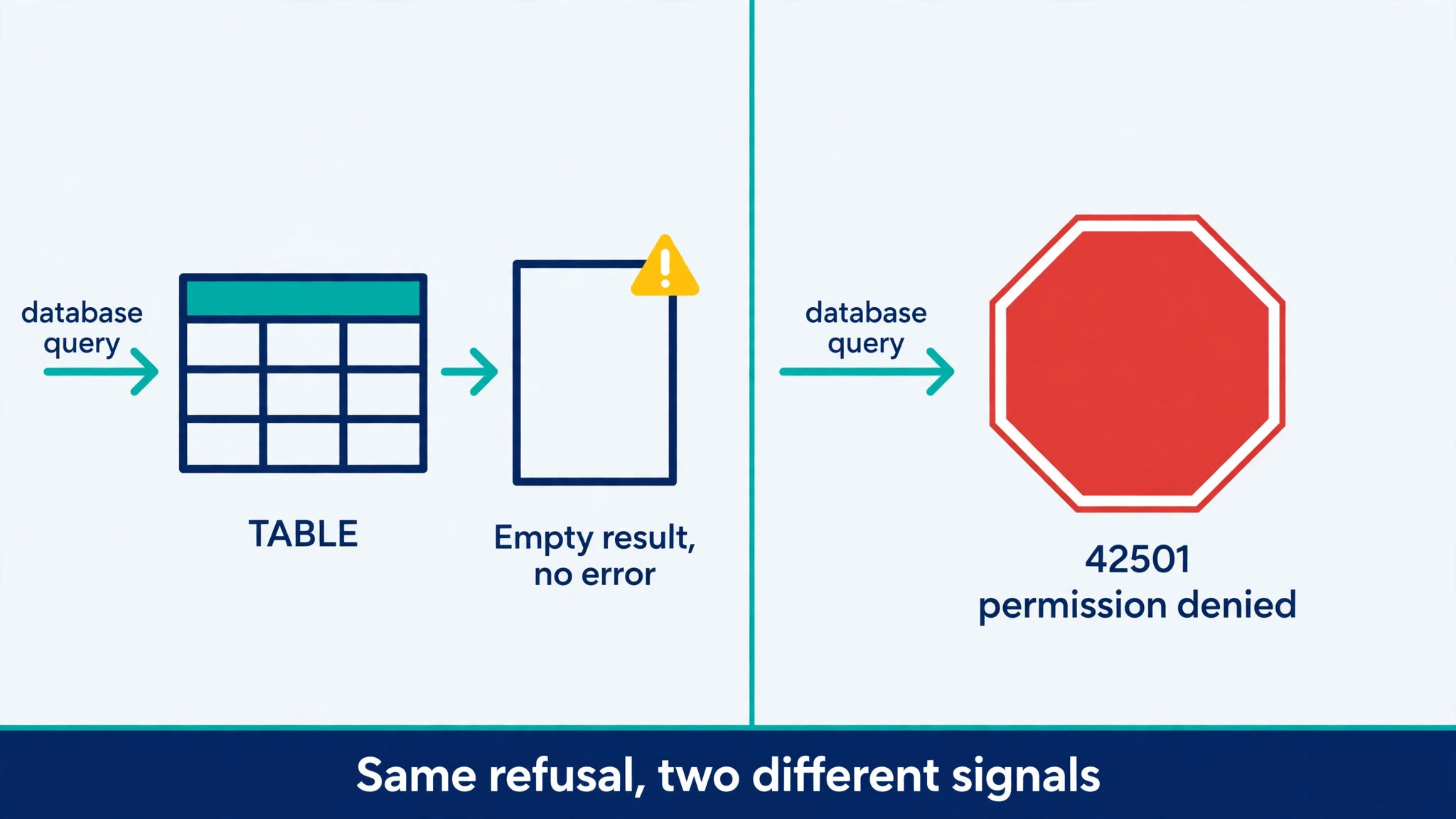
Postgres refuses a request in two different ways, and only one of them raises an error. If a grant is missing, or a with check rule is broken, Postgres raises 42501 permission denied. But if a using clause simply filters the row out, the query succeeds and returns nothing — no error, no warning, just an empty list. Supabase's docs spell out the consequence for tests: a using denial must be asserted with is_empty over the statement with returning, followed by a read proving the target row is still intact. And never prove an allowed write with lives_ok, because it passes when the write matched zero rows — which is exactly what a broken policy looks like.
The same silence applies outside the database. An empty result from a URL scanner can mean the table is empty, or that RLS filtered every row. The scanner cannot tell the difference. Seed known rows first, or the test proves nothing. A two-user test has the same hole: if user B never got a profile row, "A cannot read B's row" passes for the wrong reason. Check the setup first — both users must actually have rows — before you trust any result.
The free RLS tester options compared
Seven free options cover the three questions between them. None covers all three alone. Costs are as stated on each tool's own page on 20 November 2026.
| Option | What it tests | What it misses | Cost | Effort |
|---|---|---|---|---|
| Supabase Security Advisor | Settings: RLS off, RLS on with no policy, risky views and functions, slow policies | Whether a switched-on policy is too loose; it never sends a request as a stranger or another user | Free, built in | Open Advisors in the dashboard |
| SQL Editor role impersonation | One policy at a time, as anon or as a chosen user | Grants and API headers; slow to repeat by hand | Free, built in | SQL, in a transaction |
pgTAP + supabase test db | Every operation, both roles, repeatably, in CI | Needs a local database and written tests; does not test the live API path | Free, open source | CLI and SQL test files |
| URL scanners (RLS Checker, Vibe-Eval, Lockstamp) | What a stranger gets through the public API, no login needed | Signed-in isolation, writes (RLS Checker), Storage, Realtime, Edge Functions | Free, no signup | Paste your app URL |
| RowAttest | Real cross-tenant reads and writes on staging, with a signed report | Production (out of scope), 10 free runs a month, one project | Free tier; signed report $49 per run | Connect a staging project |
| rlsautotest | Generates the pgTAP suite and seed data from your policies, plus bypass surfaces | Beta software; needs a disposable database copy and CLI comfort | Free, open source (Apache-2.0) | One command |
| Manual two-user test | The leak that matters most: one user reaching another's rows, plus column edits | Slow to repeat; only as thorough as the checks you write | Free | Two test accounts |
1. Supabase Security Advisor — the settings check
Start here. In your project dashboard, open Advisors, then Security Advisor. It is a set of deterministic checks that flag known problems in your settings: a table with RLS disabled in public (lint 0013_rls_disabled_in_public), RLS enabled with no policy at all (0008_rls_enabled_no_policy), a view exposing auth.users, and a policy that calls an auth helper once per row instead of once per query, which slows the database as tables grow.
It is free, it needs no keys, and it catches the most common failure in seconds. Its limit is structural: it reads your settings, it never sends a request. A policy that is switched on but too loose — using (true) on private data — passes the Advisor and still leaks. Use it as the first pass, not the verdict.
Run these two catalog queries alongside it in the SQL Editor. They only read your database's structure, not your data, and they catch what the Advisor summarises:
-- Tables in the public schema with RLS off
select schemaname, tablename
from pg_tables
where schemaname = 'public' and rowsecurity = false
order by tablename;

-- Policies whose condition is simply true
select tablename, policyname, cmd, roles, qual, with_check
from pg_policies
where schemaname = 'public'
  and (qual = 'true' or with_check = 'true');
Every row the first query returns is readable by anyone with your public key. Every row the second query returns needs a decision: fine for a public product list, a leak for messages, orders or profiles.
2. SQL Editor role impersonation — the quick manual test
This is the fastest way to poke at one policy while you are writing it. Pick the Role dropdown next to the Run button in the SQL Editor, choose anon or a user, and run the query your app would run. Or use the transaction form from the trap above. It is free and built in, and it is the method Supabase's own documentation uses inside its test examples.
Its limits are that it tests the database, not the API — grants and request headers are not exercised — and it is slow to repeat by hand. Use it to debug a policy. Do not use it as your only proof.
3. pgTAP and supabase test db — the repeatable proof
This is the option Supabase itself recommends, and the only one in this list that runs automatically after every change. You write one test file per table under supabase/tests/, named <table>_rls_test.sql, and run it with supabase test db. The file asserts allow and deny for select, insert, update and delete, for anon and authenticated. Supabase's guide is blunt about why: "Until the suite passes, you don't know whether the policies do what you intended."
A test switches role and identity the same way as the manual check — set local role authenticated plus set local request.jwt.claim.sub — then asserts the exact denial. The denial table from Supabase's docs is the part most people get wrong:
| Denied by | What Postgres does | Assert with |
|---|---|---|
| A missing grant | Raises 42501 | throws_ok |
A with check violation | Raises 42501 | throws_ok |
A using clause filtering the row out | Raises nothing, matches zero rows | is_empty over the statement with returning, then a read proving the target row is intact |
Supabase also points to the supabase-test-helpers package, which adds tests.create_supabase_user(), tests.authenticate_as() and tests.rls_enabled() to make the files shorter. Create a file with supabase test new <table>_rls, run the suite against a local database with the Supabase CLI, and put it in CI so a migration that drops a policy turns the build red. One discipline from the docs: prove the test can fail. Temporarily loosen a policy to using (true), watch a test go red, then put the policy back. A security test that cannot fail is not testing anything.
The cost is effort, not money. You need the Supabase CLI, a local database, and a test file per table. That is the reason most vibe-coded apps never get here — and the reason a policy can quietly go missing in a later AI edit and nobody notices.
4. URL scanners — the stranger test, no login needed
Three free scanners test your app the way a stranger would: they take your deployed app's URL, find the Supabase project and public key from your site's own code, and probe the tables through the public API. No dashboard login, no admin key, no signup.
RLS Checker (rlschecker.com) is the most focused. It sends small anonymous reads only — it creates no account, inserts no data and writes nothing — and its report states only what the check actually observed. Its honest limit is printed on the page: an empty response is inconclusive and is never turned into a green light, because the table might simply be empty. It does not test signed-in users, writes or Storage.
Vibe-Eval's Supabase RLS Checker (vibe-eval.com) goes further. It probes anonymous reads and also writes and deletes, missing user-scoped policies, over-shared columns, open RPC functions, public storage buckets and a leaked service-role key. It also lists what it does not flag: tables outside the public schema, policies based on custom JWT claims, Realtime channels and Edge Functions. Its page includes a policy starter pack and a fix order that minimises downtime: enable RLS, add the policies in the same migration, test the login paths, then rescan.
Lockstamp's RLS checker (lockstamp.github.io) pairs a guide with a free in-browser check — no signup, it runs in your tab — and documents the four catalog checks from the section above, including views that ignore your rules and security definer functions anyone can call. Its own rebuilds of 27 public projects found attacks working in 14 of them, and most of those results still needed a person to decide whether the data was meant to be public — a reminder that a scanner cannot know your intent.
Use a URL scanner after every change that touches data. It is the only option in this list that tests the live, deployed app from the outside with zero setup. Its blind spot is signed-in isolation: it cannot tell you whether user A can read user B's rows. That needs the next options.
5. RowAttest — real cross-tenant attempts, signed
RowAttest is the newest option here and the only one that signs its result. You connect a staging Supabase project — production is out of scope, and it asks for written authorisation from the project owner — and it seeds its own test users, runs a matrix of reads and writes across users and organisations, keeps the evidence and tears everything down. The free tier is one project and 10 runs a month, with no card needed; a signed PDF report with a public verify link costs $49 per run.
Its sample report, for a fictional demo app, shows the finding that matters: a cross-tenant UPDATE that returned HTTP 200 and changed the row, because the policy checked membership in using but had no with check. That is the exact failure the pgTAP denial table warns about, caught from the outside.
RowAttest is in alpha, run by one founder, and it is honest about its limits: in its own demo fixture, six of the eight planted breaks were caught and the two that were not are reported, not hidden. Use it when you need evidence to hand to someone else — a client, a co-founder, a reviewer — rather than as a daily check.
6. rlsautotest — generated pgTAP, no hand-written tests
If pgTAP is the right answer but writing the tests is the blocker, rlsautotest closes that gap. It is free and open source under the Apache-2.0 licence, featured in Supabase's July 2026 Developer Update. Point it at your database and it reads your policies from the catalog, generates the test data and identities that exercise each policy — owners, other users, anonymous visitors, role-holders, tenants — and emits a native pgTAP suite you commit and run with supabase test db, plus a per-identity access report and a CI gate that fails the build on a leak or an unprotected table.
Two of its checks are worth knowing about even if you never run it. First, it probes the two-membership user: a policy that works for a user in one team can break, hide data or over-deliver the moment that user joins a second team, because a scalar subquery returns two rows. Second, it catches the cross-policy with check leak: Postgres OR-combines the with check clauses of every permissive policy independently of which using clause matched, so a role or owner guard that sits only in using does not limit what a permitted writer can set. The fix is to repeat the guard inside each with check, or make the policy restrictive so it ANDs instead of ORs.
It is beta software (v0.x, 26 stars on GitHub at the time of writing), and its own README is explicit: point it at a disposable copy of your database, never production. Its probes are wrapped in transactions and rolled back, but the statements still run — locks, triggers and sequences fire.
7. The manual two-user test — the check no tool replaces
Every scanner above either cannot sign in, or signs in as a user it created itself. The test that catches the most common real leak is the simplest: create two ordinary accounts, sign in as user A, and try to read, change and delete user B's rows. A guide published on 15 November 2026 gives a free copy-paste script that runs seven checks on a profiles table: both users actually have rows (the setup check that stops the other results proving nothing), A can read their own row, A cannot read B's row, A cannot update B's row and B's row is unchanged afterwards, A cannot edit a protected column on their own row, A can still edit the columns they are allowed to, and a logged-out client cannot read the table.
That fifth check is the column gap, and it deserves its own paragraph, because it is the one RLS testers most often miss. RLS decides which rows a user can touch. It does not decide which columns. If authenticated holds a table-wide UPDATE grant, owner-only policies stop A editing B, but A can still edit their own row — including a role, is_admin, plan or email column. The fix is a column-level grant:
revoke update on public.profiles from authenticated;
grant update (full_name, avatar_url) on public.profiles from authenticated;
After that, updating full_name still works and updating anything else fails with 42501. List every column your profile form saves, or those edits will start failing. The same guide's advice applies to every test in this article: verify the test can fail. Loosen a policy to using (true) and run it. If nothing goes red, the test is not testing anything.
The 10-minute test (no code)
If you have ten minutes and no appetite for the CLI, this is the minimum that means something. Run it on a project you own, with throwaway test rows.
- Advisor first (1 minute). Open Advisors in your dashboard and clear the RLS findings: no table with RLS off, no table with RLS on and no policy, no view exposing
auth.users. - Stranger test (3 minutes). With only your project URL and public key — both already in your site's code — ask for a private table:
curl "https://YOUR-PROJECT.supabase.co/rest/v1/profiles?select=*&limit=5" \
-H "apikey: YOUR_PUBLIC_KEY"
Rows coming back means anyone on the internet can read them. An empty list
[]is what you want — but only if the table actually has rows. If it is empty, the result proves nothing. - Two-user test (6 minutes). Create two test accounts. Signed in as A, try to open B's record. Then sign out and try again. If the record opens in either case, stop — that is a launch-blocking leak. Then, signed in as A, try to change your own
roleorplancolumn. If it works, add the column-level grant above.
If all three pass, your policies held against a stranger and a second user. That is a useful signal, not a certificate. Lock it in with a pgTAP file per table so the next AI edit cannot quietly undo it.
What no tester can tell you
Every option above has the same boundary, and it is worth stating plainly. A tester can show that a stranger can read a table. It cannot know whether you meant that table to be public — product listings and public reviews often should be readable by everyone; messages and orders should not. That decision is yours, table by table.
And RLS is only one layer. Storage buckets have their own policies. Realtime channels evaluate RLS separately. Edge Functions run with the service role by default and bypass RLS unless you pass the user's token through. A leaked service-role key makes every other finding moot, because it skips RLS entirely. Test those surfaces separately, and re-run the stranger test after every prompt that touches data — AI tools routinely add a table without policies, or "fix" a locked table by adding using (true).
One dated warning belongs here. Since 30 October 2026, Supabase no longer grants API access to new tables automatically on existing projects. If a test now fails with 42501, check the grants before you change the policy: the table probably has no grant at all, and loosening the policy to fix it would open a hole where none existed.
The short version
A policy existing is not a policy working. Run the Advisor for settings, a URL scanner or curl for the stranger test, and a two-user test for signed-in isolation — then write it down as pgTAP so it stays proven. Watch for the three traps: the SQL Editor running as a privileged role, a denial that fails silently, and columns that RLS never protected.
PrivacyReport's free scanner checks your live app from outside for exposed tables and readable database rows, the same way a stranger would see them — run it now, and again after every change that touches your data.
FAQs
What is the best free Supabase RLS tester? There is no single best one, because no free tester covers everything. Use Supabase's Security Advisor for settings, a free URL scanner such as RLS Checker or Vibe-Eval's checker for the stranger test, and a two-user test for signed-in isolation. For repeatable proof, add pgTAP tests with supabase test db.
How do I test Supabase RLS policies? Test as the roles your clients actually use: signed out with the public key, then as two different signed-in users. Check that each one sees only the rows your policies intend, that a denied read returns an empty list, and that a denied write leaves the row unchanged. Seed known rows first — an empty table returns [] either way.
Does RLS enabled mean my tables are private? No. Grants and policies decide access together. A table with RLS on but a using (true) policy hands every row to everyone the policy names, and a missing grant can block reads independently of the policy. Test the intended roles and operations with known records.
Why does the SQL Editor show rows that my app cannot see? The dashboard SQL Editor normally runs as a privileged role, so your policies never run. Use the Role dropdown next to the Run button to impersonate anon or a chosen user, or run the query inside a transaction with set local role and set local request.jwt.claim.sub.
What does a 42501 error mean when testing RLS? It means Postgres refused the request before, or instead of, the policy. Since 30 October 2026, new tables on existing projects get no automatic grants, so a 42501 usually means a missing grant — check the grants before loosening the policy. A using-clause denial, by contrast, raises no error at all and just returns no rows.
Can a user change their own role if RLS is on? Yes, if they hold a table-wide UPDATE grant. RLS filters rows, not columns, so an owner-only policy stops a user editing someone else's row but not their own role, is_admin or plan column. Restrict it with a column-level grant that names only the columns users may change.
Is a clean RLS scan enough to launch? No. A clean anonymous scan says a stranger could not read or write what was probed. It says nothing about one signed-in user reaching another's rows, about Storage, Realtime or Edge Functions, or about a service-role key in your front-end code. Run the two-user test and check those surfaces separately.
Sources
- Supabase — Row Level Security
- Supabase — Test Row Level Security policies with pgTAP
- Supabase — Advisors
- RLS Checker — Supabase RLS Checker | Free Public Access Test
- Vibe-Eval — Supabase RLS Checker: Free Scan for Exposed Tables
- Lockstamp — Supabase RLS checker: how to check your Row Level Security
- RowAttest — Test your Supabase RLS. Get a signed report.
- rlsautotest — Automatically generates a pgTAP test suite for Postgres/Supabase RLS
- Shaameer — How to test Supabase RLS with two users (script included)
- ShipLatch — How to test Supabase RLS (signed out, then as two users)
- Supabase — Breaking change: tables not exposed to Data and GraphQL API automatically
- Google Search Status Dashboard — November 2026 core update
Related reading
- Supabase "RLS Disabled in Public" Warning: What It Means and How to Fix It
- Is It Safe to Expose Your Supabase Anon Key? (Only If RLS Is On)
- Supabase Security Checklist for Vibe-Coded Apps (2026)
- Is Your Lovable App Leaking the Supabase Service Role Key?
- Vibe-Coded App Security Checklist: 25 Checks Before You Launch
- Lovable Security Issues: The 7 Mistakes We See Most Often
- How to Hide an API Key From the Browser Network Tab (and Why You Can't)
- Is a .env File Secure? What It Protects and What It Doesn't
- Free Security Scanner for Vibe-Coded Apps: Check Yours in 60 Seconds
- Copy-Paste Security Prompts for Vibe Coders (Cursor, Lovable, Replit, Claude)
- How to Keep API Keys Away From Claude Code, Cursor and Other AI Agents
- Firebase Security Rules Auditor: How to Audit Your Rules for Free
