

Bolt.new is a safe place to build. The app it builds for you is not safe by default. That is the whole answer, and everything in this guide is the evidence for it and the fix list that follows from it.
Bolt.new is StackBlitz's AI app builder. You describe an app, it writes the code, runs it in your browser, gives it a database and publishes it to a web address ending in bolt.host. It also gives you two security checks of its own, which is more than most AI builders offer. What it cannot do is decide, for you, who may read each row of your database, which of your server functions needs a signed-in caller, or where you pasted a key. Those decisions live in your project, and that is where Bolt apps leak.
Here is the short answer. Before you launch, run Bolt's project security audit if your plan includes it, open the database Security tab either way, and then test the published app the way a stranger would: signed out, then signed in as a second account. If a stranger can read or change another user's data, if a secret key is in the JavaScript your visitors download, or if a server function answers anyone who finds its address, the app is not ready — whatever the audit says. The rest of this guide shows you the six holes that produce those results, what Bolt's checks do and do not catch, and a ten-minute test that proves each fix on the live app.
Who is responsible for what
Bolt's documentation draws the line clearly, and it is worth reading before you argue with it. The platform keeps your secret keys out of the browser and turns row-level security on for the tables it creates. Everything else about who may do what in your app is yours.
| Area | Bolt handles | You handle |
|---|---|---|
| Secrets | Stores them and reads them only inside server functions, never in your files or the published site | Never pasting a secret key into code, chat or a public variable, and rotating one that leaked |
| Database | Turns RLS on for the tables it creates, and flags risky settings on the Security tab | RLS on tables you add, and policies that limit each user to their own rows |
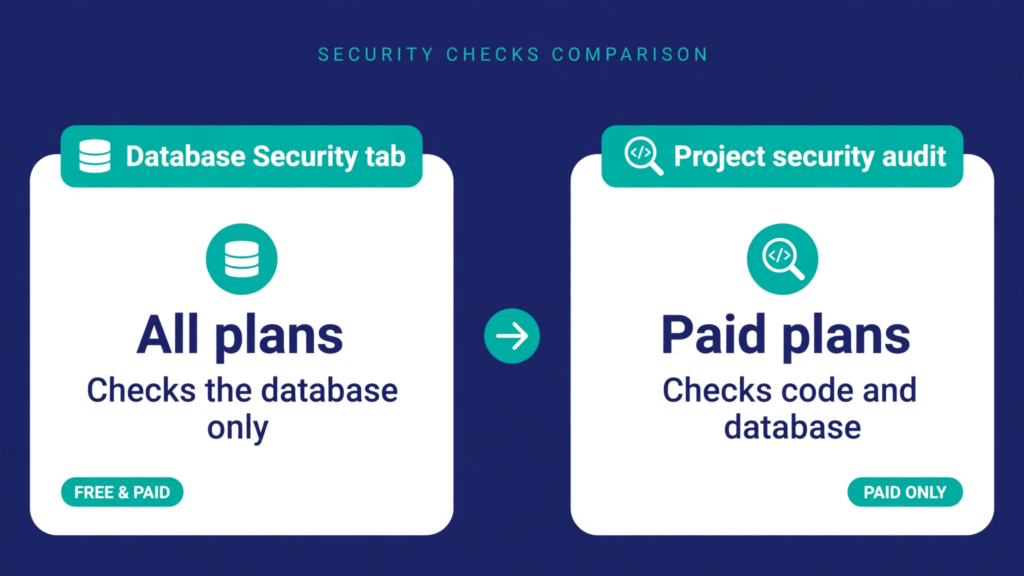
| Security checks | A project security audit on paid plans and a database Security tab on all plans | Running them, doing the items marked as needing your action, and testing the live app |
| Publishing | Hosting, HTTPS, and the publish button | Choosing public or private, and knowing the free plan publishes public only |
| Code | Writing it, and fixing what the audit finds | Reading what it wrote where money, data or access is involved |
Bolt says as much itself. After an audit, it fixes most problems on its own, but some fixes are yours to make, such as a setting in a payment or email provider you connected, and Bolt lists them under a Needs your action heading in the chat.
The stack Bolt builds, and where it leaks
A Bolt app is usually a Vite and React app with a Bolt Database behind it. Bolt Database runs on Supabase technology: you can claim it into a Supabase account, its Security tab uses Supabase's Security Advisor checks, and Bolt describes its sign-in email templates as powered by Supabase technology. The browser talks to the database directly with a public key, and anything secret is supposed to run in a server function — Bolt's name for a small piece of backend code, also called an edge function — that runs on Bolt's servers.
That shape has three leak points, and they are the same three that show up in every large scan of AI-built apps. Escape, a security company, assessed more than 5,600 publicly available vibe-coded apps in October 2025 and found 34,232 vulnerabilities, nearly 2,000 of them high-impact, plus more than 400 exposed secrets and 175 instances of personal data, including medical records and bank account numbers. Most of the flaws were reachable without signing in, and Escape notes that its passive, non-destructive scans make the numbers a lower bound. The sample was heavily skewed toward Lovable, with Bolt.new among the smaller samples, so the numbers describe the pattern more than Bolt itself. The pattern is what matters: misconfigured permissions, not injection, were the primary cause — especially database policies that AI tools struggle to configure correctly.
Bolt-specific evidence is thinner but concrete. Minimum Code scanned 100 public Bolt exports on GitHub in October 2026 and found that 7 of the 35 exports with database migrations still let anyone with the public key update or delete rows, 5 of 100 had third-party keys committed, and 13 of 100 committed a real .env file. Their test app was clean — RLS on all 16 tables, owner-only writes — which is the point: Bolt can build a clean app. It just does not guarantee one.
The six holes Bolt apps ship with
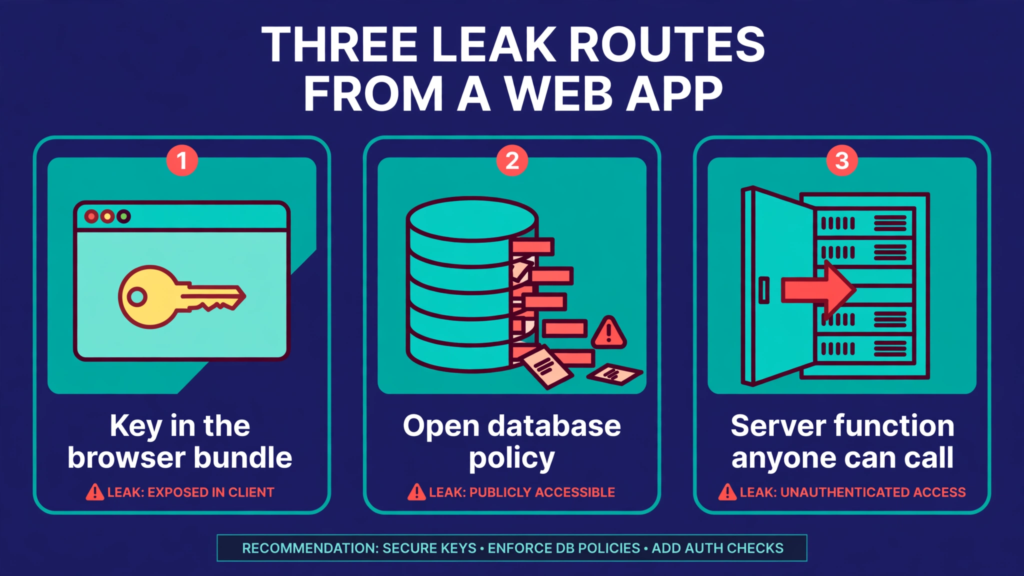
1. RLS Policy Always True, and its quieter cousin
Bolt turns on row-level security (RLS) for the tables it creates. RLS is the database feature that decides which rows a request can read or change, and a policy is the rule that says who may touch which rows. Bolt's own documentation is blunt about the starting position: "Anyone who visits your site can send requests to your database directly, without using your site's screens."
If your app has no sign-in, Bolt may write policies that let any visitor view, add, change and delete the data. The database Security tab flags these as RLS Policy Always True, which means a policy has no condition limiting who can access a row. The warning is acceptable only if you are comfortable with every visitor being able to change or delete that data. A public menu fits. Orders, messages and user records do not.
There is a quieter version of the same mistake. A policy that checks only that someone is signed in — auth.uid() is not null — does not trip the always-true warning, because it does have a condition. But every signed-in customer can then read every order, because the policy never checks that the order belongs to the caller. The fix is a policy that compares the signed-in user's ID with the owner column on the row, for each operation separately: select, insert, update and delete. Supabase's own RLS documentation makes the same point in plainer terms: a table protected only by policies still hands the anonymous role an insert path if you never revoke the grant, and a missing grant raises a 42501 error before any policy runs. Read the policies, not just the RLS switch — that is the sentence Minimum Code's scan supports, and it is the sentence most Bolt builders skip.
If you added any tables yourself, check those first. Bolt turns RLS on for the tables it creates; tables you add need it turned on too. A table without RLS can be read and changed by anyone.
2. Keys in the browser
This is the most common leak, and the easiest to understand once you see the rule. Bolt apps are Vite apps, and Vite copies any variable starting with VITE_ into the JavaScript bundle at build time. Vite's own documentation says it plainly: "Variables prefixed with VITE_ will be exposed in client-side source code after Vite bundling" and "VITE_* variables should not contain sensitive information such as API keys."
So VITE_OPENAI_API_KEY, VITE_STRIPE_SECRET_KEY or a Supabase secret key in a VITE_ variable is not a configuration choice. It is a publication. Anyone who opens your site downloads the key with the page. Escape's scan found 400+ leaked secrets in public vibe-coded apps, including 6 GitHub tokens, 7 OpenAI API keys and 2 admin payment API keys, and traced most of them to privileged credentials embedded in frontend bundles or database policies that were never configured.
Bolt gives you the right place for these keys: the Secrets page, under the database icon. Secrets only work with server functions, and Bolt reads a secret's value only when a server function needs it. Bolt's documentation states it without qualification: "Bolt never writes that value into your project's files, the code that runs in your users' browsers, or your published site." The decision table is short.
| Value | Where it goes |
|---|---|
Supabase project URL, publishable key (sb_publishable_...) or legacy anon key | .env with a VITE_ prefix, with RLS on every table |
Supabase secret key (sb_secret_...) or legacy service role key | Secrets, read only by server functions |
Stripe publishable key (pk_...) | .env, it is designed to be public |
Stripe secret key (sk_...), restricted key (rk_...), webhook signing secret (whsec_...) | Secrets |
| OpenAI, Anthropic, Resend and other API keys | Secrets |
Two details catch people. First, the Supabase publishable key in your JavaScript is expected, not a leak — it is public by design, and your RLS policies decide what a stranger can do with it. Second, the legacy Supabase keys are being retired: new projects use sb_publishable_... and sb_secret_..., and the old anon and service_role keys are scheduled to stop working in late 2026, with the exact date still to be confirmed. If your Bolt app still uses the legacy keys, rotate to the new format before that deadline, and treat the old secret key as compromised if it ever appeared in client code or a repository.
Stripe draws the same line in its own documentation: only publishable keys are safe to expose, and you should never put other keys "in source code or configuration files checked into version control". If a key was ever exposed, removing it from the code is not enough. Rotate it at the provider — Stripe gives a seven-day grace period during rotation in which both the old and new keys work, so you can migrate without downtime.
3. Server functions that never check the caller
A server function hides the key, but it does not hide the function. If a function takes a user ID, an order ID or a conversation ID from the request body and never checks that the caller owns it, anyone who finds the function's address can use it — to spend your AI budget, to read another user's data, or to write rows that belong to someone else.
Bolt's audit does look for this class of problem. It checks "ways your app can be misused", including whether users can change a price, skip a required step or claim the same single-use item twice, and it checks who can see and change data. But the audit reads your code; it does not sign in as two real customers and send real requests. Minimum Code's test app had exactly this shape of bug: an AI edge function that wrote usage records with the service role key using a conversation ID taken from the request body, without verifying that the caller owned that conversation.
The fix is one sentence you can paste into Bolt: "In every server function, verify the caller from the Authorization header before reading or writing anything, and return an error for a caller who does not own the record." Then test it from the outside, as the ten-minute check below shows.
4. Public by default, and who can see your .env
On the Free plan, every published Bolt site is public. Private sites — visible only to your team and people you invite — need a paid plan, and the Publish menu defaults to public. That means the first time you click Publish to show a friend your in-progress app, it is on the open web, listed by search engines, with whatever data and keys the app currently ships. Publish privately or not at all until the checks below are clean.
Sharing the project is a separate decision from publishing the site, and the roles matter. A Viewer can open, view and duplicate the project but cannot see environment variables. An Editor can prompt and edit the code — and can see environment variables. A Co-owner has full control. Bolt's own words: "Environment variables are never visible to viewers, so you can share projects without exposing secrets." They are visible to Editors, so only give edit access to people you trust with your keys. On the Free plan you can invite at most three collaborators per project.
Your .env file is part of your project's code. Bolt hides it from view-only collaborators, but Editors and co-owners can still see it, and if your code reads a value from the browser, that value ends up in what is sent to anyone visiting your published site. Secrets are different: once you create one, Bolt never shows its value again to anyone, and never writes it into .env, your other files, or your published site.
5. The headers gap on Bolt hosting
Security headers are short instructions your server sends with every page — they tell the browser not to let another site frame your app, not to guess file types, and to load scripts only from places you allow. They come from whatever hosts your app, not from your React code.
On Bolt-hosted apps checked on 31 October 2026, the apps sent HSTS but no Content-Security-Policy, no X-Frame-Options and no nosniff. Bolt's documentation describes no setting for custom headers on its own hosting, and a _headers or vercel.json file in your project does nothing unless Netlify or Vercel is the host actually serving the site. To add the headers, publish the same build on Netlify — where a _headers file in the public/ folder sets them — or put Cloudflare in front of your custom domain.
Headers are the least urgent item on this list. A leaked secret key or a database table anyone can read matters far more, and the header check in the ten-minute test below comes last for that reason. But a scan that flags missing headers on a Bolt app is usually right, and "Bolt hosting" is the reason.
6. The export traps
Sooner or later you will want the code out of Bolt, and the export has three traps worth knowing before you need it.
First, the GitHub sync is two-way and eager. Bolt commits every change that does not break the project, and pulls GitHub commits about every 30 seconds. The repository starts private on the main branch, which is the safe default — but every prompt that works becomes a commit, and a key pasted into code in an early prompt is in the history even if a later prompt removes it. GitHub's push protection is off by default for repositories, so the safety net is the review before the first push, not the platform after it.
Second, .env and edge-function secrets are not in the repository. A clean clone of an exported Bolt app opens to a blank page with a console error about a missing Supabase URL until you recreate .env from .env.example. That is good security and bad documentation: Bolt writes no setup steps in the README, so the first person to deploy the export has to guess. Recreate only the public values in .env and set the secrets again in the new host's secret store.
Third, your database is not in the export. The export carries your schema as migration files, not your data, users or sign-in. Bolt's way out is to claim the Bolt Database into your own Supabase account, from the database icon, Advanced tab, Claim. Claiming needs a Pro or Teams plan and you must own the Supabase organisation. Claiming into a Supabase Free-plan account turns off leaked password protection, which needs a Supabase Pro plan or higher. On the free plan, your only route is exporting tables as CSV or JSON and rebuilding the backend by hand — rows only, with sign-in, policies and functions rebuilt. Decide which side of that line you are on before your app has real users, not after.
What Bolt's security checks catch, and what they do not
Bolt has two checks, and they are worth using. They are not the same check, and confusing them is the most common reason a Bolt builder launches with a clean result and an open app.
| Check | Where | Who gets it | What it looks at |
|---|---|---|---|
| Database Security tab | Database icon, then Security | All plans | Missing RLS, policies that are too open, plus warnings such as Function Search Path Mutable and Leaked Password Protection Disabled |
| Project security audit | Publish, then Run security audit | Paid plans | Who can see and change data, what the app makes public, sign-in and session handling, misuse such as changed prices, visitor input such as file uploads, and keys in code or in the browser |
The project audit reviews your code and your database, fixes what it can, and neither the audit nor its fixes use tokens — prompting Bolt to audit in the chat does. You can run up to 30 audits a day, resetting at midnight UTC. When one finishes, the button changes to Security audit up to date.
Four limits belong next to that description, because Bolt documents all four and no competitor lists them together.
- The audit is a first pass. Bolt says so, and the audit's own categories are the evidence: it checks patterns in code and settings, not behaviour. It never signs in as two real customers, completes a checkout, clicks a reset email or restores a backup.
- A clean result goes stale. The button reads "up to date" until you change something. Run the audit again after new changes, and reopen the database Security tab after every schema change.
- Restoring an earlier version undoes fixes. Bolt warns that going back to a version from before a fix "also removes the security changes Bolt made". If you restore, re-run the audit.
- Some items are yours. After an audit, Bolt lists what it could not fix under Needs your action — usually a setting in a connected payment or email provider. Those items stay open until you change the setting yourself.
The database check has its own limit, stated on its own page: it checks only your database, not your whole project. A clean Security tab says nothing about keys in your code, server functions without caller checks, or headers.
What changed on 30 October 2026
On 30 October 2026, Bolt changed the default for new database tables: tables are now private by default, and an app needs explicit permissions to read or write them. Supabase made the parallel change the same day for new tables. This is a real improvement, and it changes what the most common advice means.
It does not fix apps built before the change, and it does not fix policies. A table created before 30 October keeps the permissions it was given. A policy that lets any signed-in user read every row is still a policy that lets any signed-in user read every row — private by default is about new tables having no permissions at all, not about your policies being correct. If your app predates the change, open the Security tab and read every policy as if the change never happened, because for your tables it did not.
The 10-minute pre-launch check
Run Bolt's checks first, then prove the result on the published app. Every step below tests the running app, not the code.
- Run the project security audit from Publish, if your plan includes it, and do every item under Needs your action. Then open the database Security tab and ask Bolt to fix what it flags.
- Read every policy. In the database settings, open each table and read its policies. For each one, say out loud who it lets in: "anyone", "any signed-in user", or "only the owner of the row". Anything in the first two groups needs a reason written down.
- Test as two users. Create two accounts. Sign in as the first, create an order, a message or a record. Sign in as the second and try to open, change and delete the first user's record — through the app's screens and, if you can, through the database API with the public key. If the second user sees the first user's data, the policy is wrong.
- Test signed out. Open the published app in a private browser window. Every page that holds private data should ask you to sign in, and an unauthenticated request to the database should return nothing.
- Search the bundle for keys. In your browser, open the published site, open DevTools, and search the JavaScript it loads for
sk-,sk_,AKIAandsb_secret. Anything that matches is a secret in the browser, and it needs rotating at the provider, not just removing from the code. - Call a server function as a stranger. Find a server function that reads or writes user data and call it without signing in, then signed in as the wrong user. It should refuse both.
- Check the headers. Run
curl -I https://your-app.bolt.host/and look forstrict-transport-security,x-content-type-options,x-frame-optionsandcontent-security-policy. Expect HSTS only on Bolt hosting; if you need the rest, move the build to Netlify or put Cloudflare in front of your domain. - Check what is public. Confirm the Publish menu shows the visibility you intend. On the Free plan it is public by definition — if that is not what you want, do not publish yet.
- Check the repository. If you connected GitHub, open the repository and confirm no
.envfile and no secret key is in the history. If one is there, rotate it at the provider first, then clean the history. - Re-run the audit after the fixes. A fix changes the project, and the "up to date" label from before the fix no longer means anything.
If any step fails, that step is the launch blocker. A green audit with a failed two-user test is a failed launch check, not a pass.
PrivacyReport's free scanner checks the published app from outside, the way a stranger sees it — keys in the JavaScript, tables that answer without signing in, and the headers your host actually sends. Run it on your live URL after the ten-minute check, and treat anything it flags the same way: fix it, rotate anything that leaked, and test again before you publish.
Frequently asked questions
Is Bolt.new safe?
Bolt.new the platform is safe to build on: it is StackBlitz's AI builder, with built-in hosting, a built-in database and two security checks of its own. The app it builds for you is not safe by default. The platform keeps secrets out of the browser and turns RLS on for the tables it creates; the policies, the server functions and the keys are yours.
Is the Supabase key in my Bolt app's JavaScript a leak?
No, if it is the publishable key (sb_publishable_... or the legacy anon key). It is public by design, and your RLS policies decide what a stranger can do with it. Yes, if it is the secret key (sb_secret_... or the legacy service role key), which bypasses RLS entirely and belongs only in Secrets, read by server functions.
Where do I put an OpenAI or Stripe secret key in Bolt?
In Secrets, under the database icon — never in .env and never with a VITE_ prefix. Secrets are read only by server functions, and Bolt never writes them into your files, your browser code or your published site. Your AI calls must run in a server function, not in the browser.
Why does Bolt flag "RLS Policy Always True"?
It means a policy has no condition limiting who can access a row, so any visitor can view, add, change and delete the data in that table. It is fine for a public menu or blog posts, and a leak for orders, messages or user records. Bolt's documentation gives three options for a table without sign-in: visitors can only view, visitors can submit but not read or change others' data, or the data stays private behind sign-in.
Does a clean Bolt security audit mean my app is safe?
No. The audit is a first pass over code and settings. It does not sign in as two real users, complete a checkout, or test a restore. Run the ten-minute check above against the published app and treat a failed two-user test as a launch blocker.
Can I make my Bolt site private on the Free plan?
No. On the Free plan, all published sites are public, and the Publish menu defaults to public. Private sites need a paid plan. If your app is not ready for the open web, do not publish it yet.
What happens to my database if I export my Bolt app to GitHub?
It stays in Bolt Cloud. The export carries your code and your schema as migration files, not your data, users or sign-in. To move the database into a Supabase account you own, claim it from the database Advanced tab, which needs a Pro or Teams plan. On the free plan you export tables as CSV or JSON and rebuild the backend by hand.
Sources
- Bolt — Check your project's security
- Bolt — Database security settings
- Bolt — Secrets
- Bolt — Publish your project to a live website
- Bolt — Share your project
- Bolt — Supabase for databases
- Bolt — Release notes
- Supabase — Row Level Security
- Supabase — Migrating to new API keys
- Vite — Env Variables and Modes
- Stripe — API keys
- Escape — The State of Security of Vibe-Coded Apps (October 2025), as reported by Security Boulevard
- Netlify — Secret scanning
- Minimum Code — Bolt.new export code: take your app to production
- PatchPaste — How to add security headers (CSP, X-Frame-Options) to a Lovable, Bolt or Base44 app
Related reading
- Is Your Lovable App Leaking the Supabase Service Role Key?
- Lovable Security Issues: The 7 Mistakes We See Most Often
- Supabase "RLS Disabled in Public" Warning: What It Means and How to Fix It
- Is It Safe to Expose Your Supabase Anon Key? (Only If RLS Is On)
- How to Test Supabase RLS Policies (Free RLS Tester Options Compared)
- How Secure Is Supabase? What's Safe by Default and What Isn't
- How to Hide an API Key From the Browser Network Tab (and Why You Can't)
- Is a .env File Secure? What It Protects and What It Doesn't
- What Happens If Your API Key Is Exposed? Real Costs and a 10-Minute Fix Plan
- Vibe-Coded App Security Checklist: 25 Checks Before You Launch
- How to Secure a Vibe-Coded App: A Non-Technical Founder's Guide
- Netlify "Exposed Secrets Detected": How to Fix a Failed Build Safely
