
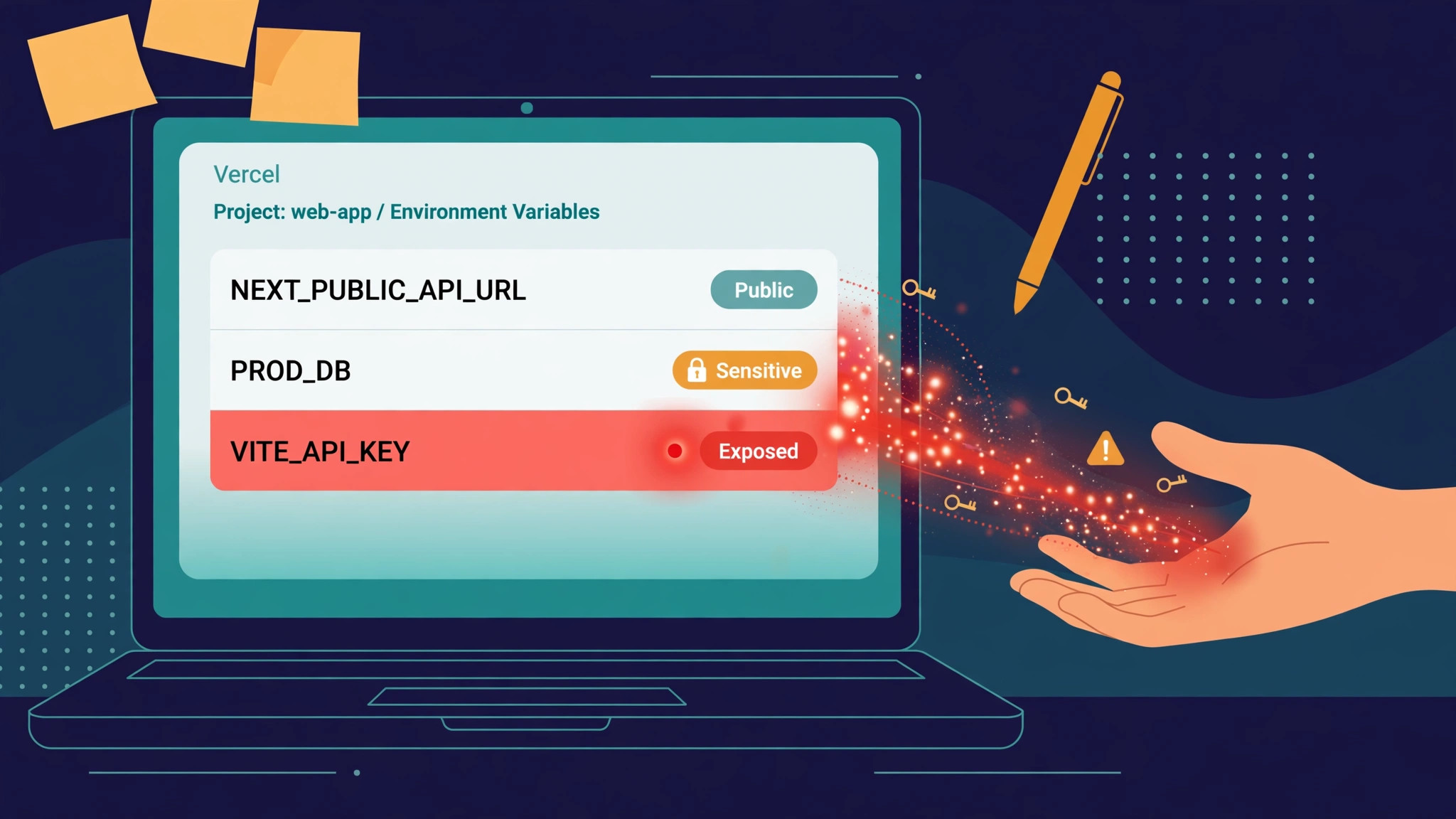
Marking a Vercel environment variable "Sensitive" does not make it secret. It makes it unreadable — to people, to the API and to the command line — after you save it. That is a real protection, and it is also a narrow one. It does nothing about the browser bundle, the build log, a preview deployment or your git history, which is where Vercel apps actually leak.
There is a second trap on top of that one. The "Sensitive" toggle no longer exists. Since 24 August 2026, Vercel asks you to choose Config or Secret when you add or edit a variable, and most of the guides you will find still describe the old toggle. If you follow one of them, you will be looking for a control that is not there, and you may miss the two facts that decide whether your key is safe: the prefix on the variable name decides whether the browser gets it, and the type decides whether anyone can read it back.
Here is the short answer. Put anything a stranger must not have — API keys, database passwords, tokens — in a Secret variable, never with a NEXT_PUBLIC_ or VITE_ prefix, and use a different value in Production from the one in Preview and Development. Then check the built app, not the dashboard: search the JavaScript your visitors download, read your build logs, and look at what your preview deployments expose. If a secret is in any of those places, the Secret type did not fail. It was never designed to cover them. The rest of this guide shows you exactly what it does cover, what still leaks, and a ten-minute check that proves each fix on your own project.
The rename: Sensitive is now Config vs Secret
Vercel announced the change on 24 August 2026: when you add or edit an environment variable, you now choose Config or Secret instead of using the Sensitive toggle. Variables you already marked Sensitive were automatically treated as Secrets and keep working without any migration. The documentation page still lives at the old address — its URL ends in sensitive-environment-variables — but its title is now "Config and Secret environment variables", and that is the wording the dashboard uses today.
The two types do different things.
| Type | What happens to the value | Use it for |
|---|---|---|
| Config | Remains readable after saving, for team members whose role gives access to the project’s environment variables | Non-sensitive configuration: public prefixes, endpoints, feature flags, anything you may need to review later |
| Secret | Write-only after saving — nobody can read the value back from the dashboard, the API or the CLI | Passwords, API keys and tokens |
Three details from Vercel’s own documentation matter when you choose. First, you cannot edit the key of a Secret after it is saved, and you cannot convert a saved Secret to Config in place — to change type you delete the Secret and create a new Config variable. Second, Secrets are now allowed in Development, which reverses the earlier rule that limited Sensitive variables to Production and Preview. Third, any change you make to an environment variable applies only to new deployments, never to previous ones, so a fix needs a redeploy before it takes effect.
The CLI has its own defaults, and they are worth knowing because they decide what happens when you add a variable without thinking about type. If you run vercel env add without a type flag, Production and Preview default to Secret, Development defaults to Config, and custom environments default to Secret. Variables with a public framework prefix such as NEXT_PUBLIC_ are always stored as Config — the CLI forces that, because a public-prefixed value is public by definition. You can set the type explicitly with --type config or --type secret; the old --sensitive and --no-sensitive flags still work and map to the same two types.
What Secret actually protects
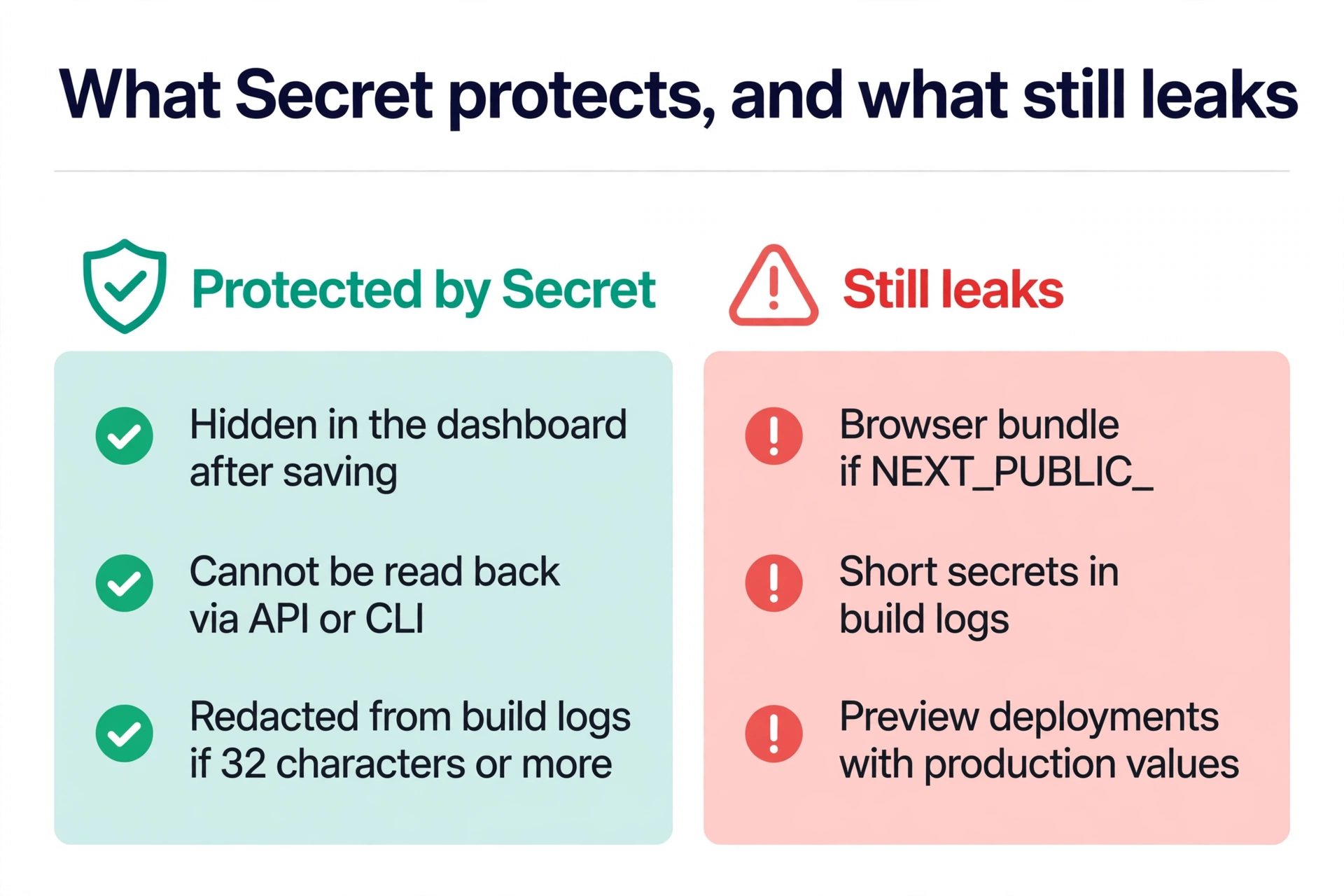
A Secret variable protects the value from people and from read-back. Once saved, the value is write-only: nobody on the team can open the dashboard and see it, the API will not return it, and vercel env pull will not download it. If your local .env.local already has a real value for that key, the CLI keeps it; if it does not, the CLI writes a placeholder for you to replace with a local-only value. That behaviour is deliberate. A Secret you could pull back would be a Secret any teammate with CLI access could pull back too.
Vercel encrypts environment variable values at rest, and the build log redacts Secret values that appear in logs — with a limit that matters and that this guide covers below. Every redaction creates an Activity Log event with the key name, project and deployment, never the value, so you can see that a redaction happened without the value being exposed again.
There is real-world proof that this protection works, and it comes from Vercel itself. In April 2026, an attacker compromised Context.ai, a third-party AI tool used by a Vercel employee, used that access to take over the employee’s Vercel Google Workspace account, and from there enumerated and decrypted non-sensitive environment variables belonging to a limited subset of customers. Vercel disclosed the incident on 19 April 2026, told the affected customers to rotate their credentials immediately, and closed the incident on 16 October 2026 once all remediation was complete. The bulletin describes the exposed set as non-sensitive variables "that decrypt to plaintext". It does not state that Secret values were accessed. That is the point of the type: the values that were readable were the ones stored as readable.
Vercel’s own advice in that bulletin is the rotation order this guide follows. Review and rotate environment variables not marked sensitive as a priority, enable multi-factor authentication, review the activity log, investigate recent deployments and delete any unexpected ones, and set Deployment Protection to Standard at a minimum. And one line in the bulletin deserves to be quoted in full, because it is the mistake people make first: "Deleting your Vercel projects or account is not sufficient to eliminate risk. Compromised secrets may still provide access to production systems, so you must rotate them before deleting your projects or account."
What still leaks
Secret is at-rest protection, not runtime isolation. The build container still decrypts Secret values to use them, and your code still receives them in plaintext at runtime. Everything below is a route a Secret does not close.
1. The browser bundle: the NEXT_PUBLIC_ and VITE_ prefixes
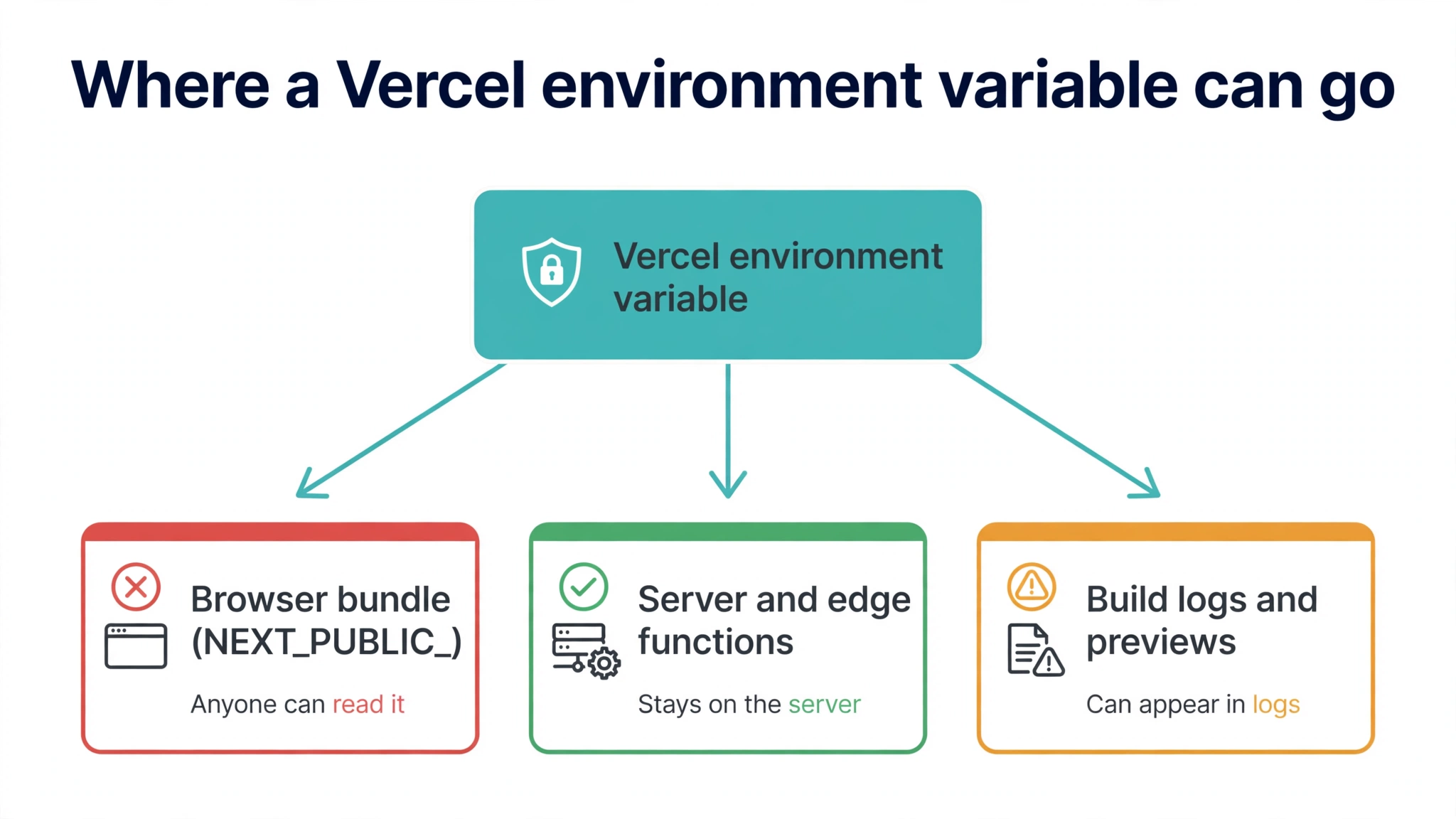
This is the most common leak, and the type system cannot save you from it. In Next.js, a variable starting with NEXT_PUBLIC_ is inlined into the JavaScript bundle at build time: Next.js replaces every reference to process.env.NEXT_PUBLIC_... with the hard-coded value, and the value is frozen from that point — changing the variable later has no effect until you rebuild. Anyone who opens your site downloads the value with the page. Vite does the same with VITE_ variables: they are copied into the client bundle at build time. Vercel hosts both kinds of app, so both prefixes matter here.
Marking a NEXT_PUBLIC_ variable as Secret changes nothing about that. The CLI even forces public-prefixed variables to Config, because the prefix, not the type, decides who gets the value. The rule is short: if the browser needs the value, the value is public. A Stripe publishable key (pk_...) or a Supabase publishable key belongs there. A Stripe secret key (sk_...), a database password or an OpenAI key does not, and no type setting will make it safe in the browser. The fix is a server route or server function that holds the secret and returns only the result.
2. Build logs: the 32-character threshold
Vercel redacts Secret values from build logs, but only when the value is 32 characters or longer. A short secret — a short API token, a short password — is not redacted, and will appear in the log in plain text if a build step prints it. The two system variables VERCEL_AUTOMATION_BYPASS_SECRET and VERCEL_OIDC_TOKEN are always redacted regardless of length, but your own short secrets are not.
Redaction is also log-only. It masks the value in the log output — it does not stop the build from seeing the value, and it does not stop a build step from sending the value somewhere else, such as an external logging service. A long secret printed by console.log is masked in the log, but a short one is not, and neither is protected once it leaves the build.
3. Preview deployments running production values
A preview deployment runs with Preview-scoped variables — unless you gave Preview the same value as Production. If your Stripe secret key or database password is the same string in Production and Preview, then anyone with a preview URL can trigger code that spends or reads with production credentials. Preview URLs are reachable by anyone who has the link, and on a new project Vercel’s Deployment Protection defaults to Standard, which protects preview deployments — but that protection is about who can open the page, not about which credentials the page’s server code holds.
Vercel’s answer is the "Separate Production Secret Values" team policy: when enabled, each Secret must use a different value in Production than in Preview, Development and custom environments, and the dashboard refuses to let you assign Production the same secret value as another environment. It replaces the old "Enforce Sensitive Environment Variables" policy, which is now deprecated. Turn it on if your team has it, and even without the policy, keep the values separate by hand: a preview that can charge a real card or read a real database is a production incident waiting for a shared link.
4. Git history, .env files and screenshots
Vercel never sees a secret you commit to your repository, and the Secret type cannot protect it there. A key pasted into code, into a .env file that gets committed, or into a screenshot of the dashboard shared in a chat is outside Vercel entirely. OWASP’s guidance is blunt on this point: once a secret reaches a git repository it must be considered compromised, because history is hard to scrub, repositories get cloned and forked, and automated bots scan public commits within seconds of a push. Rotate first, clean history second — removing the secret from the code does not un-leak it.
The same applies to the command line. Vercel’s CLI documentation warns against piping a value into vercel env add, because echo [value] | vercel env add ... saves the value in your shell history. Use vercel env add interactively, or vercel env run to run a command with variables fetched without writing them to a file.
5. No build-time secret scan on Vercel
Netlify fails a build when its scanner finds a secret in the code or the build output. As of 24 November 2026, no equivalent build-time secret scan was found in Vercel’s documentation — the documented protections are the Secret type, build-log redaction, and Deployment Protection. That is a searched negative, not proof that no scan exists anywhere in the platform, but it is the practical difference that matters: on Netlify a secret in the bundle can stop the deploy; on Vercel it ships. If you want a scan, run one yourself before deploying — scan the built output, not just the source, because that is where NEXT_PUBLIC_ values land. TruffleHog over the .vercel/output directory is one free option, and it catches what a source-only scan misses.
Which value goes where
| Value | Type | Environments | Where it is read |
|---|---|---|---|
Stripe publishable key (pk_...), Supabase publishable key, public API endpoint | Config | All | Browser is fine — public by design |
Stripe secret key (sk_...), restricted key (rk_...), webhook signing secret (whsec_...) | Secret | Production only, separate value | Server routes and server functions only |
| OpenAI, Anthropic, Resend and other provider API keys | Secret | Production only, separate value | Server routes and server functions only |
| Database URL and password | Secret | Production only, separate value | Server only — never in a NEXT_PUBLIC_ or VITE_ variable |
| Supabase service role key | Secret | Production only, separate value | Server only — it bypasses row-level security entirely |
| JWT signing secret, session secret | Secret | Production only, separate value | Server only |
| Feature flags, public prefixes, non-sensitive configuration | Config | All | Anywhere — readable by design |
Two details catch people. First, variables created by an integration cannot be changed to Secret from the environment variables list. Vercel’s documented route is to disconnect the integration resource from all of its projects, rotate the resource’s secrets, reconnect it, deselect Development in the connection environments, and enable Sensitive in the advanced options — and a connection that includes Development cannot enable Sensitive at all. Second, size limits apply: 64 KB total across all variables per deployment, and 5 KB per variable in the Edge runtime, so a large secret belongs in a secret store, not in an environment variable.
If a secret leaked: rotate in this order
- Rotate at the provider first. Revoke the exposed key and issue a new one — Stripe, OpenAI, Supabase, your database host. Do not start by editing Vercel. The old value stays valid until the provider revokes it, and anyone who copied it can use it in the meantime.
- Update Vercel, then redeploy. Put the new value in as a Secret and redeploy, because environment variable changes apply only to new deployments. The old deployment keeps serving the old value until it is replaced.
- Check what the old key touched. Review the provider’s usage logs and Vercel’s Activity Log for unexpected deployments or activity. Vercel’s April 2026 bulletin lists this as a required step, not an optional one.
- Clean the source of the leak. Remove the secret from the code, the build output and the repository history — and remember OWASP’s order: rotation first, history cleaning second.
- Separate the environments. Give Production its own value, different from Preview and Development, and enable the Separate Production Secret Values policy if your team has it. A leak in Preview should never be a leak in Production.
- Do not delete the project to "fix" it. As Vercel’s bulletin says, deleting the project or account does not eliminate the risk. The secret is still valid at the provider until you rotate it.
The 10-minute check
Run this against your own Vercel project. Every step tests the deployed app, not the dashboard.
- List your variables. In the dashboard, open Settings, then Environment Variables. For each one, say out loud whether it is Config or Secret, and which environments it targets. Anything that is a real secret and is not a Secret needs changing.
- Search for public-prefixed secrets. In your code, search for
NEXT_PUBLIC_andVITE_followed by anything that looks like a secret —KEY,SECRET,TOKEN,PASSWORD. Each match is a value in the browser bundle. Move it server-side. - Search the built JavaScript. Build the app locally, then search the output in
.nextordistforsk-,sk_,AKIAandsb_secret. Anything that matches is a secret in the bundle, and it needs rotating at the provider, not just removing from the code. - Read a recent build log. Open the latest deployment’s build log and search for your key names. If a value appears next to a key name, it leaked — and if the value is under 32 characters, Vercel’s redaction would not have caught it anyway.
- Check your preview values. For each Secret, confirm Production has a different value from Preview and Development. If they match, the preview deployment holds production credentials.
- Test
vercel env pull. Pull Development variables into a fresh folder and look at what lands in.env.local. Secret values should be placeholders, not real values. If a real secret appears, it is stored as Config. - Check your shell history. Search your shell history for
vercel env addwith a piped value. If a secret is there, rotate it — shell history is a file like any other. - Check git history. Search your repository history for secret patterns. A match means the secret is compromised even if the current code is clean — rotate it, then clean the history.
- Check Deployment Protection. Confirm previews are protected at Standard or above, and that any bypass tokens have been rotated if they were ever shared.
- Redeploy after the fixes. A type change or a new value applies only to new deployments. The old deployment keeps the old behaviour until it is replaced.
If any step fails, that step is the launch blocker. A dashboard full of Secret labels with a NEXT_PUBLIC_ key in the bundle is a failed check, not a pass.
PrivacyReport’s free scanner checks the published app from outside, the way a stranger sees it — keys in the JavaScript, tables that answer without signing in, and the headers your host actually sends. Run it on your live URL after the ten-minute check, and treat anything it flags the same way: fix it, rotate anything that leaked, and test again before you publish.
Frequently asked questions
Are Vercel environment variables public?
It depends on the variable. A NEXT_PUBLIC_ or VITE_ variable is public by design — its value is inlined into the JavaScript every visitor downloads. Any other variable is available only to your builds and your server code, unless you expose it yourself through an API route or a page. The Config or Secret type does not change this: the prefix decides whether the browser gets the value.
What does "Sensitive" mean in Vercel now?
It is the old name. Since 24 August 2026 the choice is Config or Secret. Config values stay readable after saving; Secret values are write-only after saving. Existing Sensitive variables were automatically treated as Secrets, so if your dashboard shows a variable as Secret, that is what Sensitive became.
Should I mark my Stripe secret key as Secret in Vercel?
Yes — and keep it out of the browser at the same time. Mark it Secret, give Production its own value, and read it only in server routes or server functions. A Secret label on a NEXT_PUBLIC_STRIPE_SECRET_KEY would not protect it at all, because the prefix publishes it into the bundle. The CLI forces public-prefixed variables to Config for exactly this reason.
Why can’t I see my Secret value after saving it?
That is the protection working. Secret values are write-only: to rotate one, you provide a new value, and you cannot convert a Secret back to Config in place. If you need the current value, it lives at the provider that issued it — issue a new one there and save that.
Why does vercel env pull not give me my secrets back?
Because a Secret you could pull back would be a Secret anyone with CLI access could pull back. For Secret variables the CLI keeps the value already in your local file, or writes a placeholder for you to replace with a local-only value. Use vercel env run to run a command with the variables fetched without writing them to a file.
Does Vercel hide my secrets from build logs?
Only partly. Vercel replaces a Secret value in build logs with [REDACTED] when the value is 32 characters or longer. Shorter secrets are not redacted, and redaction only masks the log — it does not stop the build from seeing the value or sending it elsewhere. Check your logs for key names, not values, and rotate anything whose value shows up.
What should I do if my Vercel environment variables were exposed in the April 2026 incident?
Rotate them at the provider, starting with the non-sensitive ones — Vercel’s bulletin made that the priority, because those were the values that were enumerated and decrypted. Then mark the replacements as Secret, separate Production values from Preview and Development, check the Activity Log, and delete any unexpected deployments. Do not just delete the project: the exposed secrets stay valid at their providers until you rotate them.
Sources
- Config and Secret environment variables (Vercel Docs, last updated 28 Aug 2026)
- Environment variables (Vercel Docs, last updated 17 Sep 2026)
- Environment variables now use Config and Secret types (Vercel Changelog, 24 Aug 2026)
- Build logs now redact Sensitive Environment Variable values (Vercel Changelog, 9 Jul 2026)
- vercel env (Vercel Docs, last updated 20 Aug 2026)
- How to use environment variables in Next.js (Next.js Docs, last updated 25 Aug 2026)
- Vercel April 2026 security incident (Vercel Security Team; closed 16 Oct 2026)
- Preview Lockdown (Vercel Academy)
- Set team-wide defaults for Deployment Protection (Vercel Changelog)
- Vercel secret exposure: inspect Next.js client output (Cremit, revised 4 Oct 2026)
- Secrets Management (OWASP DevSecOps Guideline)
- CI/CD Security Cheat Sheet (OWASP Cheat Sheet Series)
Related reading
- Is a .env File Secure? What It Protects and What It Doesn’t
- How to Hide an API Key From the Browser Network Tab (and Why You Can’t)
- Netlify "Exposed Secrets Detected": How to Fix a Failed Build Safely
- Is Your Lovable App Leaking the Supabase Service Role Key?
- What Happens If Your API Key Is Exposed? Real Costs and a 10-Minute Fix Plan
- "API Key Exposure Detected in Your Repository": What the Alert Means and How to Clean Up
- OpenAI API Key Exposed? What to Do in the Next Hour
- Supabase "RLS Disabled in Public" Warning: What It Means and How to Fix It
- Is It Safe to Expose Your Supabase Anon Key? (Only If RLS Is On)
- How to Keep API Keys Away From Claude Code, Cursor and Other AI Agents
- Vibe-Coded App Security Checklist: 25 Checks Before You Launch
- How to Secure a Vibe-Coded App: A Non-Technical Founder’s Guide
